

Tratamento de Falhas de Build Devido a Limites de PHP de 32 Bits
Se o build falhar com incompatibilidade na contagem de arquivos/pastas ou o tamanho do resultado for um valor negativo (ou seja, TAMANHO: -1724710633B), então é possível que você esteja executando uma versão PHP 32. Esses tipos de erros indicam que o servidor está executando PHP de 32 bits e o site tem mais de 2,1 GB. Infelizmente, o PHP de 32 bits só pode processar/criar arquivos de até 2,1 GB.
Mensagens de Erro Comuns
- Incompatibilidade de hash na entrada do arquivo DupArchive
- Número de arquivos esperados (xxxxx) não é igual ao número gravado
- Número de diretórios esperados (xxxxx) não é igual ao número gravado
Validação
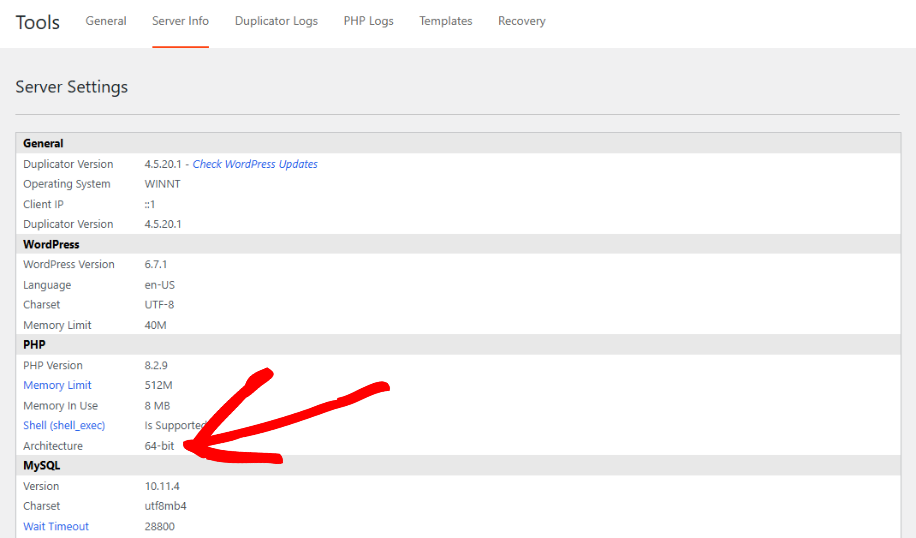
Para validar se o seu sistema está executando PHP de 32 bits, vá para Duplicator Pro » Ferramentas » Informações do Servidor » PHP e veja qual valor está na configuração “Arquitetura”.
Se você não conseguir acessar a página Ferramentas, também pode verificar por meio de um arquivo phpinfo: crie um arquivo contendo <?php phpinfo(); ?>, faça o upload para o seu site e abra-o em um navegador. Procure pelo valor “Arquitetura” ou “PHP Extension Build”, uma entrada contendo “x86” geralmente indica 32 bits, enquanto “x64” indica 64 bits. Remova o arquivo após a verificação, pois a saída do phpinfo não deve ser deixada publicamente acessível. Verifique este artigo para mais informações.
Soluções
Se você estiver executando PHP de 32 bits e o site for grande, com mais de 2,1 GB, então você tem três opções:
Opção 1
Peça ao seu provedor para atualizar o PHP para uma versão PHP de 64 bits. Quase todos os provedores suportam PHP de 64 bits hoje em dia.
Opção 2
Filtre arquivos/pastas desnecessários usando os filtros em Backups » Passo 1 (Configuração) para que o tamanho fique abaixo de 2,1 GB.
Se sua compilação também estiver lenta, além de atingir esse limite de tamanho, consulte Como acelerar o processo de compilação lenta de backup.
Opção 3
Execute uma migração em 2 etapas que minimiza o tamanho do backup usando a técnica de Instalação em Duas Partes.


