

Configuración de Duplicator Pro para alojamiento Linode
Pasos para configurar Duplicator Pro para Linode
En tu panel de control de WordPress, ve a Duplicator » Configuración » Copias de seguridad. Luego, busca la configuración de Bloqueo de Hilo. Cámbiala de Archivo (predeterminado) a SQL.
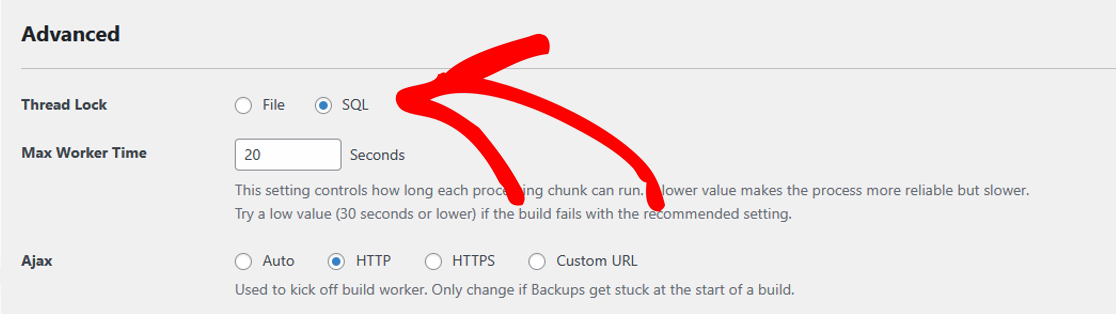
Desplázate hacia abajo y haz clic en Guardar configuración para aplicar la actualización.
Por qué esta configuración es importante
La configuración de alojamiento de Linode no admite la opción predeterminada de Archivo para el Bloqueo de Hilo, lo que puede causar fallos en la creación de copias de seguridad. Cambiar a SQL garantiza un mejor rendimiento y compatibilidad.
¡Ahora, ya está todo listo! Duplicator Pro debería funcionar sin problemas en tu sitio de WordPress alojado en Linode.
Si necesitas una guía sobre cómo realizar una Instalación Clásica sin instalar WordPress primero, consulta nuestra guía sobre cómo hacer una Instalación Clásica.


