
[NEW] WP Media Cleanup Deletes Unused Images Hiding in Your Media Library
 Joella Dunn
Joella Dunn
Joella Dunn
 John Turner
John Turner
John Turner
Your WordPress media library creates multiple versions of every image you upload. Most of those variations never actually appear on your site.
They’re sitting on your server, consuming disk space. Over months or years, that becomes gigabytes of unused files.
Manually sorting through image files to figure out which ones you can safely delete? That’s not realistic. You’d spend days comparing file names, checking posts, and hoping you don’t accidentally break something.
At Duplicator, we just launched a brand-new plugin, and it’s going to clean up your website!
WP Media Cleanup scans your site to figure out which image variations you’re actually using. Then, it removes everything else while keeping your originals intact.
Ready to see what WP Media Cleanup can do for your site?
Find Unused Image Variations
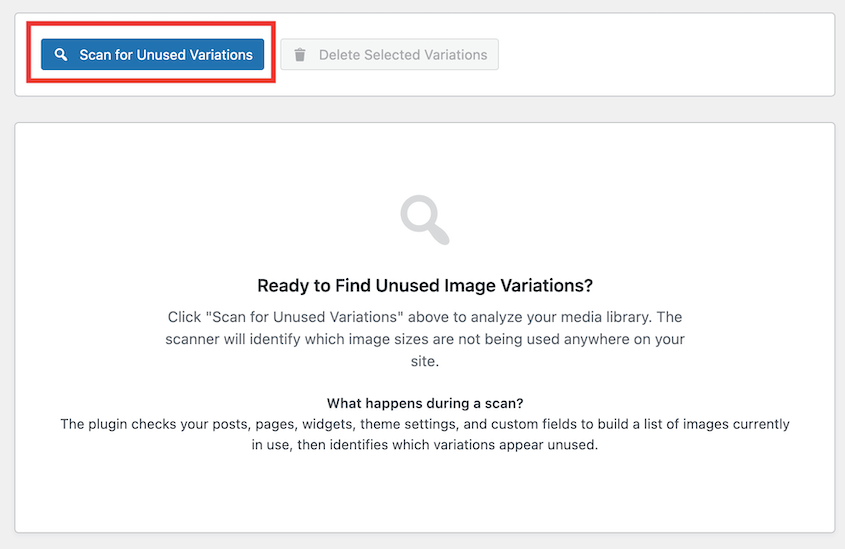
WP Media Cleanup scans your entire website to map which image variations are actively referenced in your content.
It checks posts, pages, widgets, sidebars, theme customizer settings, and custom fields (including Advanced Custom Fields and meta boxes). After building that reference list, it compares it against the actual files sitting in your media library.
Any variation that exists on your server but isn’t found in those scanned areas gets flagged as unused.
The scan runs with a single click. You’ll get a complete picture of what’s taking up space on your site.
Instantly Clean Up Media Files
Staring at a list of thousands of image files and trying to figure out which ones to delete is paralyzing. You either give up or spend hours reviewing files one by one.
WP Media Cleanup gives you a detailed report of every unused image variation across your site. From there, you can remove them in bulk or delete them individually—whatever you prefer.
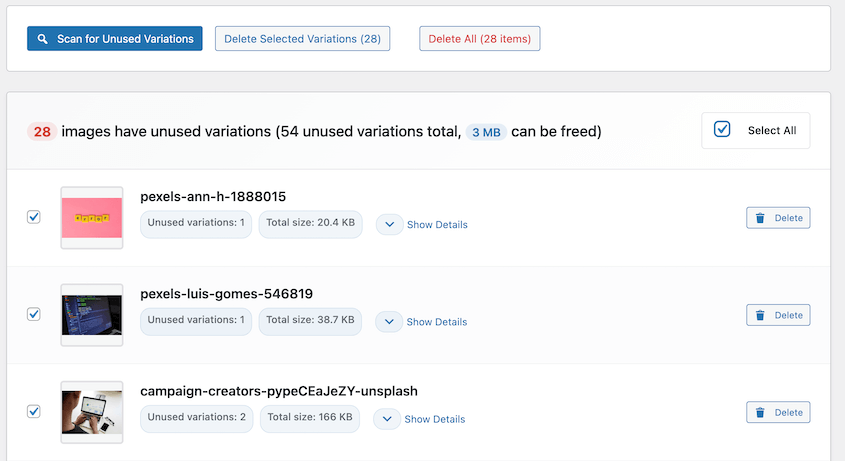
Original full-size images are never touched. WP Media Cleanup only targets size variations like thumbnail-150×150.jpg or medium-300×300.jpg. Your source uploads stay exactly where they are.
This becomes particularly valuable if you’re managing sites for clients. You can confidently reclaim disk space without worrying about breaking image references or accidentally removing files they need.
Restore Deleted Images
Nothing kills a cleanup project faster than the fear of breaking something permanently.
You want to free up space, but what if you delete the wrong file? What if your theme suddenly needs an image variation you removed? What if a client asks about a missing photo three weeks later?
WP Media Cleanup creates a backup before removing images. When you delete an image variation, it moves to a temporary directory instead of being permanently erased.
Files remain there for 30 days before final deletion. However, you can adjust this time range in the plugin settings.
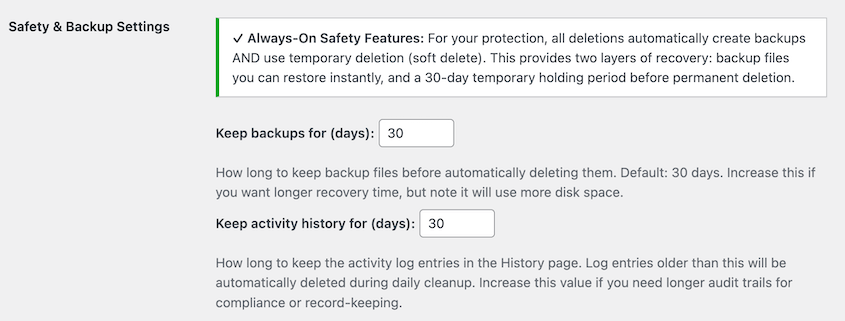
Need to roll back a deletion? You can bring back individual images or bulk restore everything.
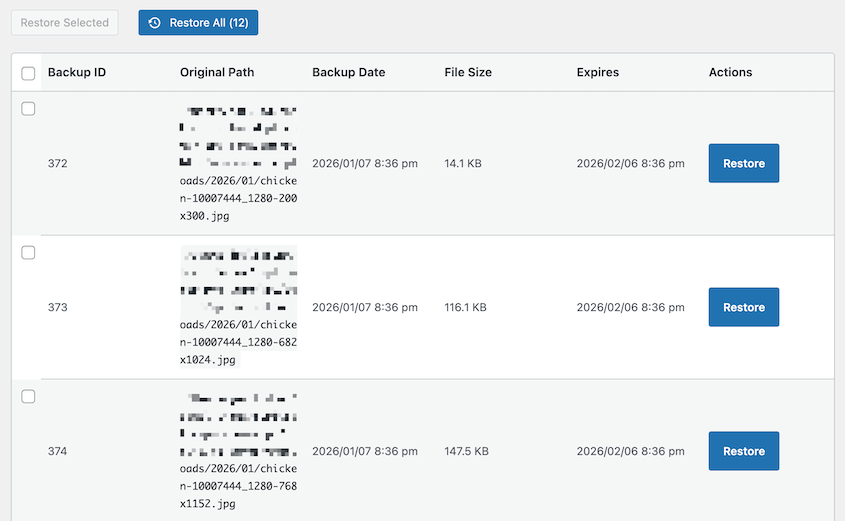
The recovery process takes seconds. This safety net allows you to clean up your website without second-guessing every decision.
Fast Media Optimization with WP-CLI
When you’re managing 20, 50, or 100 client sites, you can’t afford to click through the WordPress dashboard for every single cleanup task. You need automation.
WP Media Cleanup includes comprehensive WP-CLI support for developers and agencies managing sites from the terminal.
You can find unused variations, delete them, list available backups, restore files, check storage statistics, and run performance benchmarks—all from the command line.
Here’s how a typical workflow looks:
# Find and review unused variations

wp media-cleanup find_unused --format=table

# Delete them with confirmation

wp media-cleanup delete_unused --yes

# Check statistics

wp media-cleanup stats
Reclaim Disk Space with WP Media Cleanup
A site with 5,000 images might have 20,000+ unused variations sitting in the media library. When you create backups or migrate your site, those files get included by default. That inflates your backup size, slows down transfers, and eats into your storage limits.
For agencies managing multiple sites, those inefficiencies compound quickly. You’re paying for storage you don’t need across dozens of client accounts.
WP Media Cleanup is available now as part of our Duplicator Elite bundle, or you can purchase it separately starting at $29 per year. Try it out today!
Setup takes minutes. Install the plugin, run your first scan, and you’ll immediately see how much reclaimable space exists in your media library.
Your server gets lighter. Your backups shrink. Your hosting costs stabilize. And you didn’t have to manually sort through thousands of files to make it happen.
While you’re here, check out Duplicator’s new features:
- [New] Cloud Backups Just Got Simpler: Duplicator Cloud Eliminates Third-Party Storage
- Duplicator’s New Migration Service: Move Your Website Without Lifting a Finger
- Duplicator’s New One-Click Backup Cleanups, Auto-Deletion, and Version Updates
- Announcing Duplicator WP-CLI Commands (And How They Speed Up Backups)
- [New] Introducing Duplicator’s Sleek Redesign: New Look, Same Great Features