I Switched From WP Activity Log to Duplicator’s Activity Log: Here’s What I Found Out
 Joella Dunn
Joella Dunn
Joella Dunn
 John Turner
John Turner
John Turner
You log into a client site, and something is wrong. A page is gone, a setting changed, or the admin email got switched to an address you don’t recognize.
You ask around, and nobody knows what happened. You have no record of who was in the dashboard, what they touched, or when.
That situation is more common than it should be, and it happens because WordPress doesn’t log anything by default. Unless you install a plugin specifically for this, your site has no memory of logins, content changes, or settings edits.
Two plugins worth looking at for this job are WP Activity Log and Activity Log by Duplicator.
WP Activity Log has been around since 2013, built by Melapress, and has over 300,000 active installs. On the other hand, Activity Log was created by the team behind Duplicator, the most downloaded backup and migration plugin in WordPress.
In this post, I’ll compare them both: what each one tracks and how they rank on features that matter. By the end, you’ll have a clear picture of which WP activity log plugin is worth installing.
Here are the key takeaways:
- Activity Log by Duplicator is the better choice for most sites. It installs and starts logging immediately, with no setup required.
- Sensitive data redaction is automatic in Duplicator. Passwords and API keys are never written to the log. WP Activity Log can expose this data unless manually configured.
- Activity Log by Duplicator sends real-time, per-event email alerts. WP Activity Log only offers scheduled digest summaries, which means you may find out about a problem days after it happened.
- Activity Log by Duplicator is significantly cheaper. Ten sites cost $79/year versus $449/year for WP Activity Log Premium.
- Developers get more with Activity Log by Duplicator. JSON export and WP-CLI support are included. WP Activity Log has neither.
- Existing Duplicator Pro users should upgrade to the Elite plan. You get Activity Log, WP Media Cleanup, and Duplicator Pro together—three plugins for the price of one.
Table of Contents
WP Activity Log vs Activity Log by Duplicator
| WP Activity Log | Activity Log by Duplicator | |
|---|---|---|
| Developer | Melapress (formerly WP White Security)Since 2013 · 200,000+ active installs · 4.7★ | Duplicator TeamLaunched 2026 · Built on 1M+ user, 50M+ download track record |
| Setup | Setup wizard before logging beginsMore friction | Activates and starts logging immediatelyEasier |
| Event Coverage | Posts, users, plugins, themes, settings, multisite, file changesDoes not distinguish featured image events | 60+ events across 9 categoriesMore granular3 distinct featured image events: set, changed, removed |
| Severity Levels | Informational, Low, Medium, High | Informational, Low, Medium, High, CriticalExtra level |
| Sensitive Data Handling | Can write passwords and API keys to the log without manual configurationRisk | Passwords and API keys are automatically redactedSafer default |
| Email Notifications | Scheduled daily or weekly digest summaries onlyDelayed | Per-event, real-time alerts; toggle per event type and filter by severityImmediate |
| Log Filtering | Basic filtering | 4-level filtering by category, severity, user, and dateMore powerful |
| CSV Export | Premium plans onlyPaid feature | All plans, with pre-export filters (date, user, event, severity, IP)Included |
| JSON Export | Not available at any tierNot available | Included on all plansIncluded |
| WP-CLI Support | Not availableNot available | Export with filters and purge logs via CLIIncluded |
| Backup Plugin Integration | None | Sister plugin Duplicator Pro rolls back any bad updates with one clickUnique |
| Free Plan | Full event logging; notifications, export, and filtering locked behind premium | Standalone paid plugin, all features included at every tier |
| Pricing | Free (limited) or $139/year per site for full features | $29+/year, all features includedCheaper |
| Bundle Option | None | Duplicator Elite Bundle: Activity Log + Duplicator Pro + WP Media Cleanup, $299.50/year for 100 sitesBest value |
| Best For | Sites needing a dedicated logging plugin and comfortable with manual configuration | Most WordPress sites, especially agencies, developers, and existing Duplicator Pro users |
What Is WP Activity Log?
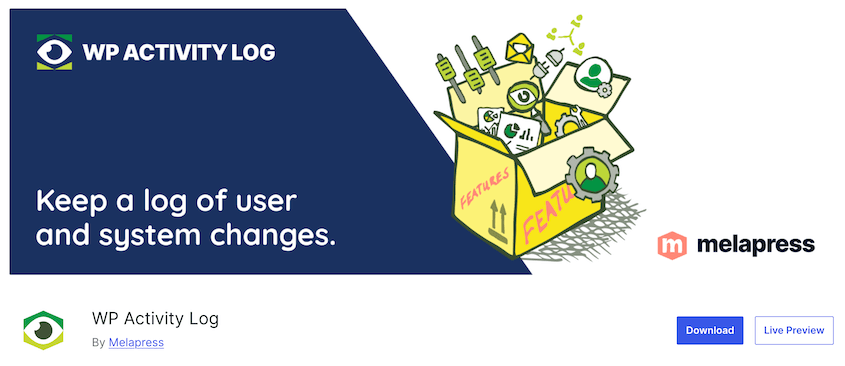
WP Activity Log has been around since 2013. It was built by WP White Security, which later rebranded to Melapress. It remains one of the most established single-purpose logging plugins in WordPress.
Over 300,000 sites run it. It holds a 4.7-star rating from more than 400 reviews on WordPress.org. Those numbers reflect a decade of development and real-world use across a wide range of site types.
One thing worth noting: this is a dedicated logging plugin and nothing else. No firewall, malware scanning, or two-factor authentication. It does one job and does it thoroughly.
What Is Activity Log by Duplicator?

Activity Log by Duplicator launched in early 2026. It was built by the Duplicator team.
If you have ever migrated or backed up a WordPress site, there’s a good chance you have used their main plugin. Duplicator has over 1 million active users and well over 50 million total downloads, making it a popular backup and migration plugin.
That track record matters here. This is not a new developer experimenting with a side project.
Activity Log is available as a free standalone plugin. It’s also included in the Duplicator Elite Bundle alongside Duplicator Pro and WP Media Cleanup.
WP Activity Log vs. Activity Log by Duplicator
Here’s how the two plugins compare across the categories that matter most:
- Setup and Day-to-Day Use: Activity Log by Duplicator activates and starts logging instantly. WP Activity Log walks you through a setup wizard before logging.
- Event Coverage: Activity Log by Duplicator tracks 60+ events. WP Activity Log covers similar ground but doesn’t track events like featured image changes.
- Sensitive Data Handling: Duplicator’s Activity Log automatically redacts passwords and API keys from the log. WP Activity Log can write sensitive values to the log without easy configuration to prevent it.
- Notifications: Activity Log by Duplicator sends immediate, per-event email alerts. WP Activity Log delivers scheduled daily or weekly digest summaries.
- Exporting and Developer Features: Duplicator’s Activity Log includes CSV and JSON export plus WP-CLI support on all plans. WP Activity Log limits CSV export to premium tiers and has no JSON export or WP-CLI support at any level.
- Pricing and Value: Activity Log by Duplicator starts at $29/year per site with all features included. WP Activity Log’s free tier lacks export and notifications; full functionality requires $139/year per site.
Setup and Day-to-Day Use
When you install WP Activity Log, you’ll see a setup wizard immediately. It asks you basic questions to customize your logging experience.
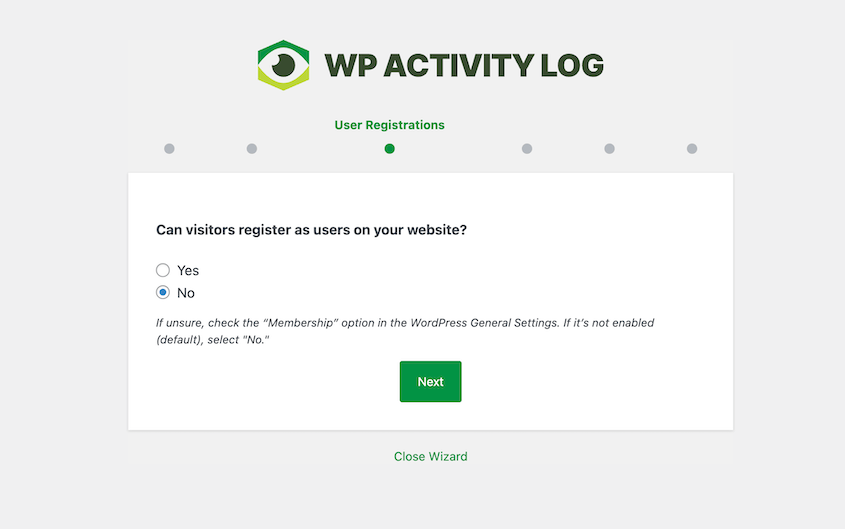
None of the questions are difficult, but there are enough of them that setup takes a few minutes of actual attention.
For beginners who want the plugin to customize logging for them, it’s useful. For someone who just wants logging to start working immediately, it feels like more than it needs to be.
Activity Log by Duplicator skips all of that. You install it, activate it, and it starts logging immediately with sensible defaults already in place. The first time you open the log viewer after activation, there are already entries in it.
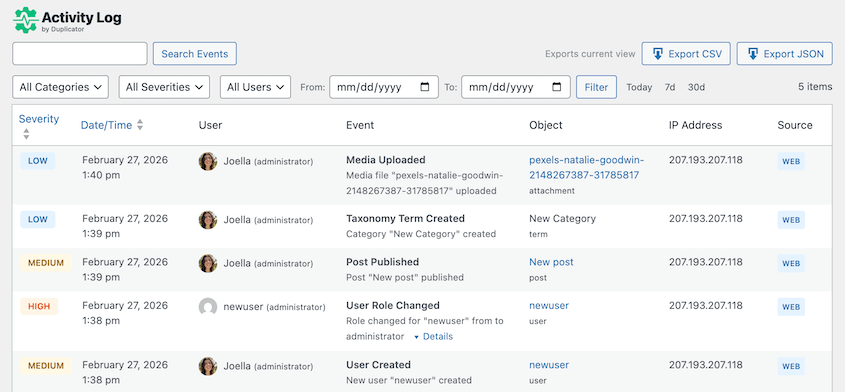
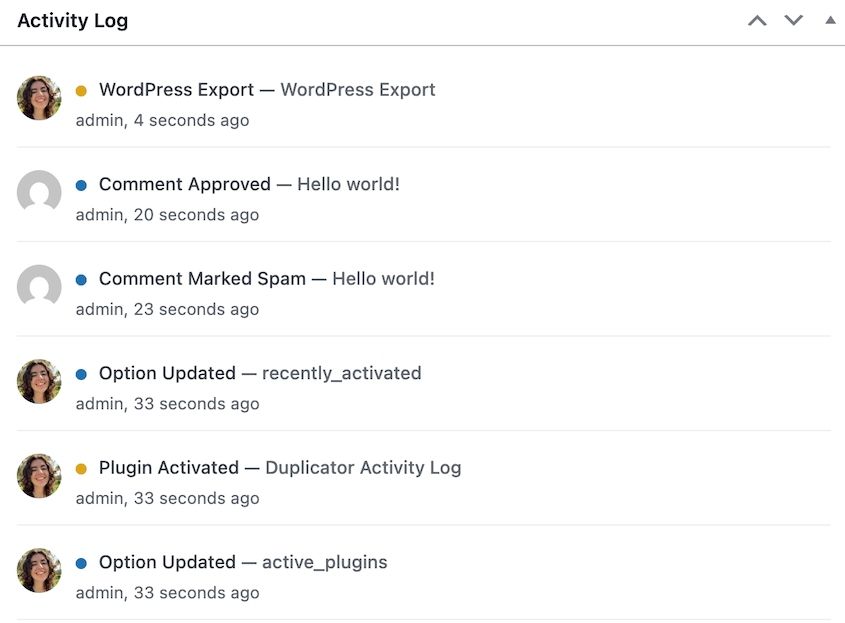
Activity Log by Duplicator’s interface is cleaner and easier to scan quickly. The timeline view on the dashboard widget gives you a fast read on recent activity without having to open the full log.
Neither plugin noticeably affects site performance in normal use. Both are built to write log entries efficiently and retrieve them without hammering the database on every page load.
Event Coverage
WP Activity Log gives events an ID, a severity level, and a description. You can see the user who performed each event, what they changed, and specific details about it.
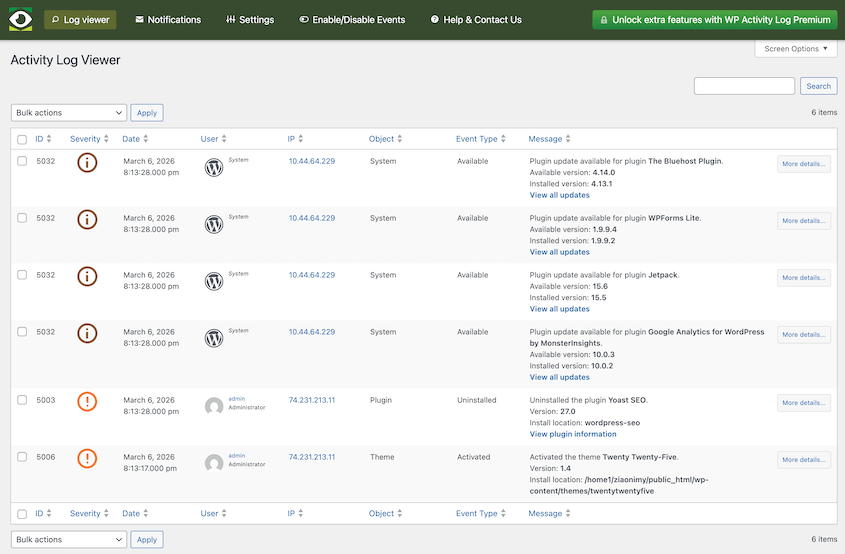
Here’s what WP Activity Log tracks:
- Post, page, and custom post type changes
- Tag and category changes
- Widget and menu changes
- User changes
- User profile changes
- Access logging
- WordPress core and settings changes
- WordPress multisite network changes
- Plugin and theme changes
- WordPress database changes
- Third-party plugin changes
- WordPress site file changes
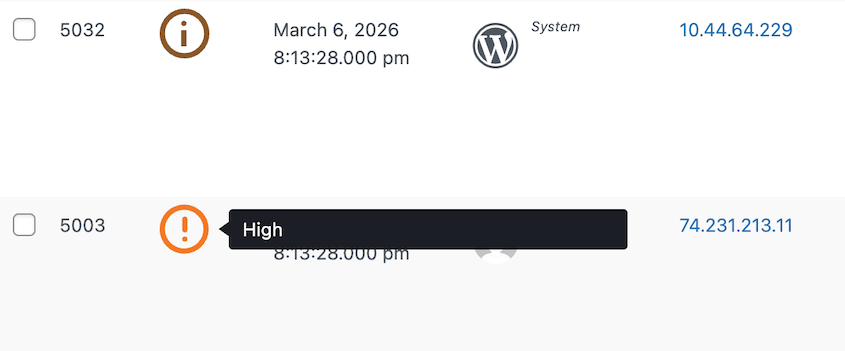
These are ranked by severity level: Informational, Low, Medium, and High. They’re color-coded in your log.
Activity Log by Duplicator’s 60+ events cover more ground. It tracks everything from failed login attempts to media uploads. It covers these categories:
- User
- Content
- Media
- Plugin
- Theme
- WordPress
- Appearance
- Taxonomy
- Settings
They’ll be labeled as Informational, Low, Medium, High, and Critical.
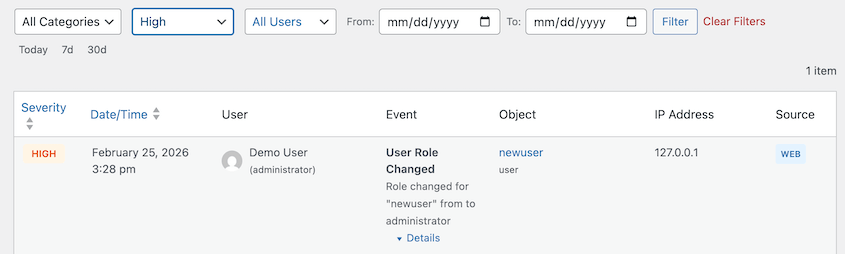
Two specific areas where Activity Log’s approach is more useful: featured image tracking and category filtering.
WP Activity Log records featured image changes as a generic content modification. Duplicator logs three distinct events: image set, image changed, and image removed.

When a client calls to say their homepage hero image disappeared, the difference between “post was modified” and “featured image was removed” is the difference between a five-minute investigation and a thirty-minute one.
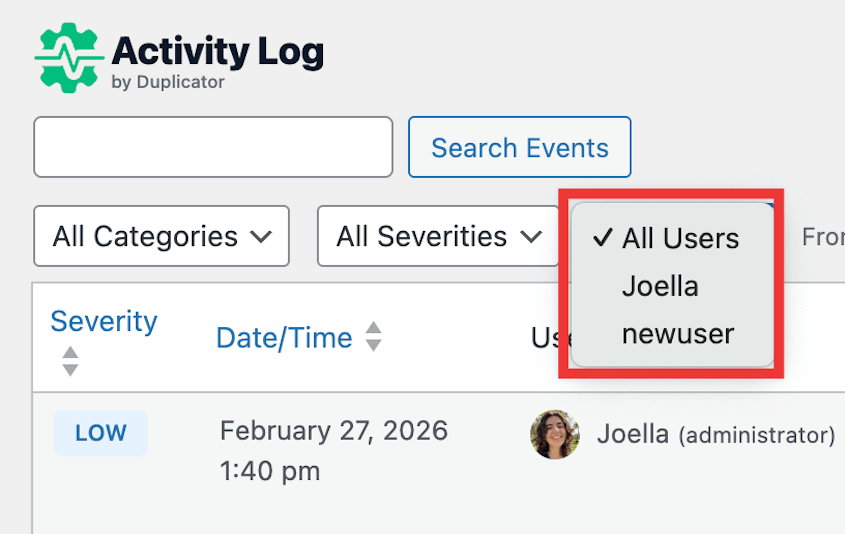
Activity Log by Duplicator lets you drill down by category, severity, date, and user. On a busy site where the log has hundreds of entries every day, that filtering structure saves real time.
Sensitive Data Handling
This one is easy to overlook until it’s not.
When you change a setting that contains sensitive data in WP Activity Log, that value gets written to the log.
Activity Log by Duplicator handles this differently. Passwords and API keys are redacted automatically before they ever reach the log.

There’s no setting to configure and no way to accidentally leave it turned off. The log simply doesn’t contain that data.
In WP Activity Log, updating a plugin that stores an API key in the options table can result in that key appearing in the log entry. In Activity Log by Duplicator, the same change produces a log entry that shows the field name and confirms a value was changed, but the value itself is replaced with a redacted placeholder.
An activity log is supposed to improve your security. A log that silently stores API keys, authentication tokens, or password hashes is introducing a new attack surface rather than reducing one.
If that log is ever accessed by someone it shouldn’t be, or exported and sent somewhere insecure, the damage goes well beyond whatever the log was originally monitoring for.
Notifications
Testing notifications in both plugins reveals a meaningful difference in how each one thinks about alerting.
WP Activity Log’s email notification system is built around summaries. You choose whether to receive a daily or weekly digest, and the plugin sends a summary on that schedule.
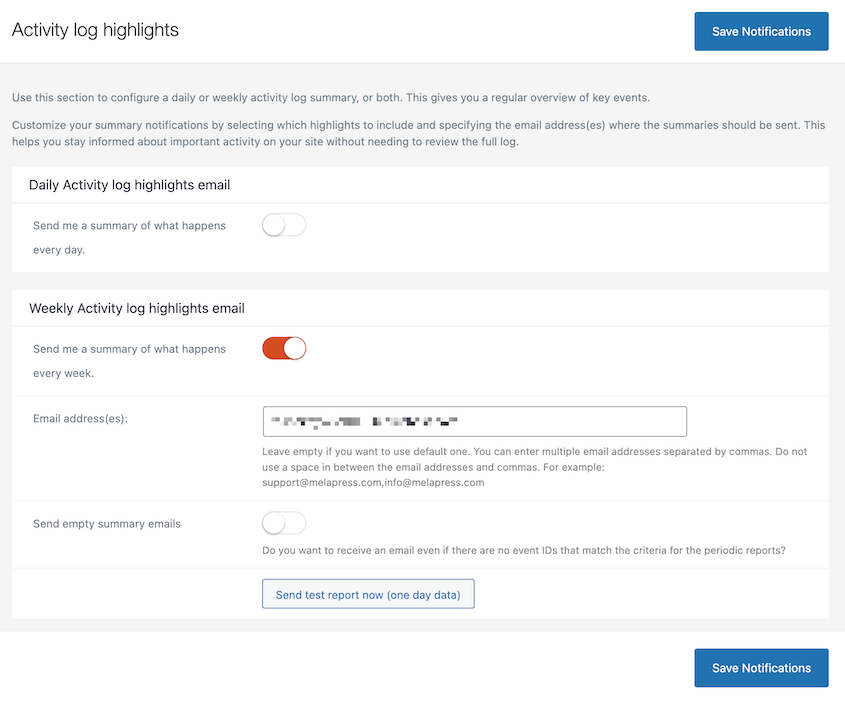
It’s a reporting model more than an alerting model. You’re getting a retrospective view of what happened over a period of time, delivered on a schedule you set.
Activity Log by Duplicator takes a different approach. Rather than scheduled digests, it lets you configure notifications at the individual event level.
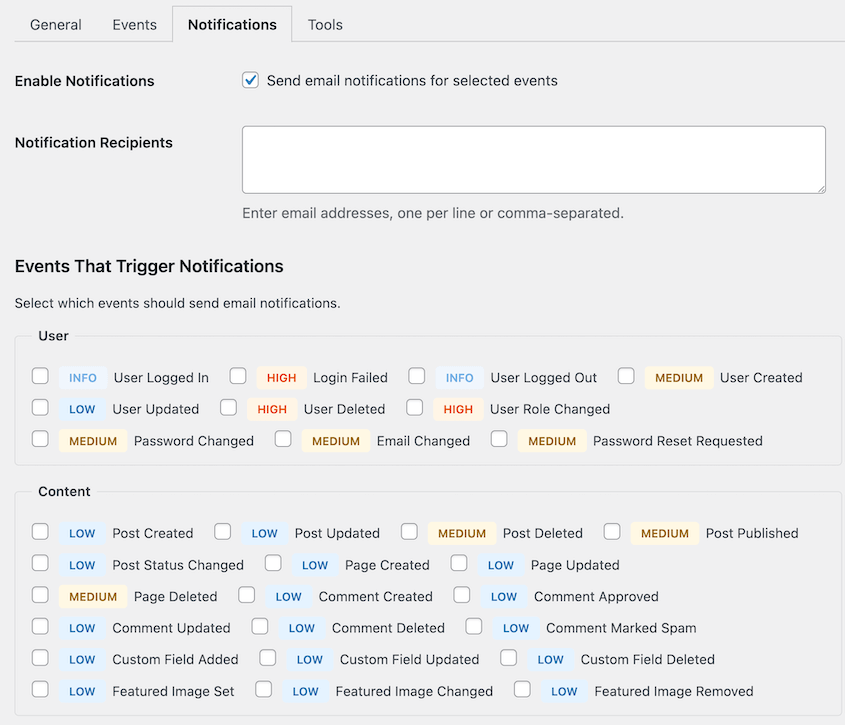
You decide which specific events trigger an email. Each event type can be toggled on or off independently. You can layer severity-based filtering on top of that to decrease inbox spam while making sure high-severity events get through immediately.
A weekly summary of activity on your WordPress site is useful for routine review. An immediate alert the moment someone fails to log in six times in a row, or the moment the site URL changes, is what lets you respond to a problem before it develops into something worse.
WP Activity Log’s digest model assumes you will catch issues on a schedule. Activity Log by Duplicator’s per-event model assumes you want to know about specific things the moment they happen.
For most site owners who are installing a logging plugin because they want early warning on suspicious activity, the Activity Log by Duplicator’s granular per-event approach is more useful.
Exporting and Developer Features
Both plugins offer CSV export, but WP Activity Log limits this to a premium feature. On the free plan, there’s no export at all.
If you want to pull your log data out of the database and do something with it, you need to upgrade first.
Activity Log by Duplicator includes CSV export with filters. You can filter by date range, user, event type, and severity before exporting, which means the exported file contains exactly what you need rather than the entire log.
It also has a JSON export option.
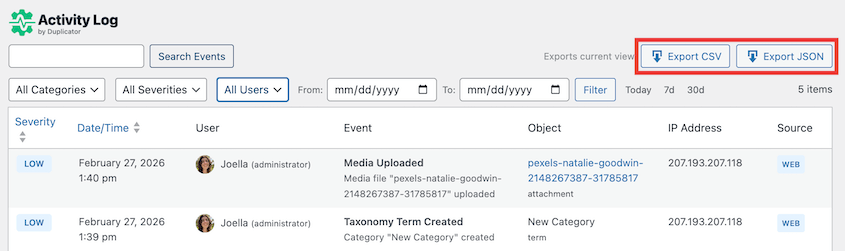
CSV is readable and works fine for manual review. JSON is what you use when you want to do something programmatic with log data: feed it into a monitoring dashboard, parse it with a script, or import it into another system.
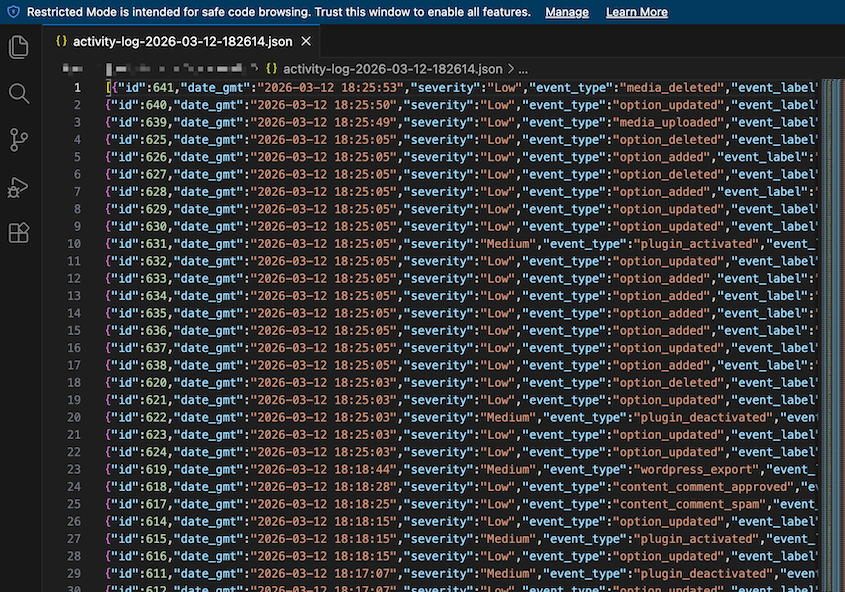
WP Activity Log doesn’t offer JSON export at any plan tier, which limits what you can build around it.
WP-CLI support in Activity Log by Duplicator takes the developer-friendly approach further. From the command line, you can export logs with filters and purge old logs with retention policies, all without touching the WordPress admin.
For anyone who manages multiple sites through automation or scripts, that kind of scriptable access to log management is genuinely useful. WP Activity Log has no WP-CLI support.
Pricing and Value
WP Activity Log’s free plan has full event logging. But notifications, export, advanced filtering, and scheduled reports are all locked behind Premium at $139/year per site.
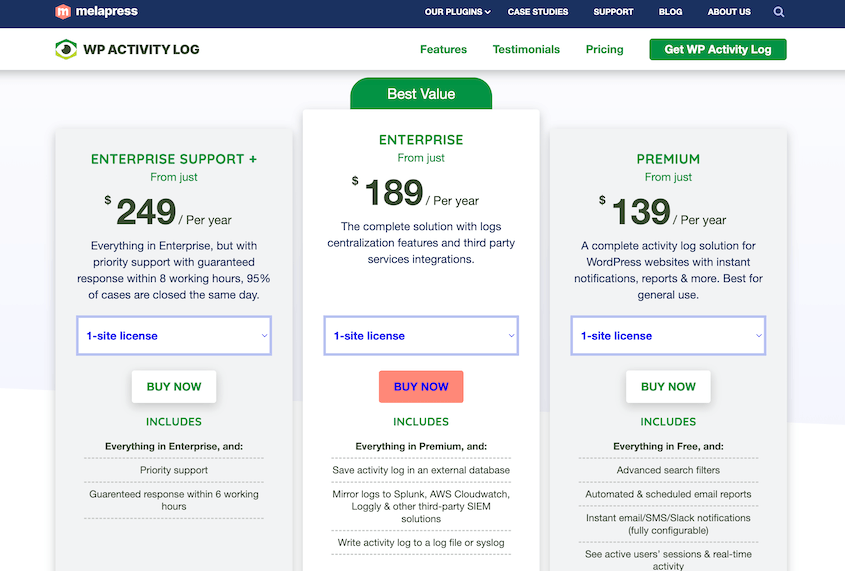
For a single site owner who just wants activity logging, the free tier is fine. For anyone who wants the full functionality, the cost for WP Activity Log Pro adds up quickly across multiple sites.
Activity Log by Duplicator is a premium plugin that includes all of its features in one plan. Starting at $29/year, you’ll get full event logging, email notifications, JSON and CSV export with filters, WP-CLI support, and the 4-level severity filter system.
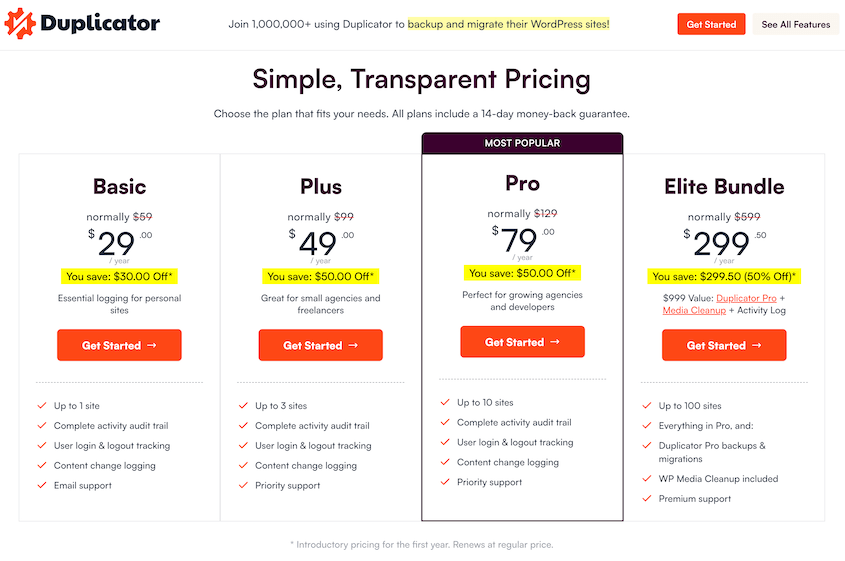
The paid tiers in Duplicator are priced for scale:
- $29/year for 1 site
- $49/year for 3 sites
- $79/year for 10 sites
For an agency managing ten client sites, that’s $79/year total versus $449/year for WP Activity Log Premium across the same sites.
Here’s the premium features list that comes in every Duplicator Activity Log plan:
- Login/Logout tracking
- User role changes
- Password changes & reset requests
- Publication status changes
- Featured image tracking
- Comment tracking
- Email notifications
- Search and filtering
- Plugin and theme tracking
- WordPress setting tracking
- CSV and JSON exporting
- Dashboard widget
The Duplicator Elite bundle changes this pricing for existing Duplicator users. At $299.50/year for 100 sites, you’re getting Activity Log, Duplicator Pro, and WP Media Cleanup together.
If you are already paying for Duplicator Pro to handle backups and migration, the bundle makes Activity Log essentially free as an add-on. For agencies already using Duplicator, that’s a straightforward decision.
For the majority of WordPress site owners who want reliable logging without enterprise complexity, the cost difference between these two plugins is difficult to justify.
Which Activity Plugin Is Right for Your Website?
Although WP Activity Log is an older plugin, Activity Log by Duplicator is the better option.
A logging plugin that requires manual configuration to stop writing API keys to the database is asking you to secure the security tool. Activity Log by Duplicator redacts sensitive data by default, without you having to think about it.
The per-event email notifications matter too.
Knowing that something suspicious happened six days ago when you open the dashboard is useful. Getting an alert within minutes of a failed login spike or an admin email change is what actually lets you do something about it.
If you’re a developer, I’d recommend using Duplicator’s Activity Log for JSON exports and WP-CLI support. WP Activity Log doesn’t have them.
For anyone already using Duplicator Pro, the case is even clearer. Having backups and an activity log linked together is genuinely useful when something breaks and you are trying to work out what happened and when.
If you upgrade to the Duplicator Elite plan, you’ll get three plugins: Duplicator, Activity Log, and WP Media Cleanup. All these plugins for the price of one.
Frequently Asked Questions (FAQs)
How do I see an activity log on WordPress?
WordPress doesn’t include activity logging by default, so there’s nothing to view until you install a plugin. Once you have Activity Log by Duplicator active, you can find the log in your WordPress admin, where you’ll get clear insights on any new events that happen to your site.
How do I export my WordPress activity log?
Activity Log by Duplicator includes CSV export with filters. Plus, it has a JSON export option for anyone who wants to process the data programmatically or feed it into another system.
Can I track who visits my website?
Activity log plugins are not visitor tracking tools. They track authenticated user actions inside the WordPress admin, things like logins, content edits, and settings changes, not front-end page visits from anonymous visitors. For visitor tracking, you need a separate analytics tool like MonsterInsights. Where activity logging does help is identifying which logged-in users visited the admin and what they did while they were there.
Where does WordPress store activity logs?
WordPress does not store activity logs anywhere. Plugins like WP Activity Log and Activity Log by Duplicator create their own database tables inside your WordPress database to store log entries. Activity Log by Duplicator uses a single dedicated table for this purpose, which keeps the data organized and the performance impact minimal.
What does Activity Log by Duplicator track?
Activity Log by Duplicator covers 60+ events across seven categories: authentication and users, content changes, plugins and themes, appearance and taxonomy, settings and options, and more. It tracks core WordPress activity thoroughly, including dedicated events for featured image changes, full taxonomy lifecycle, and automatic redaction of sensitive values like passwords and API keys.
Do I need Duplicator Pro to use Activity Log by Duplicator?
No. Activity Log by Duplicator is a standalone plugin and works independently of Duplicator Pro. If you do use Duplicator Pro, you’ll be able to roll back your website in one click if you notice suspicious changes in your activity log.
Stop Flying Blind on Your Own Site
If you’ve made it this far, the choice is clear.
For the vast majority of site owners, Activity Log by Duplicator is the one to install. It works immediately, redacts sensitive data automatically, sends you real-time alerts on the events that matter, and gives developers JSON exports and WP-CLI support.
There’s no other logging plugin in this category that will monitor activity at such an affordable price.
If you’re already using Duplicator Pro, there’s no reason to look anywhere else. Your backup history and your site change history will be linked together, exactly what you want when something breaks and you’re trying to work out what happened.
Try Activity Log by Duplicator today. You’ll have a full audit trail running in under a minute. That alone puts you ahead of the majority of WordPress sites out there.
Already on Duplicator Pro? Upgrading to the Elite Bundle gets you Activity Log, WP Media Cleanup, and expanded backup and migration capabilities in one plan, across up to 100 sites!
While you’re here, I think you’ll like these related resources:
- WordPress Database Maintenance: What to Do Weekly, Monthly, and Quarterly
- [New Plugin] Activity Log: Track Every Change, Login, and Action on Your WordPress Site
- How to Back Up a WordPress Site
- How to Encrypt Website Backup Files for Maximum Data Security
- How to Recover a Hacked WordPress Site
- WordPress Doesn’t Track Activity by Default: Here’s What I Do About It