

Como Corrigir a Página Inicial e Subpáginas Não Exibidas Após uma Migração
Se sua página inicial ou subpáginas não estão sendo exibidas corretamente após migrar seu site com o Duplicator, pode haver algumas causas possíveis. Este guia irá guiá-lo pelos problemas mais comuns e como resolvê-los.
Página Inicial Funciona, Mas Subpáginas ou Posts Não
Se sua página inicial está funcionando, mas suas subpáginas, posts ou outros URLs mostram um erro 404 ou uma página em branco, tente as seguintes soluções.
Solução 1: Re-salvar Permalinks
Às vezes, re-salvar seus permalinks pode resolver problemas de URL.
- Faça login no seu painel de administração do WordPress.
- Role para baixo e clique em Salvar Alterações (sem fazer nenhuma alteração).
- Visite uma de suas subpáginas para verificar se o problema foi resolvido.
Solução 2: Habilitar Módulo mod_rewrite
Se re-salvar os permalinks não funcionar, o módulo mod_rewrite pode não estar habilitado no seu servidor. Este módulo é necessário para que os permalinks do WordPress funcionem.
Para Apache 2.x no Linux:
- Abra um terminal.
- Execute o seguinte comando:
a2enmod rewrite/etc/init.d/apache2 restart
Para WAMP ou IIS:
Se você estiver usando um sistema diferente, use um motor de busca como o Google para pesquisar "como habilitar mod_rewrite para [seu sistema]" para encontrar as instruções relevantes.
Solução 3: Ajustar a Configuração AllowOverride (Somente Apache)
Se as soluções 1 ou 2 não resolverem o problema, pode ser necessário ajustar a configuração AllowOverride no seu arquivo de configuração do Apache.
O guia completo sobre como trabalhar com esta configuração pode ser encontrado aqui. Se você não tiver certeza sobre essas configurações, entre em contato com seu provedor de hospedagem.
Solução 4: Execute o Instalador em Modo de Segurança
Em alguns casos, plugins e/ou temas podem causar problemas no processo de instalação. Se as soluções anteriores não funcionarem, executar o instalador do Duplicator em Modo de Segurança pode ajudar.
Para isolar rapidamente problemas comuns e desativar plugins enquanto executa o Instalador, comece ativando o Modo Avançado no canto superior direito e certifique-se de que Instalação Completa esteja selecionado se você optar por usar o Modo de Segurança.
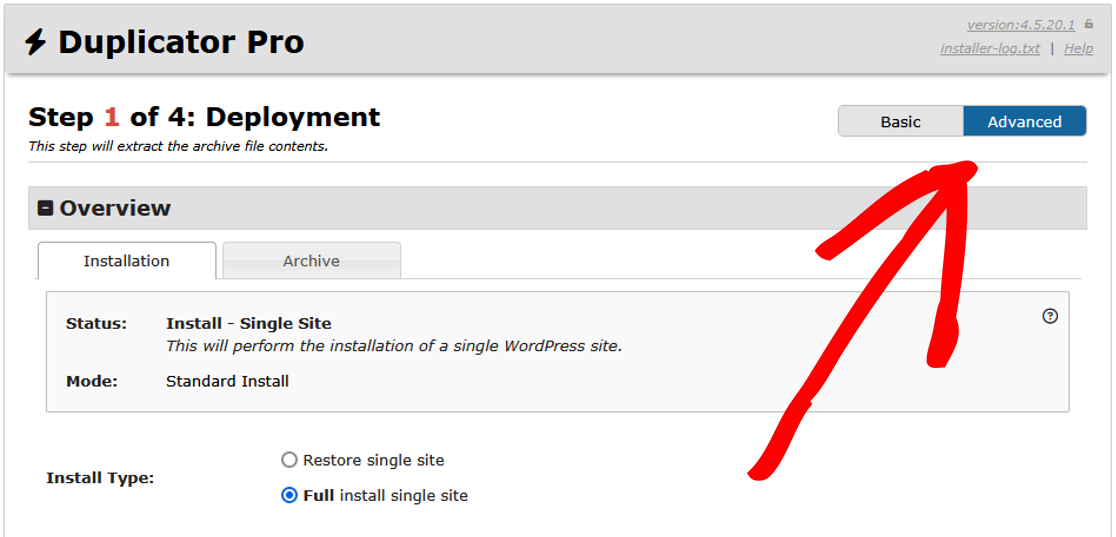
Em seguida, insira as informações de Conexão do Banco de Dados em Configuração e clique em Validar.
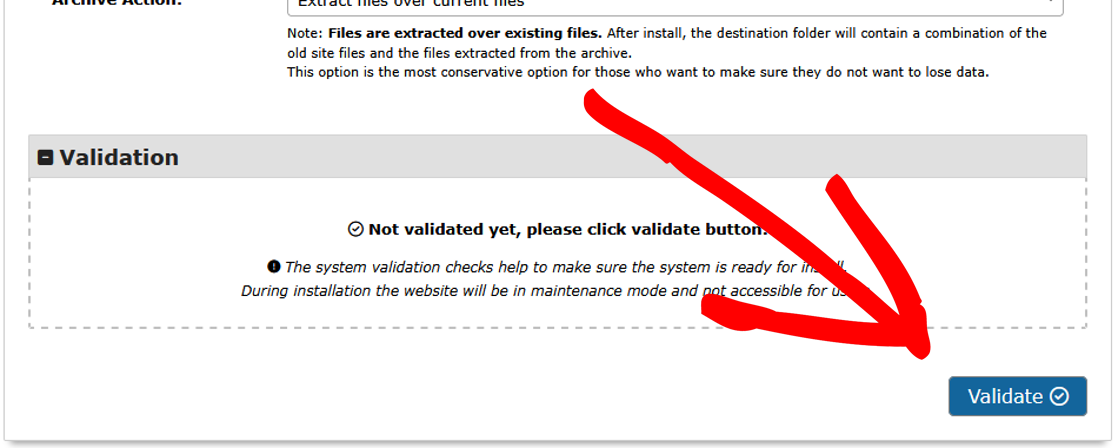
Para desativar todos os plugins de uma vez:
Ao iniciar a Etapa 1 do instalador, vá para Opções » Avançado » Geral » Modo de segurança e defina o menu suspenso para Ativado.
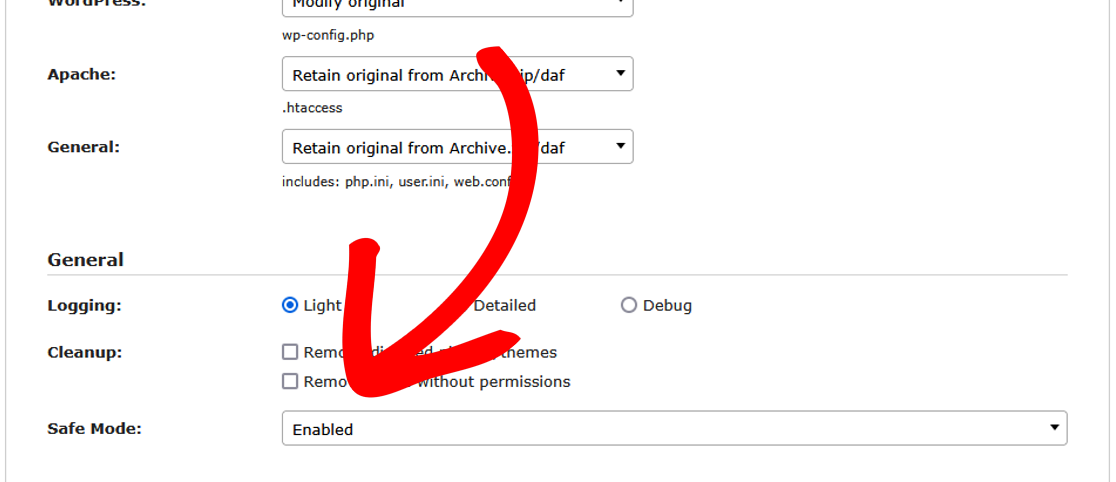
Para desativar apenas plugins específicos:
Ao iniciar a Etapa 3 do instalador, use Opções » Plugins para desativar plugins individuais um por um desmarcando-os.
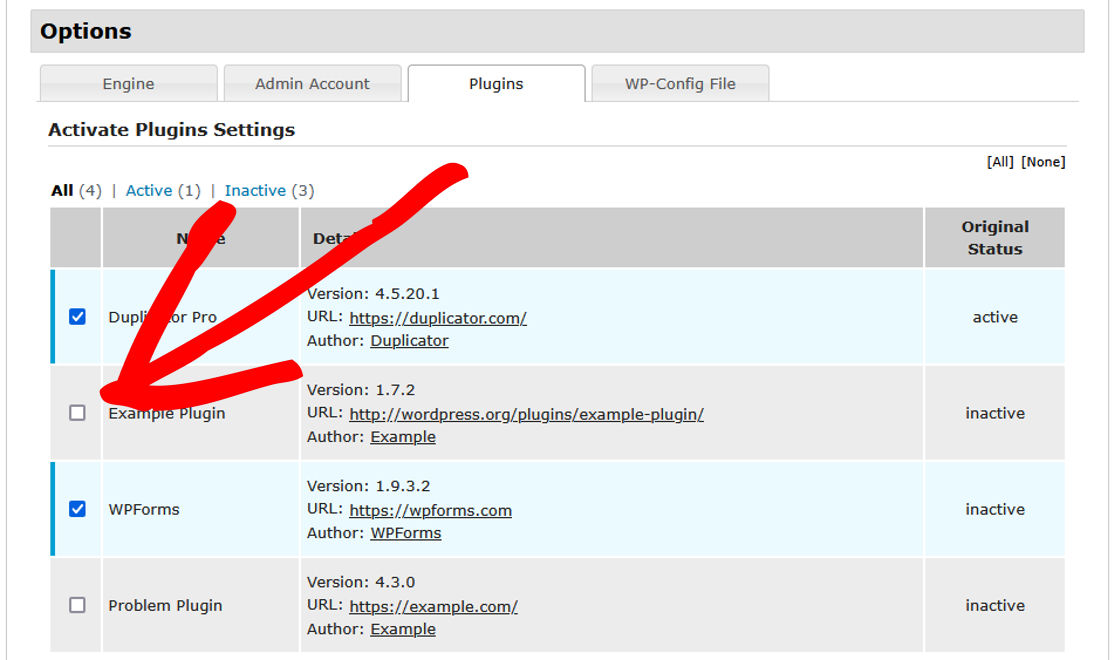
Recomenda-se usar o Modo de Segurança primeiro. Se você suspeitar que um ou mais plugins estão causando o problema, desative o Modo de Segurança e, em seguida, desative esses plugins específicos na Etapa 3, conforme mostrado acima. Por fim, após fazer login no seu WordPress admin, reative cada plugin um por um e salve novamente quaisquer configurações, se aplicável, até que o problema seja encontrado.
Solução 5: Limpar caches de objetos e páginas
Um cache de objetos desatualizado (como Redis ou Memcached) ou um cache de página de um plugin de cache pode servir conteúdo antigo em cache após uma migração, o que pode parecer idêntico a uma subpágina genuinamente quebrada. Limpe qualquer cache de objetos e cache de página, desative temporariamente os plugins de cache e verifique a subpágina novamente antes de assumir que o problema é configuração do servidor ou conflito de plugin.
Página Inicial Não Funciona ou Mostra a Página Padrão do Host
Se a sua página inicial exibe a página padrão do seu provedor de hospedagem ou não funciona, tente as seguintes correções.
Solução 1: Verifique os Arquivos HTML Padrão
Certifique-se de que um arquivo default.html ou index.html não esteja substituindo seu arquivo index.php.
- Conecte-se ao seu site via FTP ou ao gerenciador de arquivos da sua hospedagem.
- Verifique o diretório raiz (
public_htmlou equivalente). - Se você encontrar um arquivo
default.htmlouindex.html, renomeie-o ou exclua-o. - Tente acessar seu site novamente.
Solução 2: Execute o Instalador em Modo de Segurança
Semelhante à Solução 4 para o Problema A, executar o instalador em Modo de Segurança também pode ajudar a resolver este problema.
Problemas Relacionados
Se você ainda estiver enfrentando problemas, pode consultar os seguintes problemas e soluções relacionadas:
- Por que alguns plugins, imagens ou links não estão sendo atualizados?
- Por que recebo uma tela em branco/branca no meu site?
- Como Resolver Problemas de SSL? (avisos de conteúdo misto também podem deixar páginas em branco)
- Como corrigir posts do WordPress retornando erro 404 (WPBeginner)
É isso! Esperamos que este guia tenha ajudado você a corrigir a página inicial ou as subpáginas que estavam sendo exibidas incorretamente após migrar seu site com o Duplicator.
Para uma maneira de resolver problemas de migração em geral, confira o guia: “Como resolver problemas de migração do WordPress?“


