Most WordPress Activity Log Plugins Tell You What Broke—Only One Helps You Fix It
 Joella Dunn
Joella Dunn
Joella Dunn
 John Turner
John Turner
John Turner
Something changed on your WordPress site. A page looks different, a plugin isn’t behaving right, or a user’s role got modified and nobody’s owning it. Without an activity log, your only plan is asking questions and hoping someone remembers.
WordPress records none of this natively. Logins, content edits, plugin activations, and settings changes disappear the moment they happen. If your site has more than one user or if clients, editors, or contractors have access, you have no paper trail.
The real decision isn’t which plugin has the most features. It’s which one fits how you actually manage your site.
Pick the wrong one, and you’re either buried in configuration you’ll never touch or missing the events that would’ve answered your question.
Here are the key takeaways:
- WordPress doesn’t log admin activity natively. The moment a second user has access to your site, you have a traceability gap that only a dedicated activity log plugin can fill.
- Activity Log by Duplicator is the only logger that connects diagnosis to recovery. You can pinpoint the event, cross-reference the timestamp with a backup, and restore in minutes.
- Severity classification changes how fast you triage. Plugins that rank events as Critical, High, Medium, or Low let you filter to what actually matters instead of scrolling a flat chronological feed.
- Install before you need it! Activity logs only capture events that happen after the plugin is active, so there’s no retroactive data if you install it after something goes wrong.
Table of Contents
WordPress Activity Log Plugins at a Glance
Comparing the top WordPress activity log plugins on the features that matter most.
| Feature | Activity Log by Duplicator |
WP Activity Log | Simple History |
|---|---|---|---|
| Events Tracked | 60+ events across 9 categories | Unlimited (free) | Core WordPress actions (no count listed) |
| Severity Classification | Critical / High / Medium / Low |
Flat chronological feed |
|
| Backup & Restore Integration | Native Duplicator integration |
||
| Sensitive Data Auto-Redaction | Passwords & API keys hidden by default |
||
| Customizable Email Notifications | Per event type |
~ Email alerts; not customizable in free |
~ Weekly digest only |
| CSV / JSON Export | |||
| WP-CLI Support | |||
| Starting Price | $29/year Or included in Duplicator Elite |
Free to start Premium from $139/year |
Free to start Premium from $79/year |
~ = available in a limited or premium-only form. Features verified at time of publication.
Catch what changed, pinpoint the cause, and restore from backup—all in one workflow.
Why Use an Activity Log Plugin?
WordPress was built as a publishing platform. Its job is to help you write, organize, and publish content, not maintain a forensic record of admin actions.
The default installation doesn’t log what happens inside wp-admin. You don’t get a login history or a record of who updated a plugin or changed a setting.
That design made sense when most WordPress sites had one user: the owner. Today, most sites with any real traffic have editors, contractors, client access, or developer accounts.
The moment a second person has admin credentials, you have a traceability gap that WordPress doesn’t fill. Every plugin on this list exists for exactly that reason.
Our Favorite WordPress Activity Log Plugins
- Activity Log by Duplicator: the only activity log plugin built as a direct companion to a backup and restore workflow; tracks 60+ events with severity classification, sensitive data redaction, and WP-CLI support
- WP Activity Log: 300,000+ installs with a guided setup wizard, unlimited free logging, and premium integrations for external log mirroring and live session management
- Simple History: lightweight, free, and ideal for personal sites or small teams; adds a clean visual timeline to your WordPress dashboard with limited configuration
Activity Log by Duplicator
Activity Log by Duplicator tracks 60+ event types across every major WordPress action category and tags each event with a severity level. It’s the only activity log plugin built as a direct companion to a backup and one-click restore workflow, so you can identify a problem and recover from it.
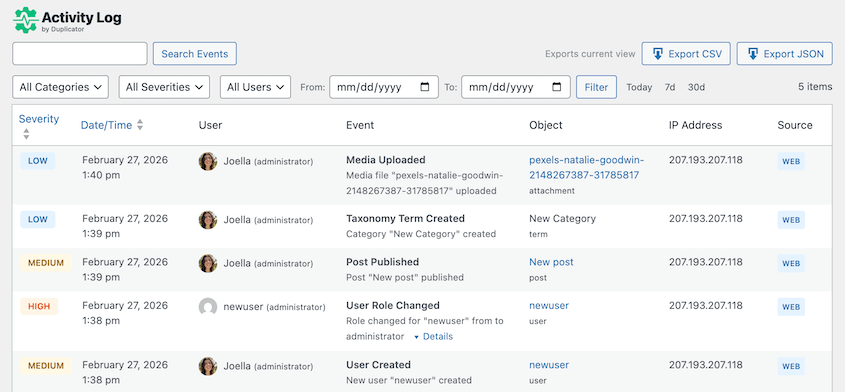
Most activity log plugins answer “what happened?” and stop there. That’s useful. But on a live site, knowing what happened is only half the job—the other half is undoing it.
Activity Log pairs with Duplicator’s backup and restore features in a way no other logger does. Check the log, find the event, cross-reference the timestamp with your most recent backup, and restore.
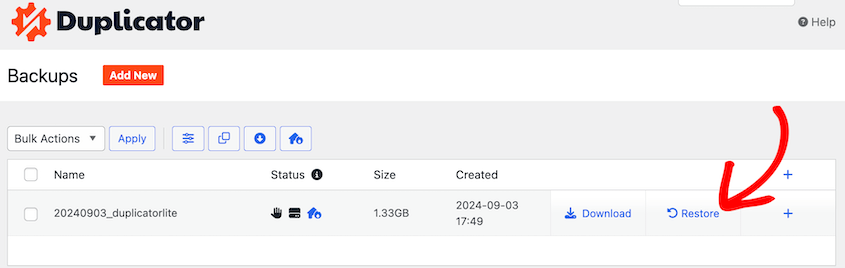
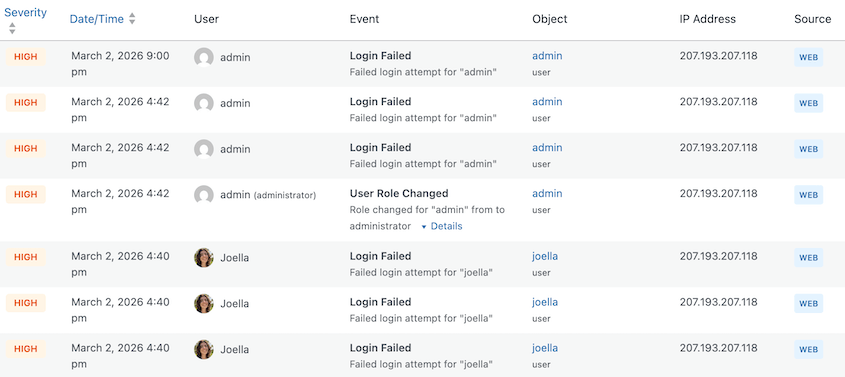
The most immediately useful part of the Activity Log dashboard is the severity classification system.
Most activity log plugins give you a flat, chronological event feed and let you search it. This one organizes 60+ events across nine categories and ranks them by four severity levels:
- Critical
- High
- Medium
- Low
There’s a severity filter dropdown directly in the toolbar. When something breaks on a client site and you’re trying to identify the cause, you’re not scrolling past a wall of “user logged in” entries to find what actually changed.
You filter to High or Critical, look at the last hour, and the relevant event is right there.
When a password is changed or an API key is rotated, Activity Log hides those values in the log entry automatically. Most plugins store that data in plaintext unless you specifically set up exclusion rules.

On multi-admin sites where several people have log access, a contractor reviewing login history doesn’t need to see credential values in the process. Redaction by default is a meaningful security feature.
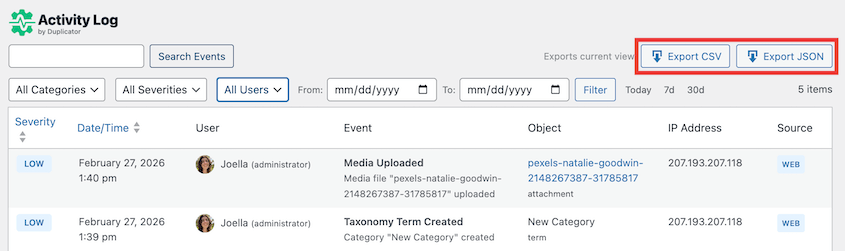
You can export logs to CSV and JSON files to handle compliance and client reporting.
Full WP-CLI support means you can manage log data from the command line. Export, filter, and purge old records faster across multiple websites.
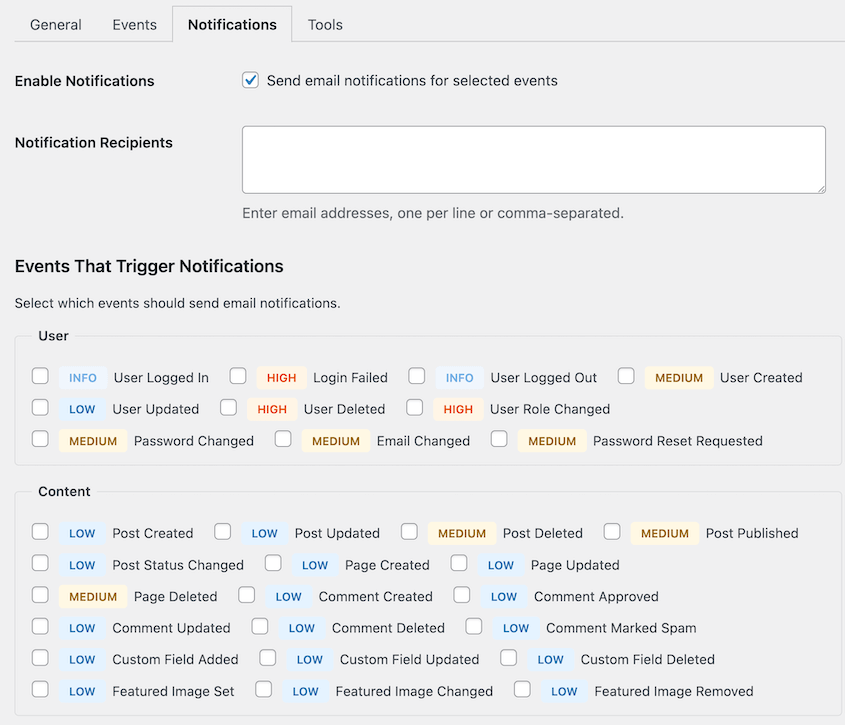
You won’t want to waste time checking your activity log every day, especially across multiple websites. Activity Log by Duplicator has a customizable email notification system, so you get the right alert at the right time.
What We Liked About Activity Log:
- 60+ tracked events organized across 9 explicit categories: more structured than the undifferentiated event feeds most plugins produce
- Four severity levels (Critical, High, Medium, Low) with a severity filter in the toolbar; you can triage by threat level instead of scrolling a single chronological list
- Sensitive data auto-redaction: passwords and API keys are hidden in log entries by default
- Featured image changes tracked as dedicated events—valuable for content-heavy sites or any setup using custom meta boxes
- CSV and JSON export with custom filters for compliance documentation and client reporting
- Full WP-CLI support for querying logs and managing history across a portfolio without touching the admin panel
- Email notifications configurable per event type: alerts only for what matters, not everything
- Included in Duplicator Elite plan, which also covers WP Media Cleanup—the per-site cost for agencies is strong
- Available as a standalone plugin starting at $29/year
What We Didn’t Like:
- New plugin compared to the other options on this list
WP Activity Log
WP Activity Log (formerly WP Security Audit Log) is a popular activity log plugin with 300,000+ active installs.
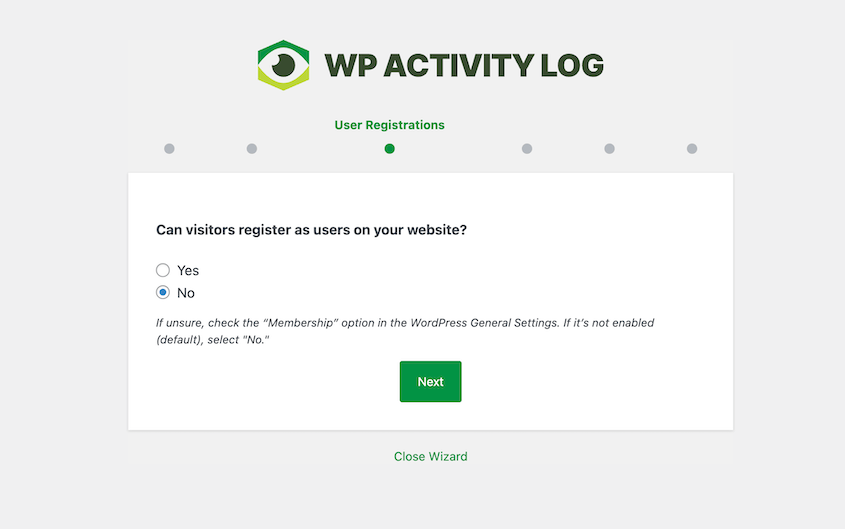
I liked that WP Activity Log had an easy-to-use setup wizard that customizes your experience with the plugin. You share some information about how you use the site, and WP Activity Log knows what activity to track.
Logs can be stored for 3 months, 6 months, 12 months, or you can keep all data. Once you set up WP Activity Log, you’ll get a full dashboard of actions marked by severity.
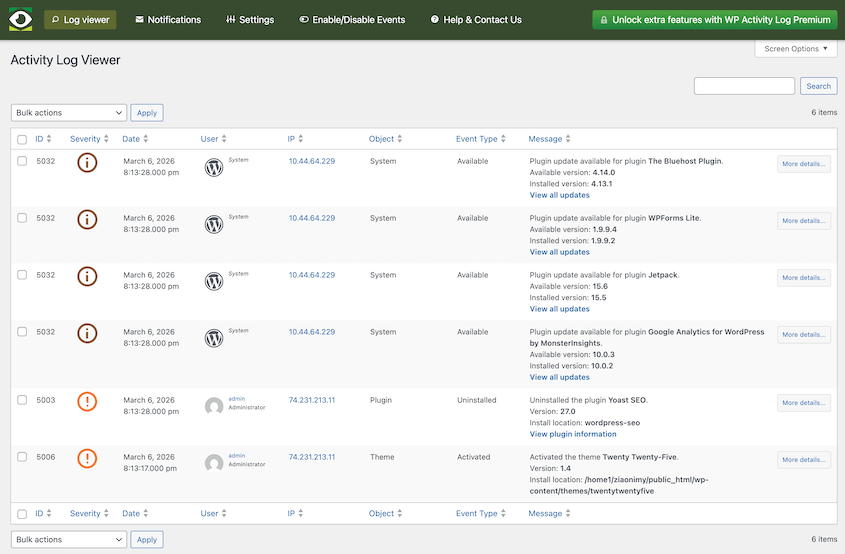
The free version logs plenty of data, including logins, post changes, multisite network changes, and theme switches.
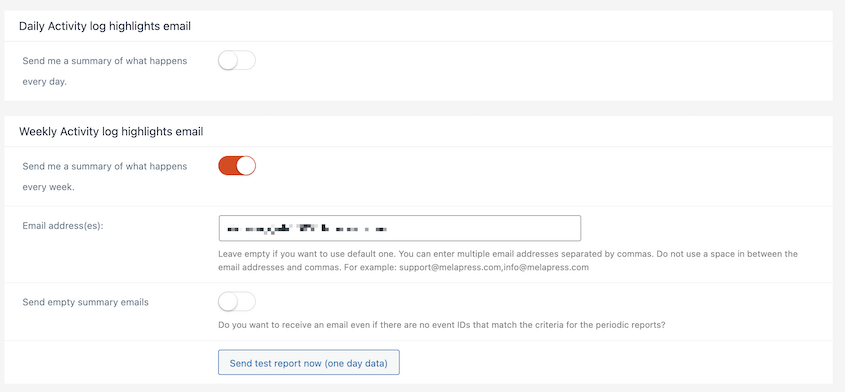
You can send yourself email notifications, but you can’t customize what events trigger emails. I prefer using Activity Log by Duplicator for custom email notifications.
What We Liked:
- Free version includes unlimited event logging
- 14+ third-party plugin integrations: WooCommerce, Gravity Forms, WPForms, RankMath, Yoast SEO, ACF, MemberPress, and more
- Premium: external database mirroring to Slack, AWS CloudWatch, Loggly, Papertrail, and Syslog
- Premium: email and SMS alerts with configurable rules per event type
- Premium: Live session management: view active logins and force-terminate sessions from the log interface
- Millisecond-precision timestamps on every logged event
What We Didn’t Like:
- Premium starts at $139/year for a single site
- No native connection to backup or recovery tools; the log identifies the problem, but the solution is entirely separate
Simple History
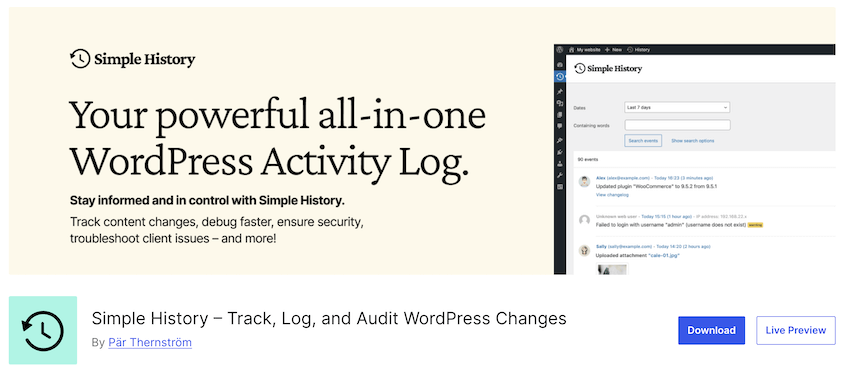
Simple History adds a visual timeline directly to your WordPress dashboard. It’ll show you logins, plugin installs, content edits, and settings changes.
It’s free, actively maintained, and lightweight. Simple History handles the baseline needs of most personal or small-team WordPress sites without adding meaningful database overhead.
Not every site needs compliance reports or external database mirroring. A personal portfolio, a blog, or a three-person content site mostly needs one thing: a basic record of what changed so you can answer, “did I do something to cause this?” Simple History answers that without asking you to learn a complicated interface.
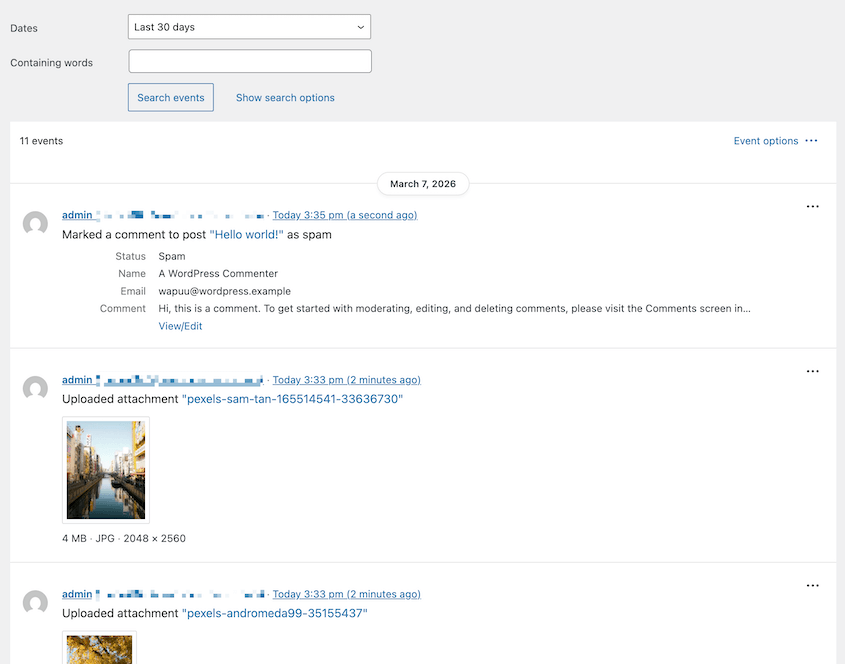
See your website’s timeline by filtering by a certain date. Simple History shows you everything that happened during that time period.
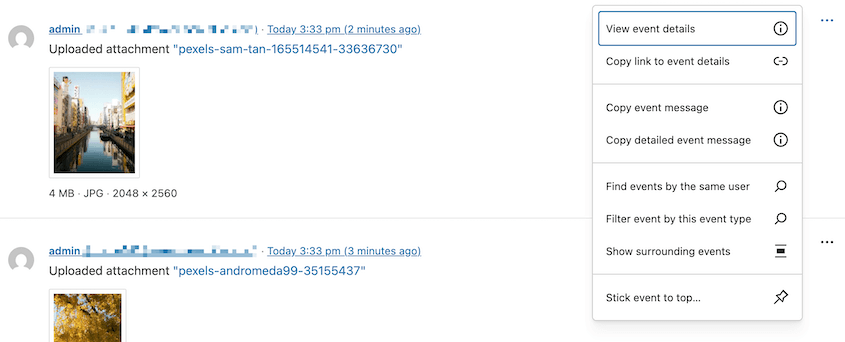
You’ll be able to view further details about specific events. If you see any malicious activity, filter the event by the user or event type to find out what’s happening.
If you need to, you can start logging custom events. The plugin has a customizable filter for tracking anything Simple History doesn’t see:
apply_filters(

'simple_history_log',

'This is a logged message'

);
On a site where it’s just you and one other person making changes, a clean dashboard timeline with timestamps and usernames is often all you need.
What We Liked:
- 4.9-star rating on WordPress.org
- 300,000 active installations
- History analytics for total content actions, media actions, and more
- Premium: extra tracking for peak activity times and days
- IP geolocation on failed login attempts
- WP-CLI commands built in
- REST API access for custom dashboards and external integrations
- Weekly email reports
What We Didn’t Like:
- No severity classification system—all events appear in the same feed with no priority ranking
- WooCommerce logging requires a paid add-on
- External log channels (Datadog, syslog, webhooks) are premium-only features
- The premium version starts at $79/year
Frequently Asked Questions (FAQs)
What does a WordPress activity log plugin track?
Most plugins cover logins and failed login attempts, content edits, plugin and theme changes (install, activate, update, deactivate), WordPress settings modifications, and user account or role changes. More advanced plugins also track WooCommerce events, file changes, widget edits, and menu updates.
The event list varies significantly by plugin—the free tiers of most options cover the core WordPress actions, while premium tiers extend to third-party plugin integrations.
Will an activity log plugin slow down my WordPress site?
Not meaningfully. Activity log plugins write to a dedicated custom database table separate from WordPress’s core tables, which keeps the performance impact minimal. Logging runs in the background after each event and doesn’t intercept or delay any frontend request. On high-traffic sites generating large log volumes, regular log pruning is good practice, but activity logging on a typical WordPress site adds little overhead.
Do I need an activity log plugin if I’m the only person who manages my site?
It’s less critical, but not useless. A solo admin still benefits from an activity log when troubleshooting unexplained behavior, when contractors or guest users touch the site even occasionally, or when any kind of security incident needs to be traced.
What’s the difference between a WordPress activity log and a security log?
An activity log records what users do inside the WordPress admin, including content edits, plugin changes, and settings modifications. A security log records external threat activity like blocked IPs, failed login attempts, malware scans, and file integrity alerts.
Some tools combine both (Sucuri, MalCare). Dedicated activity log plugins focus on internal admin-side actions and are generally more granular about who changed what.
Can I get email alerts when something specific changes on my site?
Yes, most premium activity log plugins include configurable email alert rules per event type or severity level. Activity Log by Duplicator has custom email notifications based on what events you want to be notified about.
Start Logging Before the Next Unexplained Change
For most WordPress site owners, Activity Log by Duplicator is the best starting point. Not just because of what it logs, but because it connects the log to the recovery workflow.
Knowing who broke something is useful. Being able to restore the site to resolve errors or hacks is better.
Get Activity Log for free with Duplicator Elite or install it as a standalone plugin. I’d recommend the bundle, since it comes with disaster recovery (Duplicator) and media optimization (WP Media Cleanup)!
While you’re here, I think you’ll like these related resources:
- How to Create a WordPress Staging Site (For Safe Testing)
- How to Undo Changes in WordPress (5 Methods)
- How Real-Time Backups Monitor and Protect Your Changes Instantly
- I Thought My Backups Were Working: How Backup Monitoring Services Changed Everything
- WordPress Debugging Tools That Find Errors in Minutes (Not Hours)
- How Black Bike Media Rescued a 2.4GB Corrupted Database