[New Plugin] Activity Log: Track Every Change, Login, and Action on Your WordPress Site
 Joella Dunn
Joella Dunn
Joella Dunn
 John Turner
John Turner
John Turner
Do you know what’s happening on your WordPress site right now?
Not just who’s logged in. I mean everything.
Who changed a plugin setting, deleted a post, or attempted to log in and failed three times in the middle of the night.
Most WordPress site owners don’t have a clear answer, and that’s a problem.
If something breaks, you’re left guessing. When a client calls asking why their page looks different, you have no paper trail. When a security issue appears, you don’t know where it started or who was responsible.
WordPress doesn’t give you this visibility by default. You’re flying blind unless you have the right tools in place.
Today, we’re fixing that. We’re excited to introduce Activity Log, a brand-new plugin by the Duplicator team that gives you a complete audit trail of everything that happens on your site.
Ready to see what Activity Log has to offer?
Get a Full Picture of Your Site Activity
Every day, dozens of things change on a WordPress site. Plugins get updated. Users log in and out. Settings get tweaked. Content gets edited, drafted, and deleted.
Most of the time, that’s fine. But when something goes wrong, you need to know exactly what happened and when it happened.
Without a log, you’re left piecing together clues after the fact or asking your team to remember what they did weeks ago.
Activity Log by Duplicator tracks 60+ events across your entire WordPress site. It captures actions from all of these categories:
- User
- Content
- Media
- Plugin
- Theme
- WordPress
- Appearance
- Taxonomy
- Settings
Every event is tagged with one of four severity levels so you know at a glance whether something is routine or worth your immediate attention.
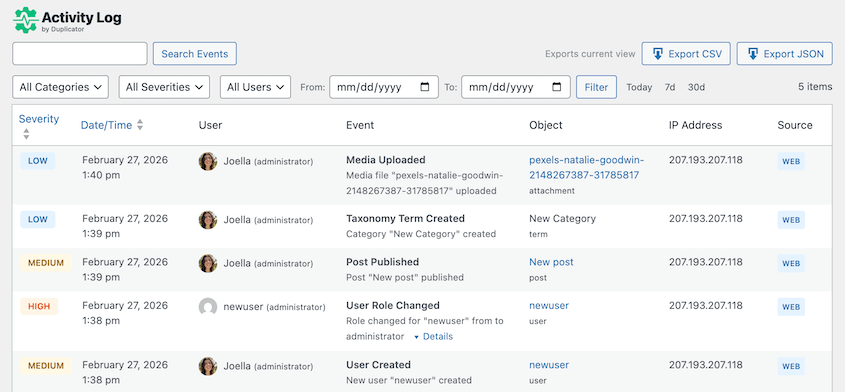
Low-level activity like standard logins sits in a different category from high-priority events like failed login attempts or core setting changes.
If someone on your team installs a new plugin or changes a user role, it gets logged. More malicious attacks (like if a failed login attempt comes in from an unknown IP address) also get tracked.
You always know what’s happening. Nothing slips through!
Know Who Did What, and When
When something goes wrong on a site, the first question is always “Who did this?” Without an activity log, that question can take hours to answer—or never get answered at all.
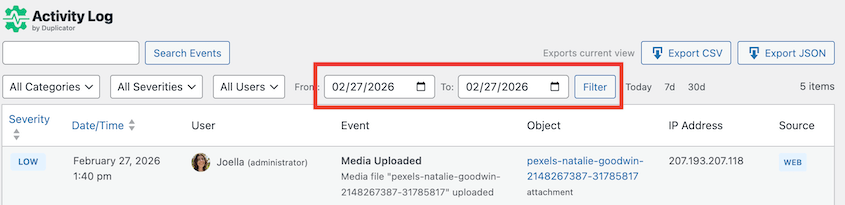
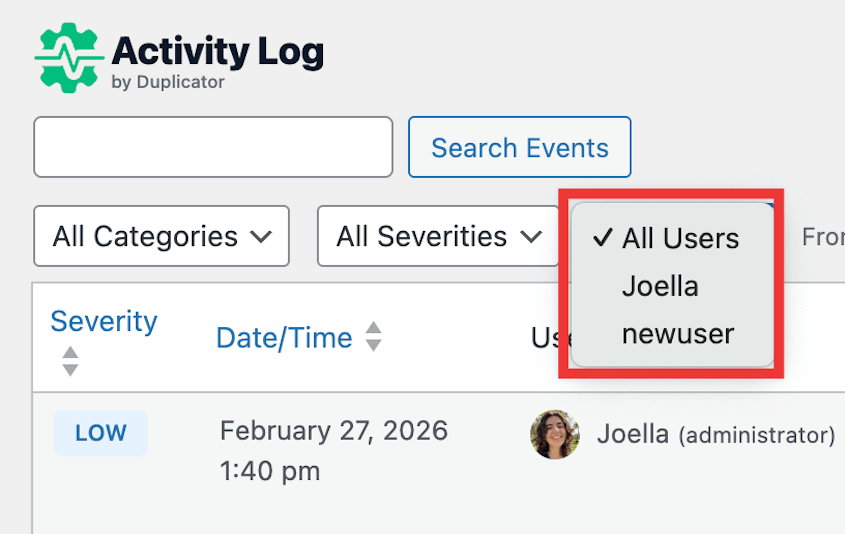
The Activity Log dashboard gives you a complete, searchable timeline of every event on your site. You can search the full log by date, user, event type, severity level, or IP address.
Need to find every change made last Tuesday? Filter by date.
Want to see everything a specific user has touched? Filter by user.
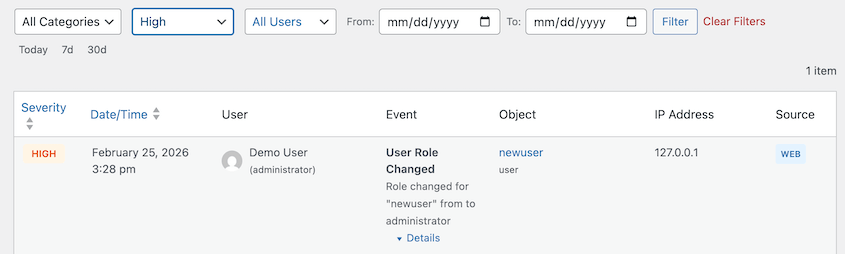
The category system is something you won’t find in other activity log plugins. Instead of scrolling through a single list of hundreds of events, you can sort by threat level:
- Critical
- High
- Medium
- Low
You can triage issues based on how critical they are. It’s a small feature that makes a big difference when you’re managing a busy site or troubleshooting under pressure.
For agencies managing client sites, this kind of detail is invaluable. When a client says something changed on their site last month, you can pull up the log and give them a precise, confident answer in seconds.
Your Content Is Covered
Content is the heart of most WordPress sites. When it gets changed, deleted, or published unexpectedly, it’s usually the first thing someone notices.
Every significant content action is recorded. That includes posts, pages, and custom post types when they are created, edited, deleted, or published.
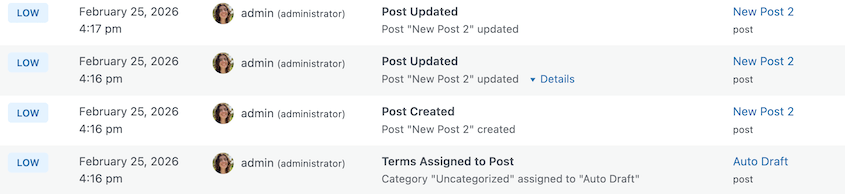
If a draft goes live when it shouldn’t have, you’ll know exactly when it was published and who triggered it.
Activity Log also tracks things that most plugins miss entirely. Featured image changes get their own dedicated events. You’ll see when a featured image is set, changed, or removed on any post.

Custom fields and post meta are tracked individually, which matters a lot if you’re running a site that relies heavily on ACF or custom meta boxes. Media uploads and deletions are recorded. Even comment management activity shows up in the log.
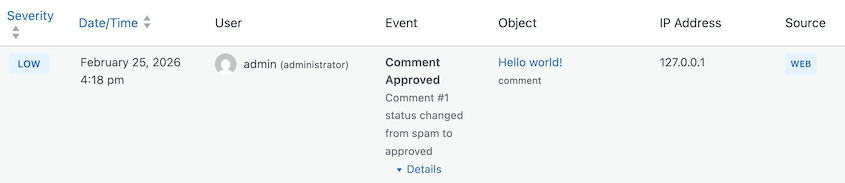
This level of content tracking creates real accountability. Contributors and editors know that their actions are recorded. That alone tends to reduce careless mistakes.
Settings Changes Won’t Go Unnoticed
Some of the most impactful changes on a WordPress site happen quietly inside the Settings menu. A URL change. A new admin email. A permalink structure update.
These aren’t flashy edits, but they can break things fast, and they’re often difficult to connect to a specific person or timestamp after the fact.
Activity Log tracks all critical WordPress setting changes. You’ll know immediately if something important shifts, and you’ll have a complete record of what it was before and after the change.
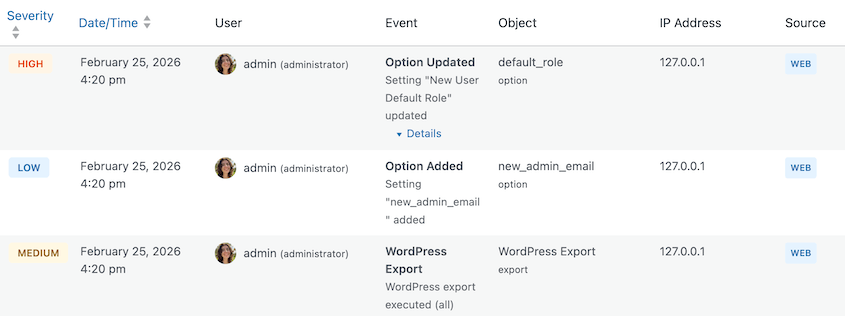
There’s one feature here we’re especially proud of: sensitive data is automatically redacted. Passwords, API keys, and other private values are hidden in the log automatically.

You get the audit trail you need without worrying about storing information you don’t want exposed. The plugin handles it for you right out of the box.
Stay Informed with Email Notifications
Checking the activity log manually is useful, but you shouldn’t have to remember to do it. Critical events need to reach you in real time, not hours later when you finally open your WordPress dashboard.
Activity Log includes a flexible email notification system that keeps you informed without overwhelming your inbox.
You choose which event triggers an alert. Specify which email should receive notifications.
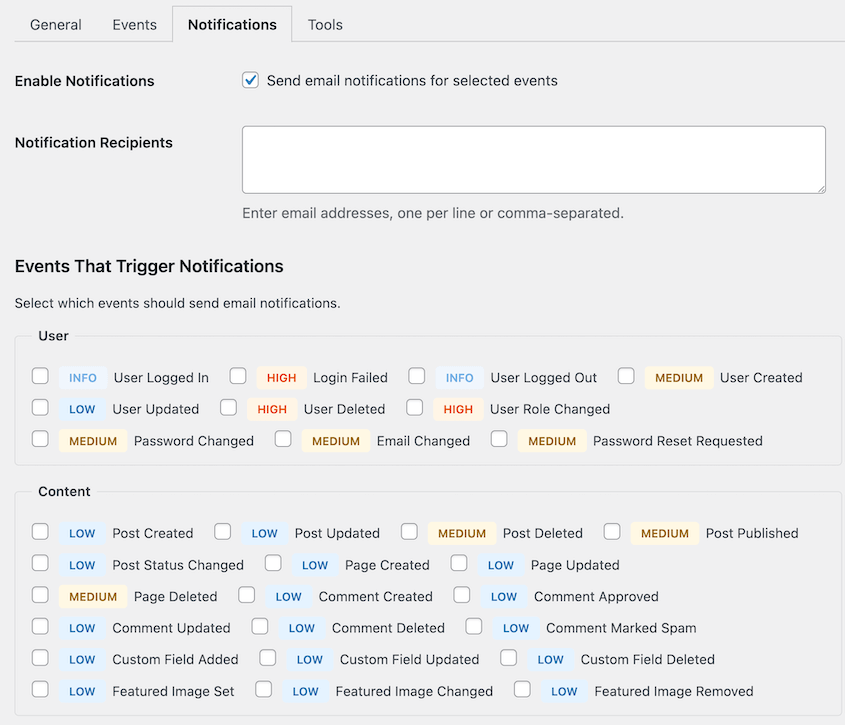
You stay in control of what gets flagged and how urgent it is. Low-level events can stay in the log without bothering you. High-severity events come straight to your email so you can respond quickly.
Export Your Logs Anytime
An activity log is only useful if you can share and use the data inside it. You might need to:
- Hand off information to a client
- Run a compliance review
- Troubleshoot a bug or security issue
Activity Log supports both CSV and JSON exports with advanced filters.
Select a date range, user, event type, or severity level, then export exactly what you need. Bulk export is supported so you’re never stuck downloading one page at a time.
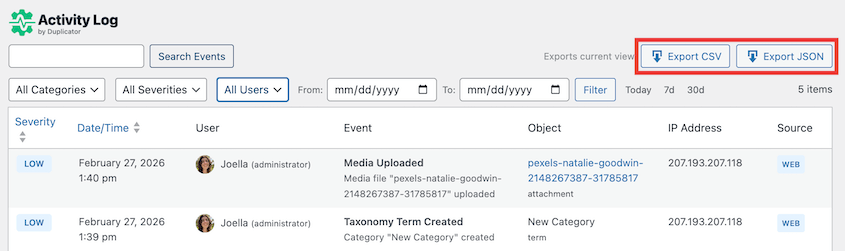
For businesses or site owners with any kind of audit or compliance requirement, having clean export options isn’t a nice-to-have. It’s a necessity.
Built for Developers and Agencies
If you’re managing multiple WordPress sites, clicking through individual dashboards to review activity logs doesn’t scale. You need a faster way to work.
Activity Log includes full WP-CLI support for developers and agencies managing sites from the command line. Here’s how to access your activity log:
wp duplicator-activity-log exportYou can customize how this data is displayed. For example, you might show all logs in a table:
# Show all logs in a table
$ wp duplicator-activity-log export
It can be helpful to view a specific date range for a targeted audit:
# Export date range
$ wp duplicator-activity-log export --date_from="2026-01-01" --date_to="2026-01-31" --format=csv
The options are endless. You can export logs with custom filters, purge old records with retention policies you define, and automate log management across your entire client portfolio.
The Answers Are Already There. You Just Need to Log Them.
If you’re already using Duplicator Pro to back up and migrate your WordPress sites, Activity Log is a natural next step.
Duplicator keeps a full backup ready so you can restore your site when something goes wrong. Activity Log keeps a full record so you understand why it went wrong in the first place.
Together, they give you complete coverage.
When an incident happens, you can look at the activity log to understand what changed and who changed it, then use your Duplicator backup to restore your site to a clean state.
That combination turns a potential disaster into a manageable, recoverable situation.
And if you’re not using Duplicator Pro yet, the Activity Log plugin stands completely on its own. Any WordPress site owner who wants real visibility into what’s happening on their site will find it valuable from day one.
The next time something unexpected happens on your site, you won’t have to guess. You’ll have the full story right there in your dashboard: who did it, when they did it, and exactly what changed.
Install Activity Log by Duplicator today!
While you’re here, check out other recent updates from the Duplicator team:
- [NEW] WP Media Cleanup Deletes Unused Images Hiding in Your Media Library
- [New] Cloud Backups Just Got Simpler: Duplicator Cloud Eliminates Third-Party Storage
- Duplicator’s New Migration Service: Move Your Website Without Lifting a Finger
- Duplicator’s New One-Click Backup Cleanups, Auto-Deletion, and Version Updates