

メール概要(週次統計)の使用
バックアップのパフォーマンスを詳細に記載した週次レポートを受け取りたいですか? Duplicator のメール概要を使用すると、以下の簡単な概要を受け取ることができます。
- 成功したバックアップと失敗したバックアップのカウント
- スケジュールによって生成されたバックアップと手動で作成されたバックアップの比較
- 失敗したバックアップの数
- 新しく追加されたストレージ
- 最近作成されたスケジュール
このチュートリアルでは、Duplicator でメール概要を設定する方法を説明します。
In This Article
メール概要を無効にするにはどうすればよいですか?
メール概要を受信したくない場合は、いつでも無効にすることができます。 WordPress 管理画面に移動し、左側のメニューで Duplicator Lite/Pro » 設定 に移動してから、一般 タブをクリックしてください。
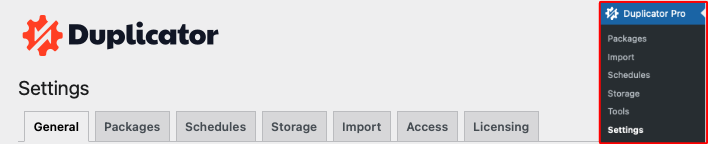
この画面で、メール概要 セクションまでスクロールし、頻度を なし に設定します。
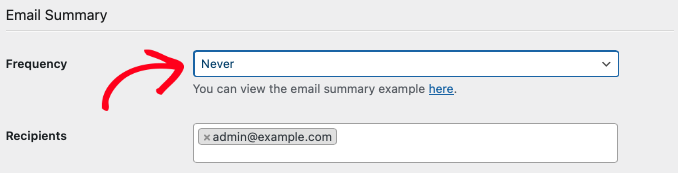
完了したら、ページの下部にある 一般設定を保存 ボタンをクリックします。
よくある質問
Do I get Email Summaries if I’m using Duplicator Lite?
All Duplicator users will, by default, have Email Summaries enabled.
How can I detect the site that is generating the Email Summary?
The footer of the email will display the Source of the site.
What email address are Email Summaries sent to?
Email Summaries will be sent to your WordPress site’s admin email. If you aren’t sure how to find your site’s admin email, or if you think you might want to change it, be sure to check out WPBeginner’s admin email tutorial.


