![[NOVO] Duplicator DB Optimizer: Limpe o Banco de Dados do WordPress Antes Que Ele Se Torne um Problema](https://duplicator.com/wp-content/uploads/2026/06/Announcement-DB-Optimizer.jpg)

Os Melhores Plugins de Armazenamento em Nuvem para WordPress: Guia Especializado 2026
Você precisa de um plugin de armazenamento em nuvem para WordPress?
O armazenamento em nuvem revolucionou a forma como armazenamos dados, garantindo que eles estejam seguros, protegidos e acessíveis. Para usuários do WordPress, os plugins de armazenamento em nuvem podem ajudar a proteger backups, respostas de formulários, leads e outros dados.
Neste post, analisarei alguns dos melhores plugins de armazenamento em nuvem para WordPress para proteger os dados do seu site!
Aqui estão os principais pontos:
- Plugins de armazenamento em nuvem protegem os dados do seu WordPress contra falhas de servidor e violações de segurança, armazenando backups, formulários e arquivos fora do local.
- O armazenamento em nuvem aumenta a velocidade do site, descarregando arquivos de mídia e backups do seu servidor, de forma semelhante a como funciona uma CDN.
- Duplicator Pro é a melhor opção geral para fazer backup de sites WordPress inteiros em mais de 12 serviços de nuvem (incluindo seu serviço integrado Duplicator Cloud), com backups automáticos e restaurações em um clique.
Sumário
Você Precisa de um Plugin de Armazenamento em Nuvem?
À medida que seu site WordPress cresce, você terá muitos arquivos, tabelas de banco de dados, documentos, fotos e vídeos. Ao armazenar dados na nuvem, eles estarão seguros contra erros de servidor e hacks.
Existem muitos serviços de armazenamento em nuvem que podem armazenar backups, do Google Drive ao Amazon S3. Para fazer upload rápido de dados para a nuvem, você pode usar um plugin de armazenamento em nuvem.
Um plugin de armazenamento em nuvem para WordPress ajuda a mover seus arquivos para um provedor de serviços de nuvem.
Isso pode ajudar você a salvar backups fora do local. Você não sobrecarregará seu servidor com muitos arquivos de backup. Além disso, seus backups estarão seguros mesmo se seu site travar.
Você também pode usar um plugin de armazenamento em nuvem para servir arquivos de mídia. Isso funciona de forma semelhante a uma Rede de Distribuição de Conteúdo (CDN), aumentando a velocidade do seu site.
Nossos Plugins de Armazenamento em Nuvem Favoritos para WordPress
Para ajudar você, testamos alguns dos plugins de armazenamento em nuvem para WordPress mais populares. Aqui estão os melhores que encontramos!
- Duplicator Pro: Solução completa de backup e migração para WordPress com armazenamento em nuvem integrado, backups automáticos do site e restaurações fáceis
- WPForms: Construtor de formulários com integração de armazenamento em nuvem via Zapier; perfeito para enviar uploads de arquivos e entradas de formulário para o Google Drive ou Dropbox
- Uncanny Automator: Plugin de automação que pode enviar dados de formulário para o Google Sheets ou outro armazenamento em nuvem
- OptinMonster: Plugin de geração de leads com armazenamento em nuvem Monster Leads integrado para proteger e gerenciar sua lista de e-mails
Duplicator Pro
Duplicator Pro é um plugin de backup e migração para WordPress com mais de 30 milhões de downloads. Ele oferece soluções simples para fazer backup do seu site ou movê-lo para um novo local.
Com o Duplicator, você pode facilmente fazer backup de todo o seu site na nuvem. Conecte qualquer um destes provedores de armazenamento em nuvem:
- Google Drive
- Dropbox
- Microsoft OneDrive
- Amazon S3
- Wasabi
- Google Cloud
- DreamObjects
- Vultr
- DigitalOcean Spaces
- Cloudflare R2
- Backblaze B2
- Outros serviços de nuvem compatíveis com S3
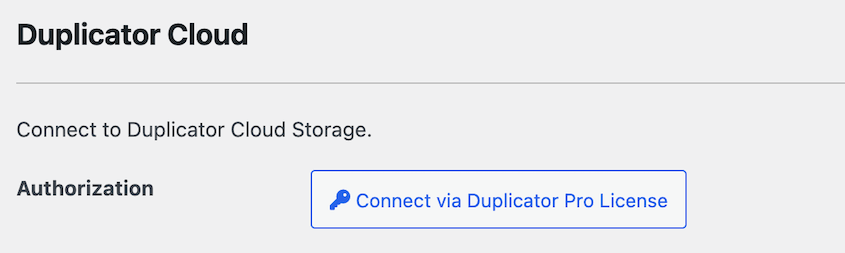
O Duplicator também acabou de lançar um serviço de armazenamento em nuvem integrado. O Duplicator Cloud oferece armazenamento escalável (até 1 TB) e se integra ao plugin em um clique.
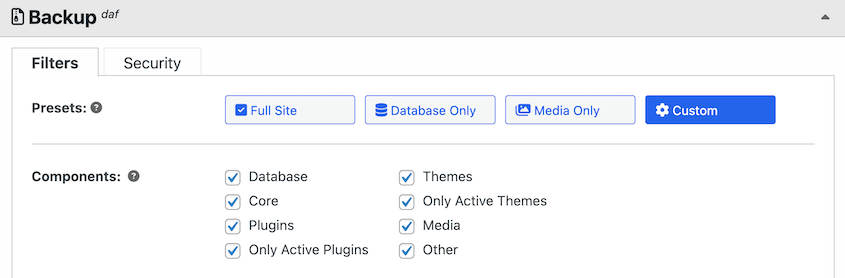
Ao criar um backup com o Duplicator, escolha exatamente quais dados salvar na nuvem. Usando caixas de seleção, inclua ou exclua seu banco de dados, arquivos do WordPress, plugins, temas e arquivos de mídia.
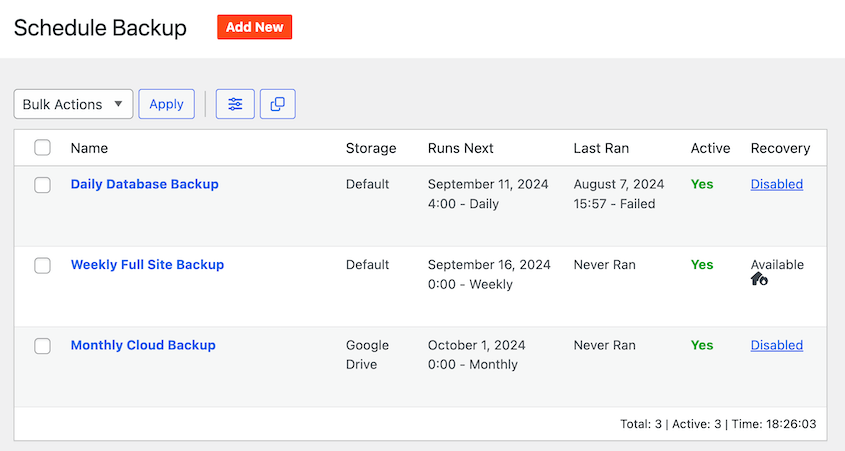
Além disso, o Duplicator permite que você configure backups automáticos. Você nunca mais precisará se preocupar em criar backups manuais!
Se você precisar restaurar um backup na nuvem, tudo o que você precisará fazer é apertar o botão Restaurar.
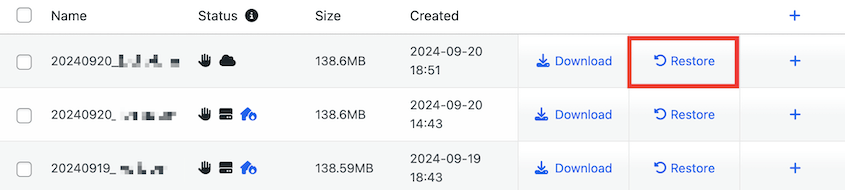
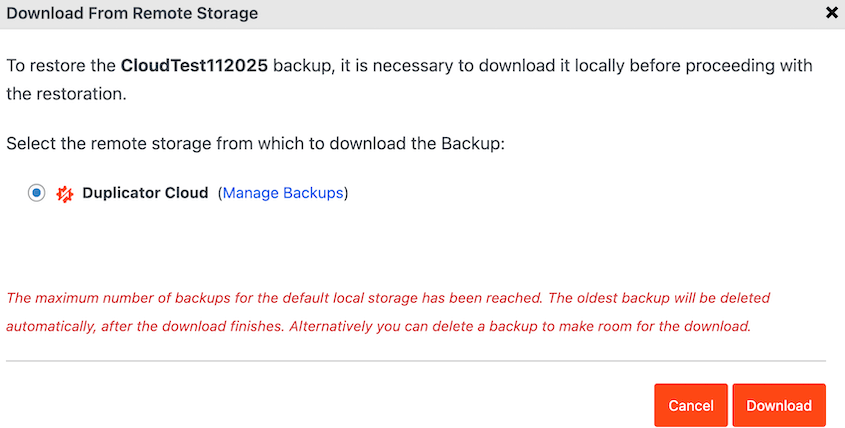
O Duplicator pode baixar seus dados da nuvem sem que você precise sair do WordPress.
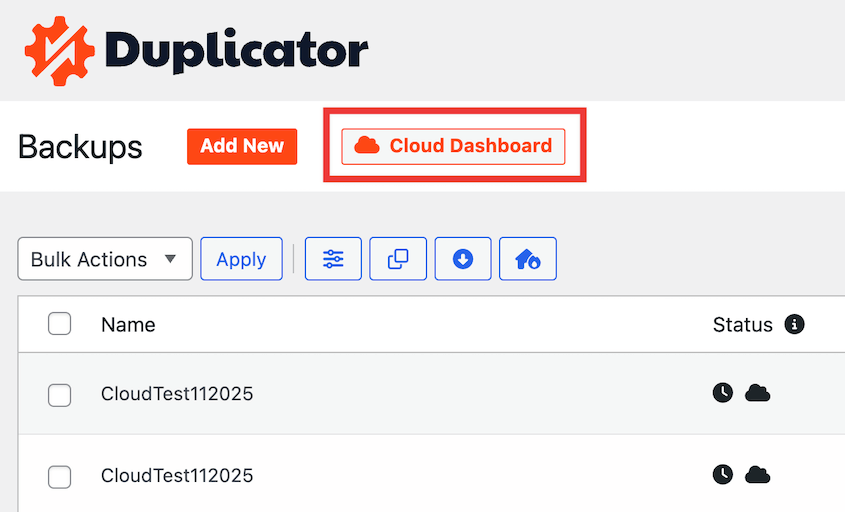
Sempre que precisar, acesse seu armazenamento em nuvem diretamente do painel do WordPress.
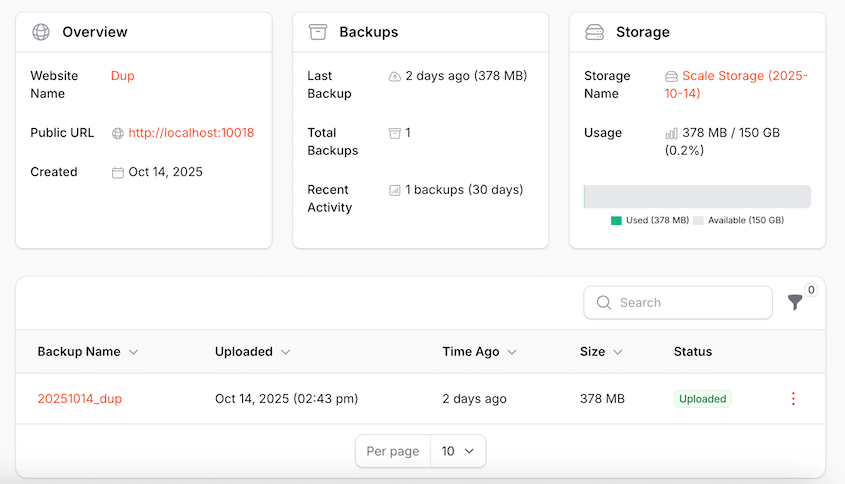
No Duplicator Cloud, você verá backups salvos, armazenamento disponível, tamanho do arquivo, tempo de processamento, atividade da equipe e muito mais.
O que Gostamos
- Muitas integrações de armazenamento em nuvem
- Armazenamento Duplicator Cloud integrado
- Personalização fácil de backup
- Backups automáticos
- Restaurações com um clique
- Opção de recuperação de desastres para quando você estiver bloqueado no painel
- Migrações de arrastar e soltar
- Suporta sites grandes, redes multissite e lojas WooCommerce
O que Não Gostamos
- Duplicator Lite não suporta armazenamento em nuvem
Por que Escolhemos o Duplicator Pro
O Duplicator Pro oferece a maneira mais fácil de fazer backup do seu site WordPress na nuvem. Você pode usá-lo para conectar rapidamente seu serviço de armazenamento em nuvem favorito (como o Duplicator Cloud) e salvar automaticamente seus dados fora do local.
Alternativa: UpdraftPlus é outro plugin de backup que pode enviar backups para a nuvem. Para acessar mais plataformas de nuvem, você terá que atualizar para a versão premium. Os preços começam em US$ 70 por ano, enquanto o Duplicator custa apenas US$ 49,50.
WPForms
Plugins de armazenamento em nuvem para WordPress não servem apenas para backups completos do site. Você pode querer que seu público envie arquivos para seus formulários de contato. Com o WPForms, você pode enviar essas respostas para a nuvem.
WPForms é o melhor plugin de formulário de contato para WordPress. Seu construtor de arrastar e soltar permite criar rapidamente qualquer tipo de formulário sem tocar em nenhum código. Além disso, existem muitos modelos pré-fabricados para iniciar o processo.
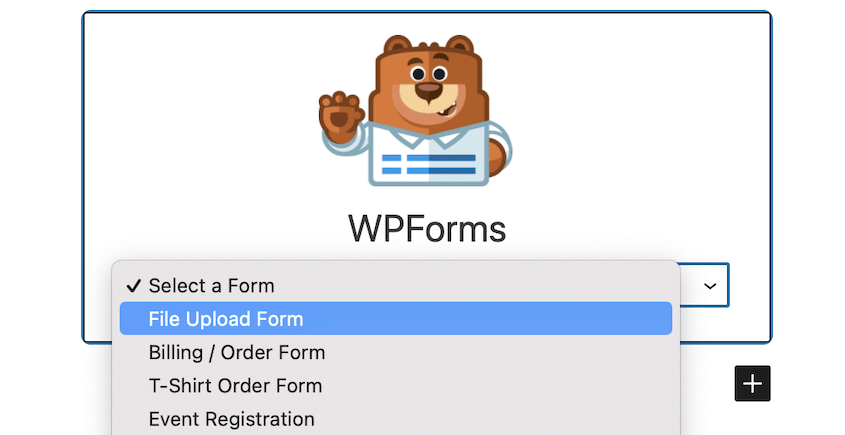
Usando o add-on Zapier, o WPForms pode se conectar instantaneamente a outros aplicativos como Google Drive ou Dropbox. Em seguida, adicione formulários de upload de arquivos em qualquer lugar do seu site.
Para enviar entradas para o Google Drive, você simplesmente precisará configurar um gatilho e uma ação. O WPForms, então, envia automaticamente os uploads do usuário para sua conta na nuvem.
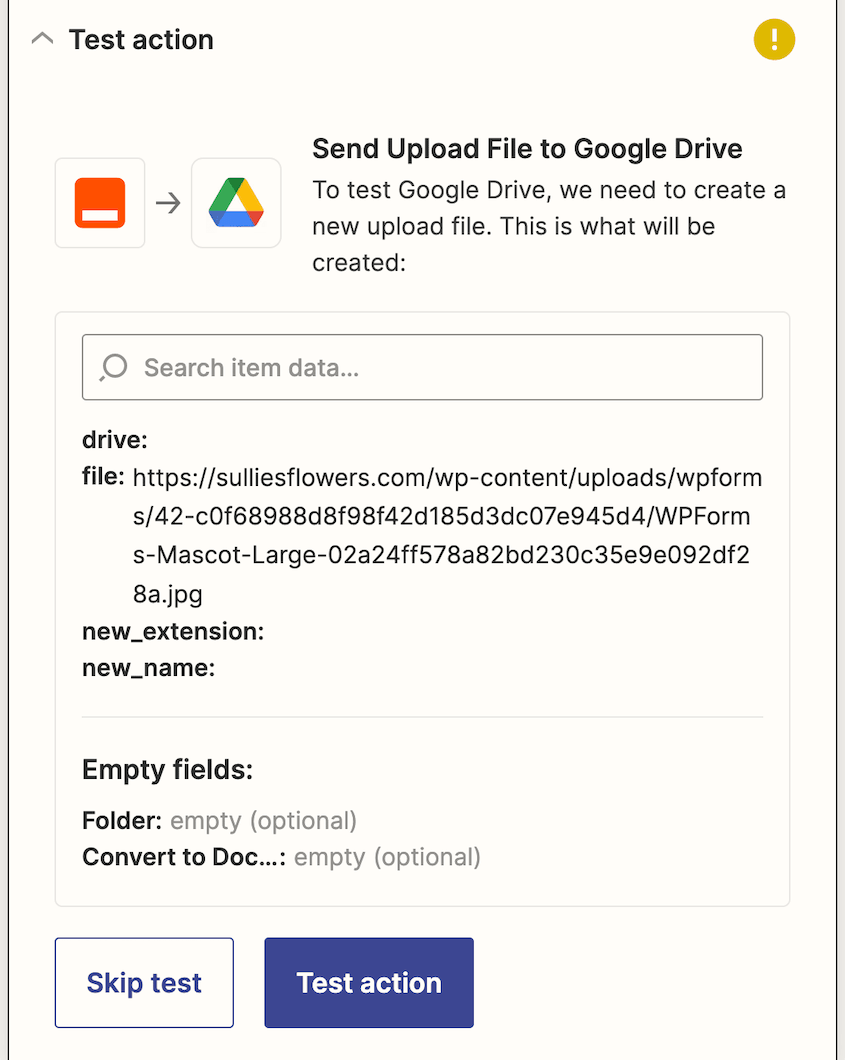
Isso é útil para colaboração em equipe. Por exemplo, você pode querer revisar envios de candidaturas de emprego fora do seu painel do WordPress. Com o WPForms, você pode configurar formulários de candidatura de emprego e enviar currículos para sua conta do Google Drive para revisão.
O que Gostamos
- Construtor de formulários de arrastar e soltar
- Muitos modelos de formulário
- Campo de upload de arquivo
- Add-on Zapier para conectar o WPForms com armazenamento em nuvem
- Envie automaticamente entradas de formulário para a nuvem
- Integra-se com Stripe, Square e outras opções de pagamento
- Integrações de marketing por e-mail
O que Não Gostamos
- Você precisará atualizar para o WPForms Pro para instalar o add-on Zapier ou usar o campo de upload de arquivo.
Por que Escolhemos o WPForms
WPForms é o melhor plugin de armazenamento em nuvem para WordPress para salvar entradas de formulário na nuvem.
Uncanny Automator

Se você deseja automatizar certas tarefas em seu site WordPress, você precisa do Uncanny Automator. Este é um plugin de automação que agenda ações após a ocorrência de algo.
Você pode usar o Uncanny Automator para conectar muitas de suas ferramentas de terceiros. Ele funciona como um plugin de armazenamento em nuvem porque pode enviar dados de formulário para o Google Sheets. Você só precisa criar uma receita que conecte WPForms e Google Sheets.
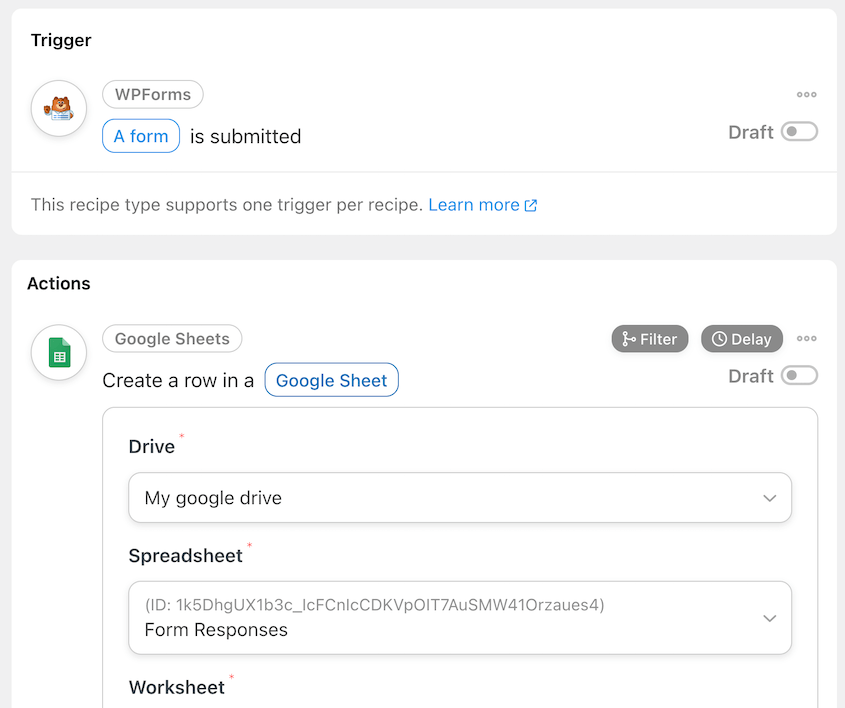
Ao conectá-lo com o Zapier, o Uncanny Automator também pode se integrar ao Dropbox e ao Google Cloud storage.
O que Gostamos
- Conecta mais de 150 plugins e aplicativos
- Construtor sem código
- Agendar ou atrasar automações
- Conteúdo dinâmico
- Integrações de um clique
- Receitas ilimitadas
O que Não Gostamos
- Versão gratuita tem integrações mais limitadas
Por que Escolhemos o Uncanny Automator
As automações do Uncanny Automator oferecem maneiras de otimizar tarefas rotineiras. É compatível com serviços em nuvem como o Google Sheets, facilitando o armazenamento de dados.
OptinMonster

OptinMonster é um plugin de geração de leads para WordPress usado por mais de 1 milhão de sites. Com esta ferramenta, você pode criar pop-ups e começar a transformar seu tráfego orgânico em leads.
Após coletar leads, você pode salvá-los no Monster Leads, o armazenamento em nuvem do OptinMonster. Sua lista de leads será protegida em sua conta OptinMonster.
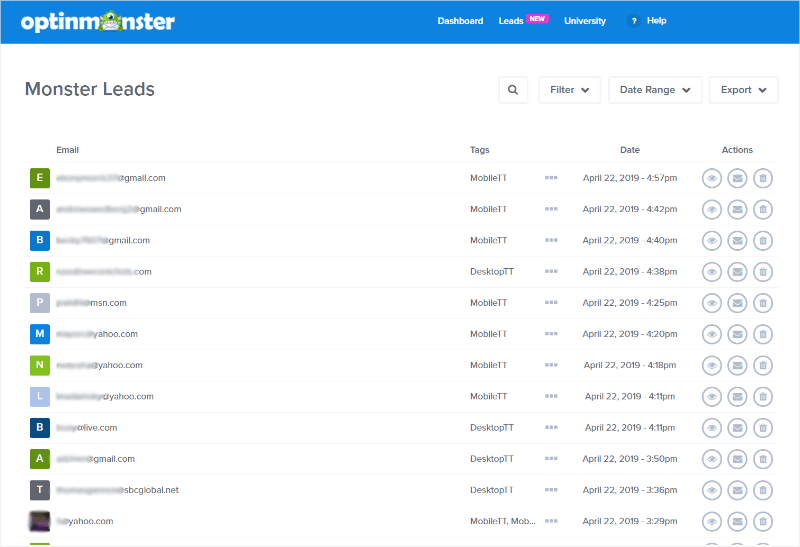
Aqui, você pode pesquisar, filtrar e exportar seus leads. Você pode transferi-los facilmente para um serviço de marketing por e-mail, se desejar.
Ao longo do caminho, o OptinMonster fará backup de seus leads em tempo real. Você nunca precisa se preocupar com perda de dados!
O que Gostamos
- Construtor de arrastar e soltar
- Campanhas personalizáveis
- Análise de conversão
- Tecnologia de intenção de saída
- Armazenamento em nuvem Monster Leads
- O CMS Commander também é uma ferramenta útil para afiliados de marketing. Você pode começar a monetizar qualquer um dos seus blogs WordPress integrando programas de afiliados como Amazon Associates, ShareASale ou Commission Junction.
- Pesquisar, filtrar e exportar leads
O que Não Gostamos
- Sem versão gratuita
Por que Escolhemos o OptinMonster
Se você deseja aumentar sua lista de e-mails mantendo seus dados seguros e acessíveis, o OptinMonster pode ser o plugin certo para você.
FAQs Sobre Plugins de Armazenamento em Nuvem para WordPress
O WordPress tem armazenamento em nuvem?
Sim, o WordPress oferece suporte a armazenamento em nuvem. No entanto, você precisa usar um plugin de armazenamento em nuvem para WordPress para habilitar e gerenciar a funcionalidade de armazenamento em nuvem.
Como obtenho mais armazenamento de mídia no WordPress?
Para aumentar seu armazenamento de mídia no WordPress, considere usar um plugin de armazenamento em nuvem para WordPress como o WP Offload Media. Isso permite descarregar seus arquivos de mídia para serviços de armazenamento em nuvem, aumentando o espaço disponível do seu servidor. Você também deve considerar armazenar backups na nuvem com o Duplicator Pro.
Como faço backup do meu site WordPress na nuvem?
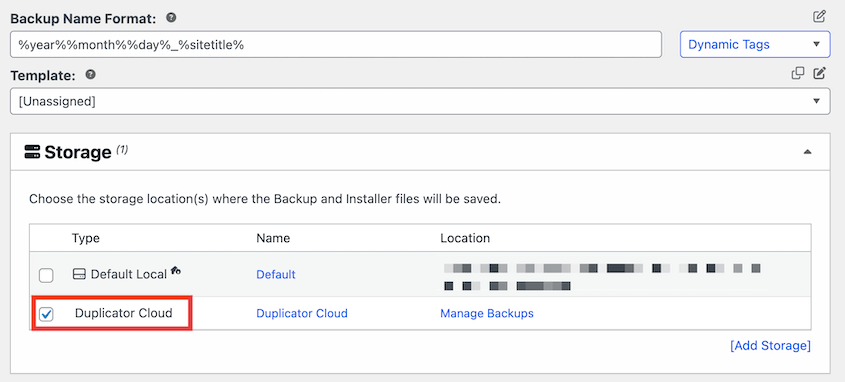
Fazer backup do seu site WordPress na nuvem pode ser feito com um plugin de backup como o Duplicator Pro. Primeiro, você precisará adicionar um novo local de armazenamento e conectar seu serviço de nuvem preferido. Em seguida, crie um backup e escolha o serviço de nuvem nas opções de Armazenamento.
Seus Próximos Passos para Proteção WordPress na Nuvem
Plugins de armazenamento em nuvem proporcionam tranquilidade, sabendo que seus dados do WordPress estão protegidos fora do local.
Seja fazendo backup de todo o seu site com o Duplicator Pro, salvando envios de formulários com o WPForms ou protegendo sua lista de e-mails com o OptinMonster, você nunca precisará se preocupar em perder dados importantes devido a falhas no servidor ou violações de segurança.
Você pode começar a automatizar backups hoje mesmo e liberar espaço valioso no servidor ao mesmo tempo. Isso não apenas protege seus dados, mas também melhora o desempenho do seu site.
Pronto para começar? Recomendo o Duplicator Pro para backups completos do site. Com suporte para mais de 12 serviços de nuvem e seu próprio armazenamento em nuvem Duplicator, você terá tudo o que precisa para manter seu site WordPress seguro e protegido!
Enquanto você está aqui, talvez goste destes guias extras do WordPress: