![[New] Introducing Duplicator 5.0: AI Backups, AutoTune, and Extra Free Features](https://duplicator.com/wp-content/uploads/2026/09/Duplicator-5-0-Announcement.jpg)
Rapyd Cloud Review: Built for the Sites Most Managed Hosts Struggle With
 Joella Dunn
Joella Dunn
Joella Dunn
 John Turner
John Turner
John Turner
We moved Duplicator.com to Rapyd Cloud. Not because something was broken, but we kept noticing the drag in wp-admin and wondering how much of it was the hosting.
Great WordPress tools only carry you so far when the hosting underneath is slow.
You could have the best-configured WordPress stack on the internet and still hit a wall during a flash sale, a membership login surge, or a viral blog post. That ceiling isn’t something you built. It came with your hosting plan.
We’ve worked with enough WordPress hosting environments to have a clear sense of what companies promise versus what they actually deliver.
Rapyd Cloud is one of the ones worth your attention. In this post, I’ll explain why we decided to move Duplicator onto Rapyd Cloud servers.
Here are the key takeaways:
- Rapyd Cloud is managed WordPress hosting built for dynamic sites (WooCommerce, membership platforms, LMS) where logged-in user performance matters most
- It runs on LiteSpeed Web Servers with Dynamic Accelerate Technology that caches logged-in sessions, not just anonymous visitors
- Auto-scaling PHP workers handle traffic spikes automatically, with Performance Boosts available
- Every plan includes Cloudflare Enterprise CDN, KeyDB and Redis Object Cache, and automated backups
- PatchStack-powered Advanced SiteShield deploys virtual patches for plugin vulnerabilities before the developer publishes an official fix
- Live chat support averages under 45 seconds, with WordPress specialists who understand complex plugin environments
- Multi-Site Plans host 5 to 10 isolated WordPress sites in separate containers, making it a strong fit for agencies managing client portfolios
- The Duplicator team moved Duplicator.com to Rapyd Cloud after evaluating major hosting platforms in the market
- Pairing Rapyd Cloud with Duplicator Pro covers both performance and disaster recovery: your site runs fast, and you can restore it from anywhere if something breaks
- Plans start at $29/month with a 3-day free trial
Table of Contents
- What Is Rapyd Cloud?
- Performance: Built for Dynamic WordPress, Not Just Static Blogs
- Security Built Into Every Plan
- Support: The 45-Second Standard
- Multi-Site Plans: Designed for Agencies and Freelancers
- Developer Tools: For the Technical Professionals
- Pricing: Transparent, Inclusive, No Unpleasant Surprises
- The Duplicator + Rapyd Cloud: Two Tools, One Bulletproof Setup
- Who Should Switch to Rapyd Cloud?
- Frequently Asked Questions (FAQs)
- Try Rapyd Cloud Yourself: Risk Free
- Before You Switch Hosts, Make Sure Your Backups Are Ready
What Is Rapyd Cloud?
Rapyd Cloud is a fully managed WordPress hosting platform built for dynamic, content-rich websites where performance is tied directly to business outcomes. Think WooCommerce stores, membership platforms, LMS sites, community-driven WordPress installs, and media publishers handling serious traffic.
Rapyd wasn’t built for the static blog market. It’s for the sites most managed hosts quietly struggle with.
Environments where thousands of logged-in users are hitting your database simultaneously. Where a two-second delay in checkout costs real revenue.
It runs on LiteSpeed Servers, advanced caching, and AWS-backed cloud infrastructure. This gives you solid reliability without the complexity of managing it yourself.
Performance: Built for Dynamic WordPress, Not Just Static Blogs
Duplicator.com now runs on Rapyd Cloud! Here’s what we found about its performance and why we made the move.
LiteSpeed Web Servers
Rapyd Cloud runs on LiteSpeed Web Servers.
LiteSpeed handles concurrent connections and dynamic WordPress requests through a different architecture than Apache. It’s built specifically for the kinds of workloads modern WordPress sites need.
For a WooCommerce store processing product searches, cart updates, and checkout flows, that architecture reduces server-level bottlenecks.
For an LMS platform tracking course progress for thousands of users, it means fewer students hitting a loading spinner at a critical moment.
The difference shows up in faster checkouts, smoother course navigation, and fewer users abandoning mid-session.
Caching Designed for Logged-In Users
Most managed WordPress hosts fail the audience that needs them most.
The standard approach to WordPress hosting performance is straightforward: cache everything for anonymous visitors and let logged-in users load pages dynamically.
For a simple blog, that works.
For a WooCommerce store with active customers, a membership platform with subscriber dashboards, or an LMS with students mid-course, that approach means your highest-value users get your worst performance.
Rapyd Cloud uses Dynamic Accelerate Technology, which is designed for the dynamic, logged-in content that traditional caching can’t touch.
It also includes:
- KeyDB and Redis Object Cache, included on every plan
- LiteSpeed server-level caching for static assets
- MariaDB tuned for high-query workloads, including product filtering, inventory lookups, user dashboards, and bulk order processing
The result: your WooCommerce product pages, membership dashboards, and course progress pages load with the same responsiveness as your cached static pages.
Auto-Scaling PHP Workers to Avoid Traffic Anxiety
A newsletter goes out. A product launches. A post gets picked up by someone with a large following. On conventional hosting, that moment is a gamble.
Rapyd Cloud handles surges through auto-scaling PHP workers that allocate additional resources as demand increases. You won’t need to upgrade your plan.
For planned spikes like flash sales, product launches, or membership enrollment windows, Performance Boosts let you temporarily increase your resources on demand.
Your site stays fast. Your users don’t notice anything.
Security Built Into Every Plan
Performance is only half the equation. A site that loads fast but gets taken down by a DDoS attack, exploited through a plugin vulnerability, or flagged for malware still costs you revenue and trust.
Rapyd Cloud includes serious security tools at every plan tier, not locked behind premium pricing.
Cloudflare Enterprise CDN Integration
Rapyd Cloud partners with Cloudflare for CDN delivery through a 300+ global data center network.
In practice, that means:
- Threat blocking before requests reach your server
- DNS management directly in the Rapyd dashboard
- Full-page caching optimized for dynamic WordPress sites
- Global edge delivery through 300+ data centers
For agencies managing client sites across multiple countries or publishers with international readership, this is a competitive advantage that would normally cost thousands of dollars annually on its own.
Proactive Plugin Vulnerability Defense
If you’re managing complex plugin stacks like WooCommerce, LearnDash, or BuddyBoss, Rapyd’s Advanced SiteShield powered by PatchStack is one of the most valuable features on the platform.
PatchStack monitors installed plugins and themes for known security vulnerabilities and deploys virtual patches automatically.
Your site is protected before the plugin developer has published a fix. Since plugin vulnerabilities can get exploited within hours of public disclosure, that gap matters.
Real-Time Malware Scanning
Unlike weekly or daily scans that leave windows of exposure, Monarx provides continuous real-time malware detection at the server level.
It watches for known malware signatures and suspicious behavior constantly, not on a schedule you have to manage.
DDoS Protection, Bot Filtering, and SSL
DDoS mitigation, intelligent bot filtering, and free SSL certificate management are built into Rapyd Cloud across all plans.
For e-commerce businesses handling payment data, LMS platforms storing student records, and membership sites managing subscriber information, security matters as much as performance.
Support: The 45-Second Standard
“24/7 expert WordPress support” appears on the homepage of nearly every managed host. For most of them, it means a ticketing system with a 4-to-8-hour response window and a support team that escalates anything technical.
Rapyd Cloud’s live chat averages a response time of under 45 seconds. Their support team are WordPress specialists who understand WooCommerce configuration, BuddyBoss environments, LearnDash performance tuning, and the plugin conflicts that make complex WordPress sites difficult to troubleshoot.
When we migrated Duplicator.com, a Rapyd infrastructure architect reviewed our setup post-migration and flagged specific configuration changes we hadn’t considered.
A performance issue that had been causing intermittent slowdowns on our busiest pages was identified and resolved in a single session. That kind of post-migration attention isn’t something most hosts offer at any price tier.
Multi-Site Plans: Designed for Agencies and Freelancers
If you’re managing WordPress sites for multiple clients (and as a Duplicator user, there’s a good chance you are), Rapyd Cloud’s Multi-Site Plans are worth looking at.
Multi-Site Plans let you host 5 to 10 WordPress sites under a single managed environment. Each site gets its own isolated container with no shared resources, noisy neighbor problems, or performance bleed between accounts.
Every site on a Multi-Site Plan includes the complete stack: KeyDB and Redis Object Cache, CDN, automated backups, staging environments, and the same 24/7 support.
For agencies, this consolidation has real operational value. One platform, one dashboard, one support relationship, with help from one team that knows your entire environment.
Developer Tools: For the Technical Professionals
For developers and technical leads who want full control, the platform provides tools that most managed hosts charge extra for or don’t offer at all.
You’ll get:
- SSH and SFTP access for direct server interaction and workflow automation
- WP-CLI for command-line WordPress management and scripting
- One-click staging environments for testing changes before they touch production
- Git integration for teams managing code collaboratively (higher plans)
- Real-time resource monitoring covering CPU, RAM, and storage usage in the dashboard at all times
- Plugin and theme management with rollback capability
The dashboard gives you full visibility without needing to touch a server config file directly.
Pricing: Transparent, Inclusive, No Unpleasant Surprises
Rapyd Cloud’s pricing is structured around what’s included.
- Starter Plan: from $29/month: The entry point for a single site that’s outgrown generic managed hosting. Best for growing WooCommerce stores, early-stage membership sites, and any WordPress environment where performance matters.
- Business Plans: from $99/month: Built for agencies, freelancers, and users managing multiple sites. Scales from 5 to 10 sites, with larger options on Performance and Enterprise plans.
Every Business plan includes:
- Full KeyDB and Redis Object Cache
- Cloudflare Enterprise CDN
- Automated backups with easy restoration
- Staging environments
- 24/7 expert WordPress support.
There are no hidden tiers where the features that matter are locked behind upsells. The tools that drive performance (object caching, CDN, staging, backups) are included at every level.
Every plan includes a 3-day free trial. Spin up your site, put it under real load, and make a decision based on actual evidence.
The Duplicator + Rapyd Cloud: Two Tools, One Bulletproof Setup
If you want a high-performing and secure site, I recommend using Duplicator and Rapyd Cloud together.
Rapyd Cloud handles the environment your site lives in: the performance, security, uptime, and scalability.
Duplicator handles your safety net. You can schedule automatic backups and set disaster recovery points to restore your site even when the server is down.
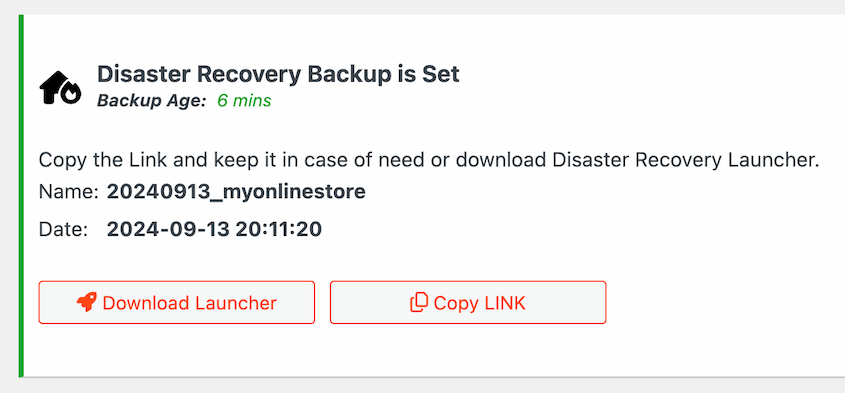
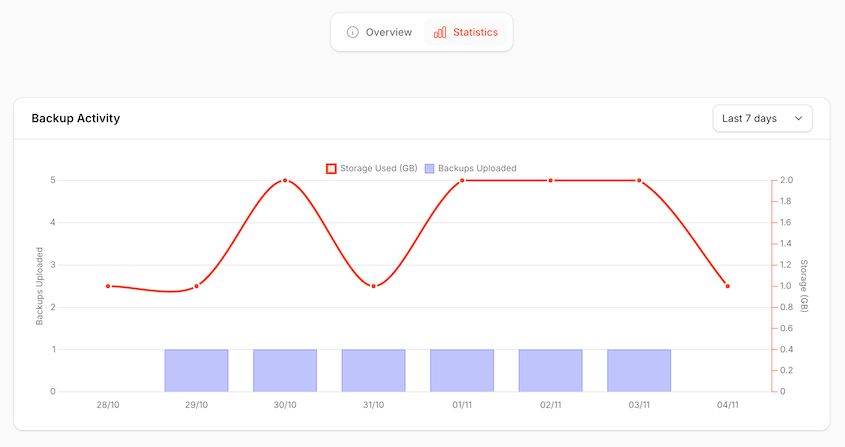
It even has its own cloud storage: Duplicator Cloud. Unlike Google Drive and Amazon S3, Duplicator Cloud was specifically designed for storing WordPress backups and restoring them remotely after catastrophic crashes.
Together, they cover the two questions that matter:
- What happens if something breaks?
- What happens when my site really takes off?
Duplicator answers the first. Rapyd Cloud answers the second.
And notably, the Duplicator team chose Rapyd Cloud for our site after evaluating every major hosting environment in the market. When people who migrate and test WordPress sites for a living make that choice, it carries weight.
Who Should Switch to Rapyd Cloud?
Rapyd Cloud isn’t the cheapest managed WordPress hosting on the market, but it’s not trying to be. It’s built for sites where performance has a direct cost when it fails.
You should use Rapyd Cloud if you run:
- A WooCommerce store
- A membership or LMS platform
- A high-traffic content site
- A portfolio of client sites as an agency
One thing I’d add: before you migrate to any new host, test your most dynamic pages specifically, not just your homepage.
Run your WooCommerce cart-to-checkout flow under concurrent load. Test your membership dashboard with multiple logged-in sessions.
That’s where the LiteSpeed advantage is most visible, and where most hosting benchmarks don’t go deep enough to show you the real difference.
When you’re ready to move, Rapyd Cloud will help you get your data onto the platform. If you want more control, use Duplicator Pro to migrate your site to the new host!
Frequently Asked Questions (FAQs)
Who is Rapyd Cloud built for?
Rapyd Cloud is designed for dynamic WordPress sites where performance directly affects revenue or user retention. WooCommerce stores, membership platforms, LMS sites, and agency-managed client portfolios are the core use cases. If your site relies heavily on logged-in users, real-time content, or high-concurrency traffic, Rapyd Cloud’s infrastructure is built for that workload.
Is Rapyd Cloud good for WooCommerce?
Yes, and this is where Rapyd Cloud makes its strongest case. Its Dynamic Accelerate Technology and MariaDB tuning are specifically built for the kinds of queries WooCommerce generates: product filtering, cart updates, inventory lookups, and simultaneous checkout flows. Most managed hosts cache anonymous visitors well but struggle with logged-in customer performance. Rapyd Cloud handles both.
Does Rapyd Cloud include automated backups?
Automated backups are included across all plans. For additional protection and off-site recovery options, pairing Rapyd Cloud with Duplicator Pro gives you scheduled backups to 10+ cloud storage locations, one-click restores, and a disaster recovery URL that works even if your hosting environment goes down entirely.
How does Rapyd Cloud handle traffic spikes?
Rapyd Cloud auto-scales PHP workers that allocate additional server resources automatically as demand increases. There’s no manual intervention or plan upgrades needed for standard spikes. For planned high-traffic events like product launches or flash sales, Performance Boosts let you temporarily increase resources on demand.
Does Rapyd Cloud support WordPress Multisite?
Multi-Site Plans support 5 to 10 WordPress sites per account, each in an isolated container with no shared resources. This is different from WordPress Multisite (the built-in network feature) but addresses the same agency need: managing multiple sites without noisy-neighbor performance issues or shared-resource bottlenecks.
How does Rapyd Cloud compare to WP Engine or Kinsta?
Rapyd Cloud positions itself specifically for dynamic, logged-in content, whereas WP Engine and Kinsta rely more heavily on full-page caching for anonymous visitors. Rapyd Cloud’s inclusion of Cloudflare Enterprise CDN, KeyDB and Redis Object Cache, and auto-scaling PHP workers at the entry-level plan gives it a feature-per-dollar advantage for WooCommerce and membership use cases specifically.
Is Rapyd Cloud worth the price?
For sites where performance is tied to revenue (WooCommerce stores, membership platforms, and LMS sites), Rapyd Cloud is well-priced for what’s included. Cloudflare Enterprise CDN and Redis Object Cache alone justify the cost at the entry level. For a simple blog or brochure site, it might be more than you need.
Try Rapyd Cloud Yourself: Risk Free
The best way to evaluate a hosting platform is to put your actual site on it and see what happens.
Your backups are already covered by Duplicator. Your migrations are clean. Spend 3 days finding out whether Rapyd Cloud is worth switching to.
We think you’ll know pretty quickly.
Before You Switch Hosts, Make Sure Your Backups Are Ready
Switching hosts is one of the highest-risk moments in a WordPress site’s life. DNS propagation gaps, misconfigured databases, plugin conflicts in a new environment — any of these can take a site down at exactly the wrong moment.
Over 1.5 million WordPress professionals use Duplicator to make that moment recoverable.
With automated backups on schedule, one-click restores from cloud storage, and a disaster recovery URL that works even when WordPress itself is locked out, Duplicator Pro means a failed migration is a minor setback, not a crisis.
Get Duplicator Pro to protect your site before (and after) you migrate!
If this post got you thinking about migrations, hosting changes, and keeping your site protected, these guides are worth reading next.
- How to Move a WordPress Website to a New Host
- Your Host’s Backups Are Useless: Here’s Affordable Backup Software You Can Trust
- How WPHostee Cut Migration Time by 50% and Downtime by 80%
- How to Edit Your Hosts File Before WordPress Migrations (Windows, Mac, & Linux Tutorial)
- DNS Migration Done Right: How to Avoid the Most Common Mistakes
- How to Back Up a WordPress Site