

What Does the Activity Log Track?
Activity Log tracks a wide range of events across your WordPress site. Each category can be enabled, disabled, or filtered independently in Settings › Events, where the Registered Event Types reference lists every trackable event live.
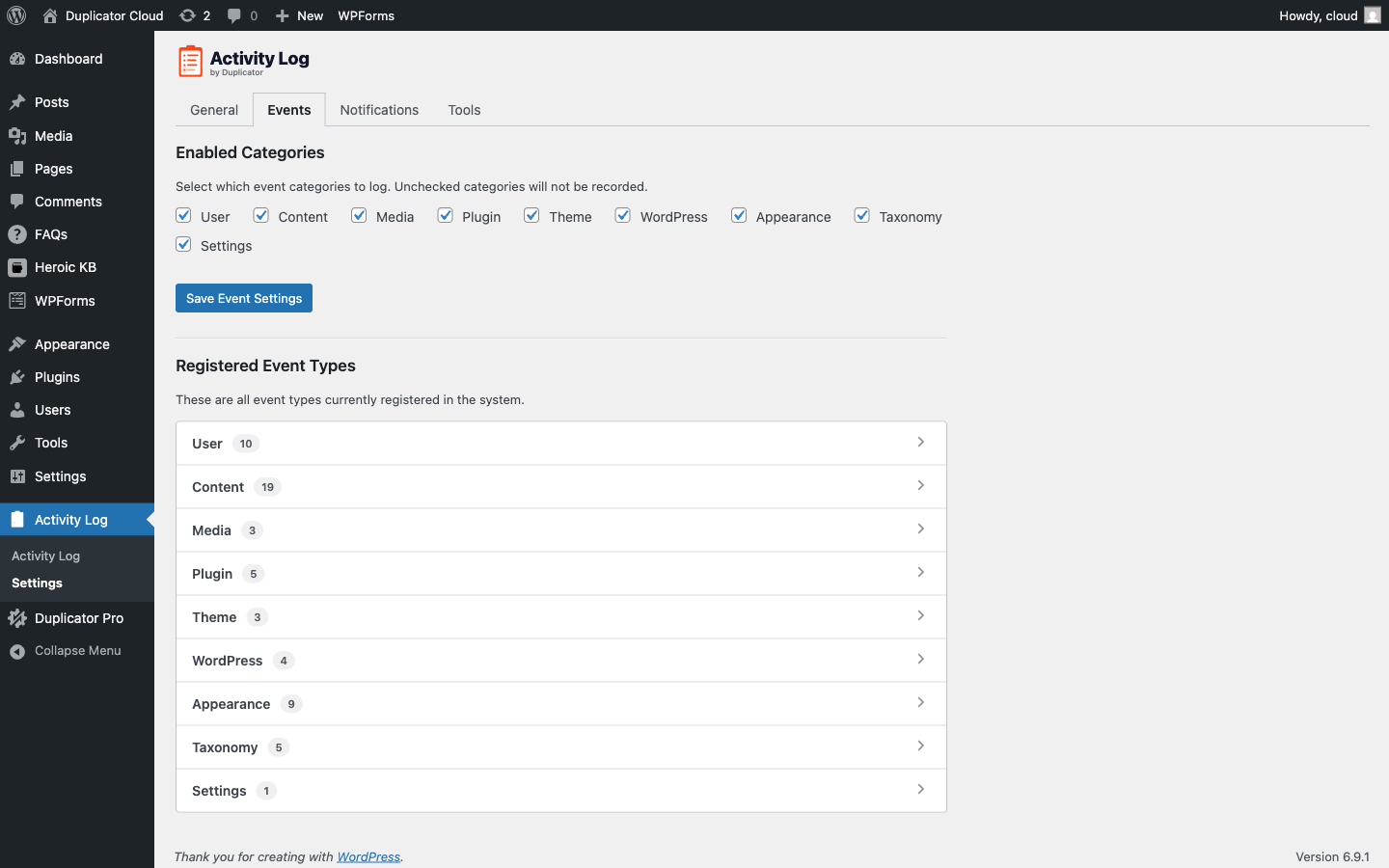
This article guides you through everything Activity Log tracks, category by category, so you know exactly what’s being recorded and can configure it to fit your needs.
User Events
The User category covers authentication and user account changes. These are some of the most important events to monitor for security. The following user events are tracked:
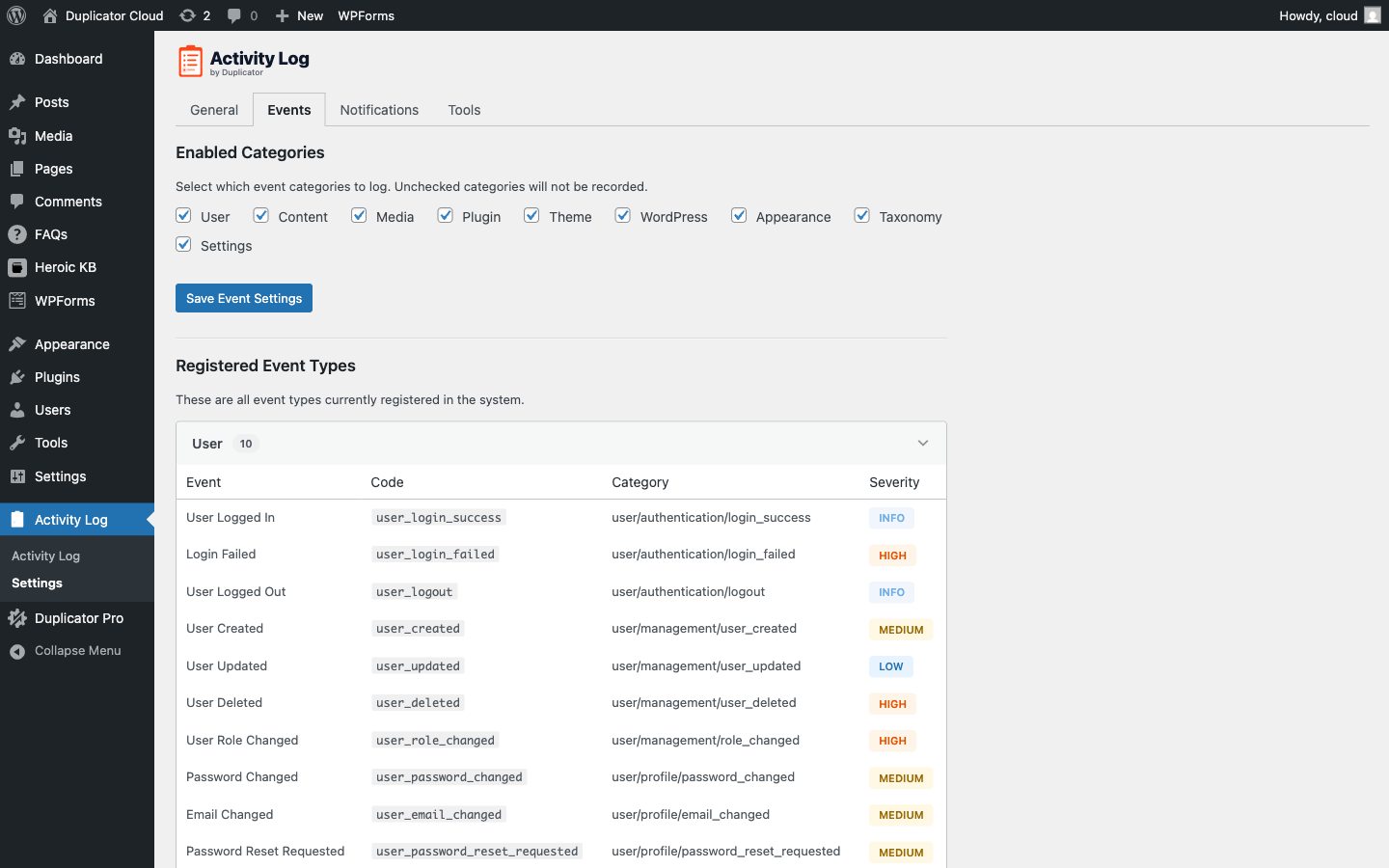
Events tracked include:
- User Logged In (Info): Successful login
- Login Failed (High): Failed login attempt, including the username tried
- User Logged Out (Info)
- User Created (Medium): New user account added
- User Updated (Low): Profile details changed
- User Deleted (High)
- User Role Changed (High): Logs both old and new role
- Password Changed (Medium)
- Email Changed (Medium)
- Password Reset Requested (Medium)
Content Events
The Content category tracks changes to posts, pages, custom fields, and featured images, grouped into the event types below.
Post and page events track the following changes: Created, Updated, Published, Deleted (to trash or permanently), and Status Changed (for example, draft to pending review).
Custom field, or post meta, events track the following changes, logging the field name and the value change: Custom Field Added, Custom Field Updated, Custom Field Deleted.
Featured image events track the following changes: Featured Image Set, Featured Image Changed, Featured Image Removed.
Revisions, autosaves, and nav menu items are excluded from content tracking by design.
Media Events
The Media category tracks uploads and deletions in the media library, separately from the Content category. The following media events are tracked:
- Media Uploaded (Low)
- Media Updated (Low)
- Media Deleted (Low)
Comment Events
Comments are tracked under the Content category. Each event logs the comment author and the post it belongs to. The following comment events are tracked:
- Comment Created (Low): New comment submitted (spam comments are excluded)
- Comment Approved (Low): Comment moved from pending to approved
- Comment Updated (Low): Comment content edited
- Comment Deleted (Low)
- Comment Marked Spam (Low)
Plugin Events
The Plugin category tracks plugin installs, activations, updates, and deletions. The following plugin events are tracked:
- Plugin Installed
- Plugin Activated (Medium)
- Plugin Deactivated (Medium)
- Plugin Updated (Medium)
- Plugin Deleted (High)
Theme Events
The Theme category tracks theme installs, activations, and deletions. The following theme events are tracked:
- Theme Installed (Medium)
- Theme Activated (Medium): Logs both the old and new active theme
- Theme Deleted (High)
WordPress Events
The WordPress category tracks core updates and content exports. The following WordPress events are tracked:
- WordPress Updated (High): Logs the version number whenever core updates
- WordPress Export (Medium): Logged whenever someone exports site content from Tools › Export
Settings Events
The Settings category tracks changes to WordPress options like site URL, admin email, permalink structure, timezone, comment settings, and more. The following settings events are tracked:
- Settings Changed (Medium)
- Option Changed (Low)
Sensitive values (passwords, secret keys) are automatically redacted and logged as [REDACTED].
Appearance Events
The Appearance category tracks changes to navigation menus and widget areas, grouped into the event types below.
Menu events track the following changes: Menu Created (Low), Menu Updated (Low), Menu Deleted (Medium), Menu Item Added (Low), Menu Item Updated (Low), Menu Item Deleted (Low).
Widget events track the following changes: Widget Added (Low), Widget Updated (Low), Widget Removed (Low).
Taxonomy Events
The Taxonomy category tracks changes to categories, tags, and custom taxonomy terms. The following taxonomy events are tracked:
- Taxonomy Term Created (Low)
- Taxonomy Term Updated (Low)
- Taxonomy Term Deleted (Medium)
- Terms Assigned to Post (Low)
- Terms Removed from Post (Low)
Navigation menu terms, link categories, post formats, and other internal WordPress taxonomies are excluded from tracking by design.
Fine-Grained Control for Developers
Beyond the category toggles in Settings › Events, developers can filter exactly what gets logged using the following hooks:
- dactlog_should_log_post_type: control which post types are tracked
- dactlog_should_log_post_meta: control which custom fields are tracked
- dactlog_should_log_taxonomy: control which taxonomies are tracked
- dactlog_should_log_option: add or exclude specific WordPress options from tracking
That’s it! With every category mapped to what it actually tracks, it’s easy to enable, disable, or filter exactly the events that matter.
To adjust which categories and events get logged, see Configuring Activity Log Settings. Running Activity Log on a network of sites? Check out Activity Log and WordPress Multisite.


