

Troubleshooting Guide for WPEngine Hosting
Are your backups failing to build on WP Engine hosting? A small change to your Duplicator Pro settings fixes most build errors on this host.
This troubleshooting guide for WP Engine hosting shows you how to fix backup build errors in Duplicator Pro. Before you start, make sure you use the latest version of Duplicator Pro, and check the changelog and system requirements.
Build Processing Errors
When you build a backup on WP Engine, the build may stop with errors or notices.
Solutions
Switch the archive engine to DupArchive. In your WordPress dashboard, go to Duplicator Pro » Settings and open the Backups tab.
- In the Archive section, set Archive Engine to DupArchive.
- Click Save Settings.
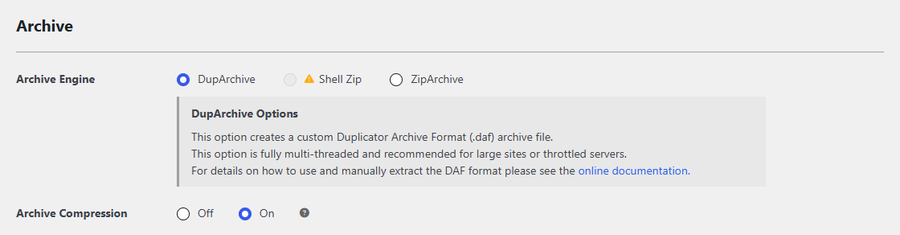
You don’t need to change any lock settings. Duplicator Pro detects which process lock works on your server and uses it automatically.
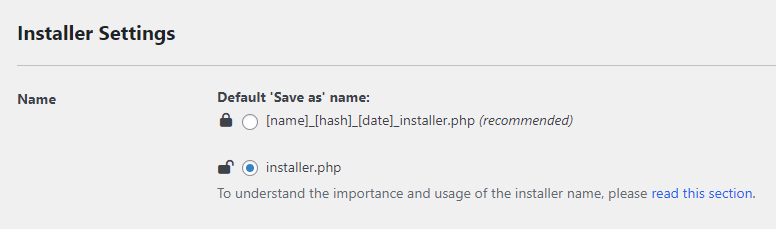
WP Engine blocks the creation of new PHP files. Duplicator Pro avoids this block automatically: it stores the installer on your site with a .php.bak extension, for example [name]_[hash]_[date]_installer.php.bak. When you download the installer, it gets a .php name again. The Name option in the Installer Settings section of the same Backups tab sets whether that name is hashed or plain installer.php.
Duplicator Lite
WP Engine does not currently support Duplicator Lite. If you’d like to see support for it, contact WP Engine and request compatibility with the plugin.
Following the steps in this guide resolves the most common backup build errors on WP Engine hosting, so your backups complete without manual workarounds.
Want to learn more about the installer name and the other backup options? See A Complete Guide to Duplicator Pro Settings.


