[New] Introducing Duplicator 5.0: AI Backups, AutoTune, and Extra Free Features
 Joella Dunn
Joella Dunn
Joella Dunn
 John Turner
John Turner
John Turner
Duplicator 5.0 is here, and it’s the biggest update we’ve ever released.
You can now ask your AI assistant to back up your site. AutoTune finds the backup settings that work best on your server. And if you use the free plugin, you can store backups off-site in Duplicator Cloud.
This is also the first time Duplicator Lite and Pro run on the same engine, so every user gets these features today.
Ready to see what you can do with Duplicator 5.0?
Table of Contents
Tell Your AI Assistant to Back Up Your Site
AI assistants are starting to do real work on WordPress sites. They draft posts, adjust settings, and edit content.
That’s useful. However, it’s also a lot of change happening fast, often on a live site.
Every one of those changes should start with a backup.
Duplicator 5.0 connects to the WordPress Abilities API, which arrived in WordPress 6.9. It gives AI assistants a standard way to use the tools installed on your site.
Duplicator adds three abilities that any compatible AI assistant can use:
- List your backups to see what already exists
- Create a backup of your full site or only the database
- Check a backup’s status to confirm it finished
Here’s how to set it up:
- Install and activate the free WPVibe plugin.
- Add the MCP server URL to your AI client.
- Approve the connection with the magic link.
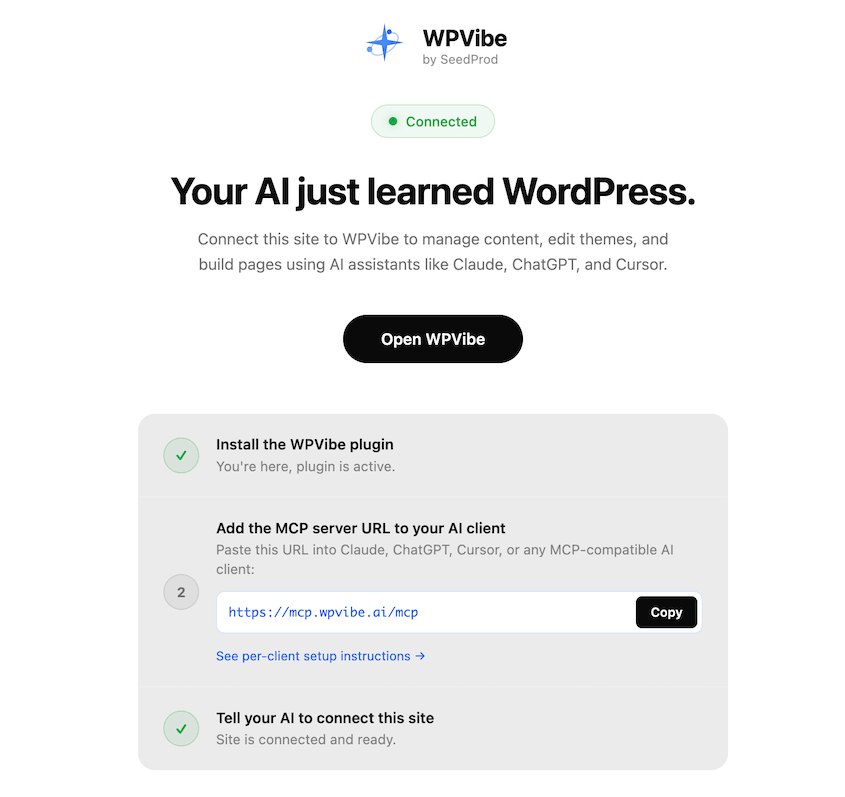
WPVibe works with Claude, ChatGPT, Cursor, Windsurf, and other AI tools.
Once it’s connected, you can make a simple request like “Create a full backup of my site and tell me when it’s done.” Your assistant uses Duplicator to create the backup and lets you know when it’s finished.
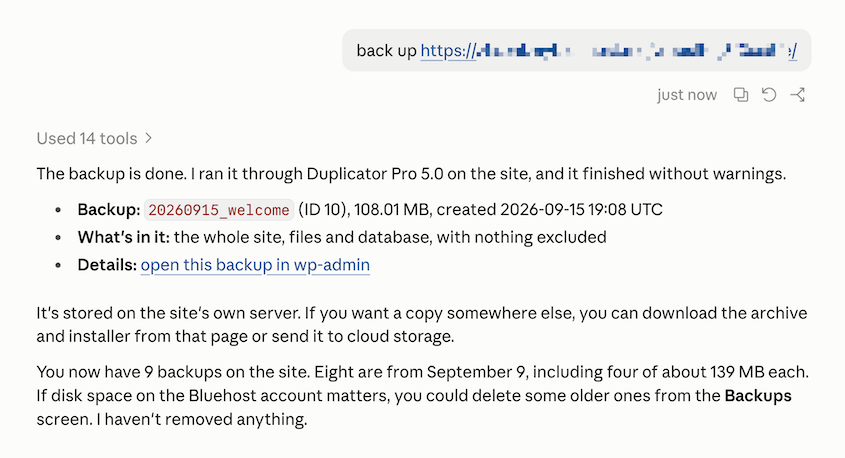
If you manage client sites with AI tools, this puts a backup at the start of every workflow. You’ll always have a clean copy to go back to.
Instantly Find the Right Backup Settings for Your Server
If a backup fails, the fix is usually adjusting a setting like the archive engine, chunk size, or database engine.
Most people don’t know which one to change. So they guess, run another backup, and wait to see if it fails again.
AutoTune does that testing for you.
Click AutoTune at the top of your Backups page, or go to Tools » AutoTune. Duplicator runs real test backups on your server.
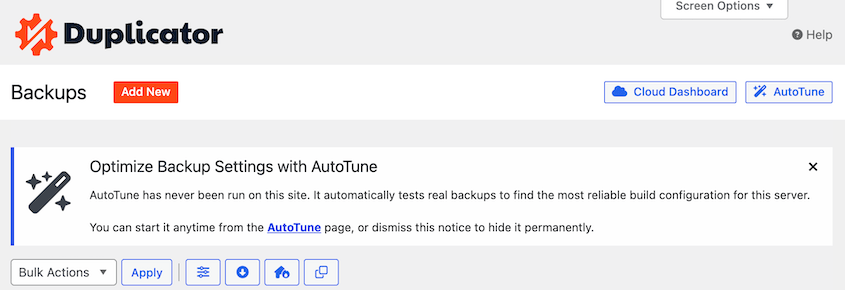
It starts with the fastest configuration. When a test fails, AutoTune changes only the setting that caused the problem and tries again. It keeps going until a backup succeeds.
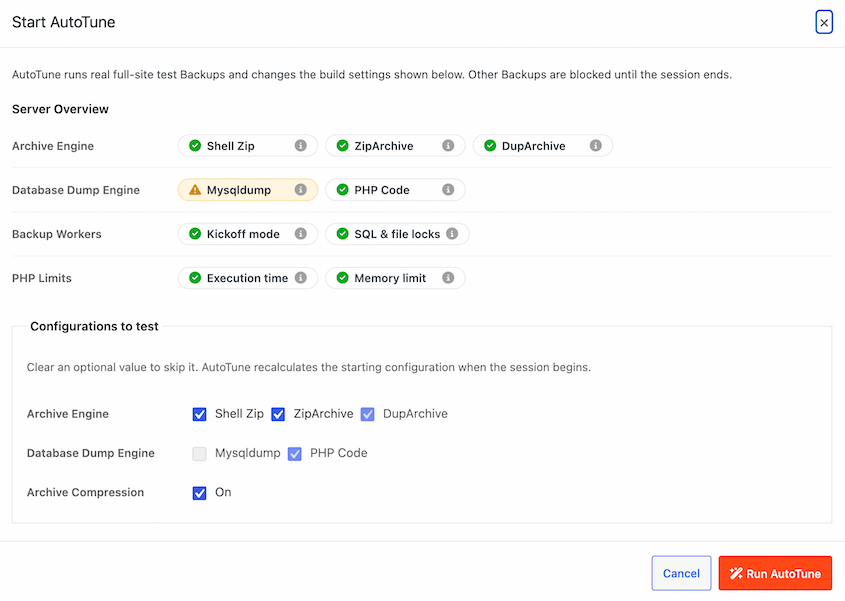
Here’s what AutoTune adjusts:
- Archive engine and compression
- ZIP mode and chunk size
- Database engine and PHP dump mode
- Server load reduction
You’ll also see a Server Overview panel. It checks worker mode, loopback requests, HTTP authentication, process locks, and your PHP time and memory limits.
Each item gets a pass or fail, plus advice when something needs attention.
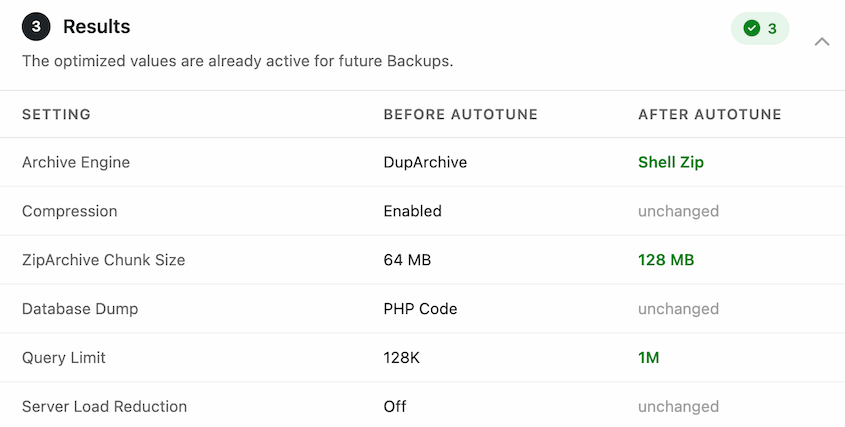
Some issues live at the server level, where no plugin setting can fix them. AutoTune flags those and shows you how to resolve them.
Running scheduled backups in Duplicator Pro? They pause automatically while AutoTune works, then resume when it’s done.
Back Up to Duplicator Cloud with Lite
A backup stored on your server has one big weakness. If the server fails, the backup goes down with it.
Until now, off-site storage wasn’t available in the free Duplicator plugin. Duplicator 5.0 changes that.
Free Duplicator users can now connect to Duplicator Cloud, our own backup storage. You won’t need a Duplicator Pro license or a third-party storage account.
Go to your Storage page and hit Connect next to Duplicator Cloud.
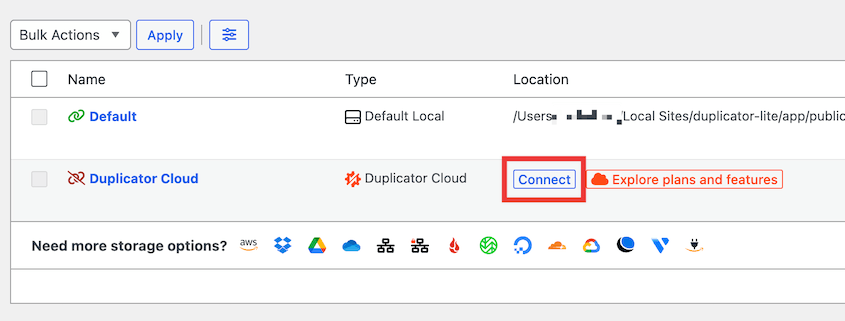
From here, get storage and paste your connection token.
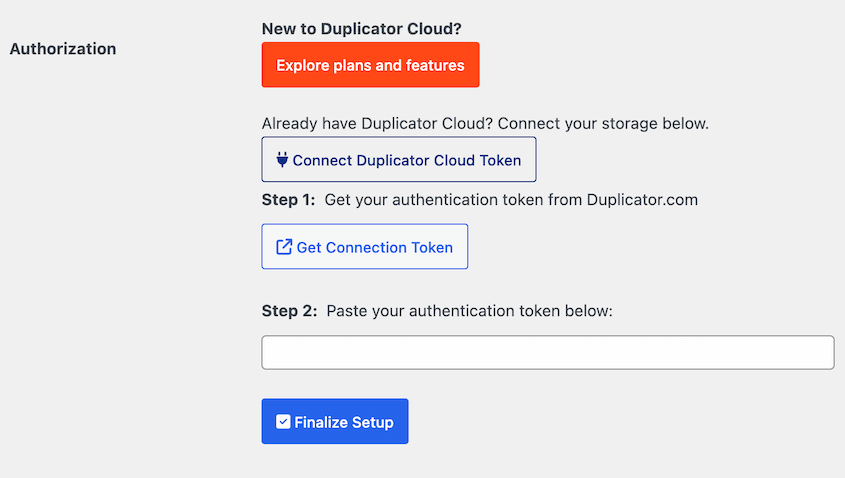
Once you’re connected, you can:
- Send backups off-site to Duplicator Cloud
- Browse and download your cloud backups
- Restore your site from a cloud backup (without needing wp-admin)
- Transfer an existing backup to another storage location
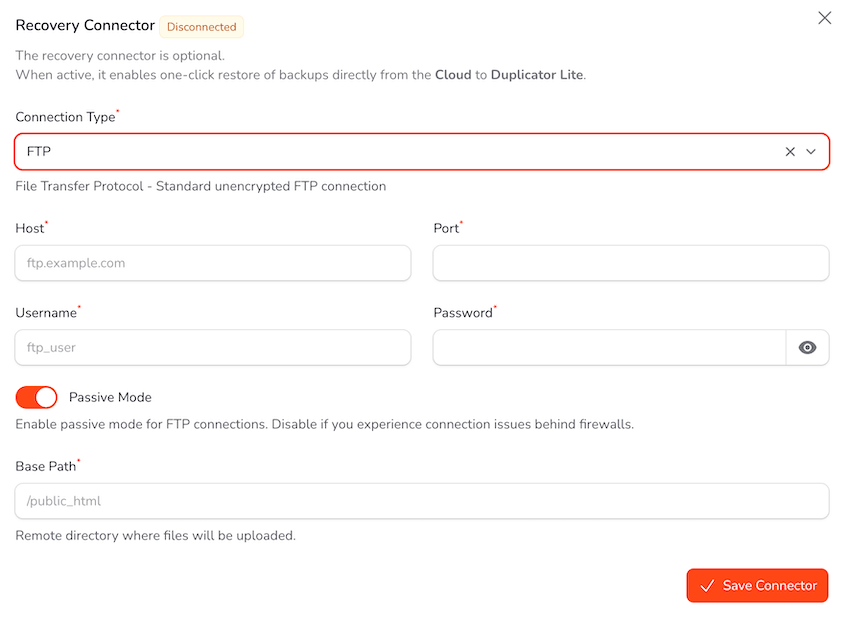
Restoring works even when your server is completely down. In your Duplicator Cloud dashboard, set up a recovery connector with your site’s FTP or SFTP details. Then, you can restore your site from anywhere.
Catch Backup Problems Early and Fix Them in One Click
Duplicator 5.0 checks your setup before a backup starts. It looks for missing PHP extensions, unavailable engines, folders it can’t write to, and leftover installer files.
If something’s wrong, the backup stops right away. You’ll get a list of exactly what to fix.
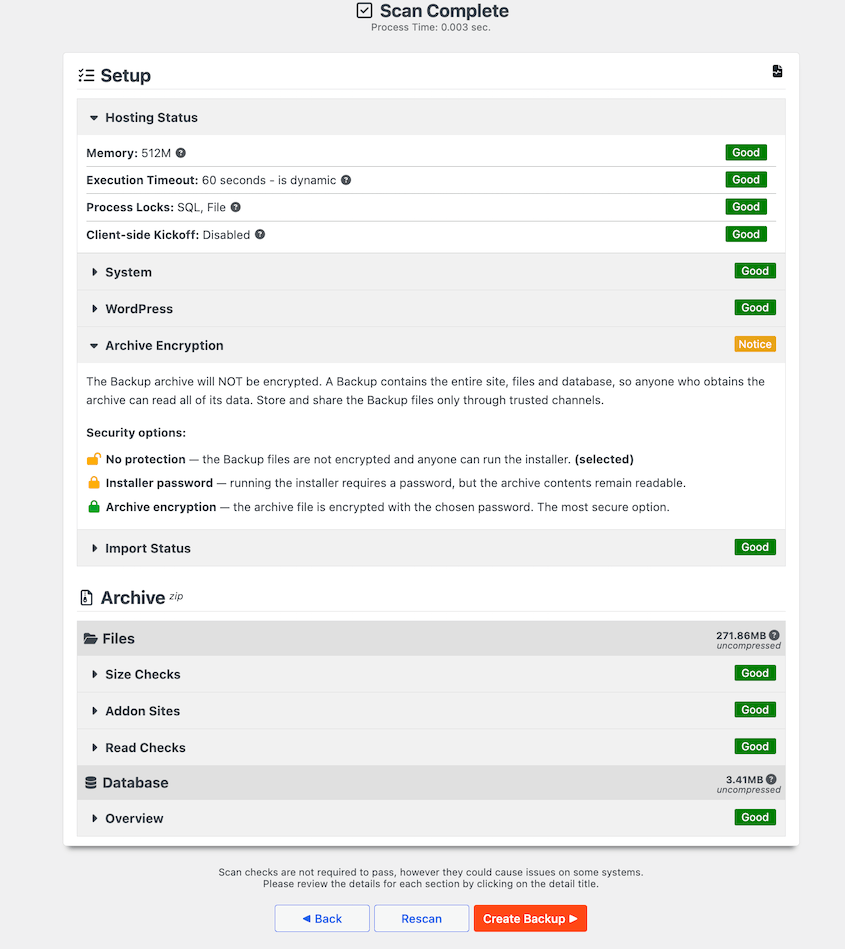
Your settings now show which engines and options are available on your server. When an option isn’t available, Duplicator explains why.
If a backup still fails, you won’t be stuck with a cryptic error. You’ll see an explanation of what happened, a troubleshooting checklist, and links to the right documentation.
When the fix is a setting, you’ll see an Apply button. Click it, and Duplicator corrects your configuration.
For agencies working across different hosts, that’s a lot less time spent digging through backup logs.
Get Pro’s Backup Engine in the Free Duplicator Plugin
The free Duplicator plugin used to run on its own code, separate from Pro. In 5.0, it runs on the same engine Duplicator Pro users rely on.
That engine splits each backup into smaller steps and picks up where it left off after an interruption. You get more stable backups on sites with lots of files and large databases.
Everyone gets smaller backups, too. Duplicator now compresses your database inside the archive, which saves disk space and bandwidth.
Restore Your Site in One Click From wp-admin
Restoring a backup in the old free version meant downloading two files, uploading them over FTP, and running the installer by hand.
Now, you can pick a backup and click Restore. The installer runs automatically and brings your site back to that point.
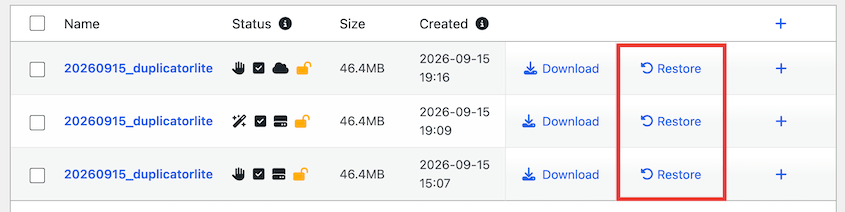
It’s the quickest way to undo changes in WordPress after a bad plugin update or an edit you didn’t mean to make.
Encrypt Your Backups With a Password
Backup encryption used to be a Duplicator Pro feature. It’s now included in the free plugin.
Set a password, and Duplicator encrypts your backup with AES-256. It works with both DupArchive and ZIP archives.
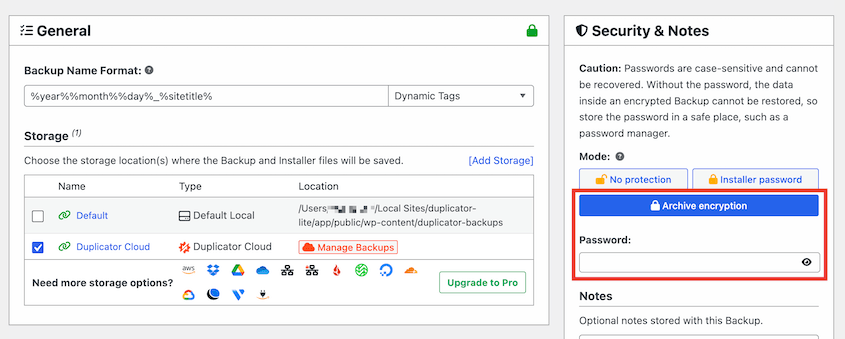
This keeps your data protected wherever the backup ends up (your server, your computer, or the cloud).
Start Using Duplicator 5.0 Today
Duplicator 5.0 gives you more efficient ways to create, store, and restore your backups. You can ask AI to build backups, optimize builds with AutoTune, store data off-site in Duplicator Cloud, and much more.
To get these features, update your Duplicator plugin.
If you’re using the free plugin, Duplicator Pro can handle the step that’s still up to you: creating backups. With Pro, you can:
- Schedule automatic backups, so a recent backup is always ready to restore
- Send backups to 10+ cloud storage destinations, including Duplicator Cloud, Google Drive, Dropbox, and Amazon S3
- Migrate sites with drag-and-drop
- Test changes on staging sites before they go live
- Get extra free plugins: WP Media Cleanup, DB Optimizer, and Activity Log
While you’re here, check out Duplicator’s other new features:
- [NEW] Duplicator DB Optimizer: Clean Your WordPress Database Before It Becomes a Problem
- Announcing One-Click Staging and Remote Cloud Restores for Bold Changes, Zero Consequences
- [New Plugin] Activity Log: Track Every Change, Login, and Action on Your WordPress Site
- [NEW] WP Media Cleanup Deletes Unused Images Hiding in Your Media Library
- [New] Cloud Backups Just Got Simpler — Duplicator Cloud Eliminates Third-Party Storage