
16 Best WordPress Plugins for Agencies: What We Install on Client Sites
 Joella Dunn
Joella Dunn
Joella Dunn
 John Turner
John Turner
John Turner
Every WordPress agency has a disaster story.
A client’s site is down. Nobody knows what changed. The last backup was three weeks ago, and restoring it means an hour of back-and-forth with the hosting provider. You spend the next four hours fixing something that should’ve taken ten minutes.
The right plugins change that. Not by preventing every problem, but by making recovery fast, accountability clear, and the next client site launch faster than the last.
Most “best plugins for agencies” lists are generic WordPress roundups with “agencies” added to the title. They skip the tools that matter at scale, like a backup plugin that works when WordPress itself breaks, an audit trail for when a client swears they didn’t touch anything, and a multi-site dashboard that doesn’t route client data through a third-party server.
This list is different. We evaluated 40+ plugins against four agency-specific criteria: reliability across hosting environments, licensing value at scale, features that reduce your liability, and time saved across a full client roster.
We found plugins that do the best work for agencies and organized them by the workflow problems they solve.
Here are the key takeaways:
- Best all-around for client site protection: Duplicator Pro handles backups, migrations, cloning, staging, and disaster recovery from one install, with a restore URL that works even when WordPress itself is locked out
- Best for client accountability: Activity Log by Duplicator logs 60+ event types with four severity levels and CSV export, so you know exactly who changed what on any client site
- Best for managing multiple client sites: MainWP manages unlimited WordPress sites from a self-hosted dashboard, with no client data passing through a third-party server
- Best for membership and course sites: MemberPress handles gated content, membership tiers, and online courses from a single plugin, making it the go-to for agencies building subscription-based client projects
- Best for converting client site traffic: OptinMonster’s exit-intent and behavioral targeting turn existing traffic into leads without additional ad spend
Table of Contents
- What Makes an Agency Plugin Different From Any Other WordPress Plugin
- At a Glance: 16 Best WordPress Plugins for Agencies
- How We Chose These Agency Plugins
- The 16 Best WordPress Plugins for Agencies
- Backup & Disaster Recovery
- Site Management & Accountability
- Page Builders & Custom Fields
- Forms & Email
- SEO & Marketing
- Performance & Security
- Membership & Monetization
- Client Collaboration
- Frequently Asked Questions
What Makes an Agency Plugin Different From Any Other WordPress Plugin
Most plugins are built for single site owners. Someone who knows their site, has time to troubleshoot, and is the only one logging in.
Agency plugins work differently. You’re responsible for someone else’s site, data, and deadline. When something breaks the day before a new product launch or campaign, you can’t spend two hours in documentation.
Every plugin on this list clears at least one of three bars:
- Saves agency time (cloning, templating, bulk updates)
- Protects agency reputation (backups, security, audit trails)
- Reduces client support tickets (email deliverability, performance, SEO guidance)
Plugins that are popular in general WordPress circles but don’t clear any of those bars didn’t make the cut.
At a Glance: 16 Best WordPress Plugins for Agencies
Before diving into the full reviews, here’s the complete list sorted by category so you can scan what’s relevant to your current setup.
| Plugin | Category | Best For | Agency Pricing |
|---|---|---|---|
| Duplicator Pro | Backup & Disaster Recovery | Backup, migration, cloning, staging | $299.50/yr |
| UpdraftPlus | Backup & Disaster Recovery | Automated scheduled backups on budget accounts | $145/yr |
| MainWP | Site Management | Managing multiple client sites | $199/yr |
| Activity Log | Site Management | Client site audit trails | Free with Duplicator Elite |
| SeedProd | Page Builders & Custom Fields | Full-site theme building, landing pages, AI copy | $239.60/yr |
| Elementor | Page Builders & Custom Fields | Template-based client site builds | $38/mo |
| ACF Pro | Page Builders & Custom Fields | Complex custom site builds | $249/yr |
| WPForms | Forms & Email | Contact forms and lead capture | $299.50/yr |
| WP Mail SMTP | Forms & Email | Email deliverability | $399/yr |
| All in One SEO | SEO & Marketing | On-page SEO management | $299.50/yr |
| OptinMonster | SEO & Marketing | Lead generation and conversion | $49/mo |
| MonsterInsights | SEO & Marketing | GA4 reporting inside WordPress | $299.50/yr |
| WP Rocket | Performance & Security | Site performance | $299/yr |
| Wordfence | Performance & Security | Firewall and malware scanning | $149/yr |
| MemberPress | Membership & Monetization | Membership sites and online courses | $199.50/yr |
| Atarim | Client Collaboration | Visual client feedback | $35/mo |
How We Chose These Agency Plugins
We evaluated 40+ plugins against four criteria specific to agency workflows:
- Multi-site licensing value
- Reliability across hosting environments
- Support quality (because clients break things and you need answers fast)
- Features that reduce agency liability
Each plugin was tested on live sites across a range of hosts and configurations. We prioritized proven reliability over impressive feature lists.
Duplicator is our own product. We’ve included it because it genuinely fits this use case, and its disaster recovery capability has no equivalent among competing plugins. We’ve been honest about where competitors have real advantages.
The 16 Best WordPress Plugins for Agencies
Now let’s get to the plugin recommendations you’re here for!
I’ll introduce you to our favorite WordPress agency plugins. Reviews are organized by category, not ranked from best to worst, because the right plugin depends on what your agency actually does.
Backup & Disaster Recovery
Everything else on this list assumes the site is up and running. This category covers what happens when it’s not. For agencies, that scenario is a matter of when, not if.
1. Duplicator: Best for Backup, Migration, Cloning, and Staging
Agencies are the last line of defense on client sites. When a plugin update breaks something, you’re fielding the call. When a host has an outage, recovery is your responsibility.
Most backup plugins only work when WordPress is healthy. They can’t restore a site when the database is corrupted, the admin panel is locked, or WordPress itself has failed. Most agencies don’t discover that gap until they’re in the middle of an emergency.
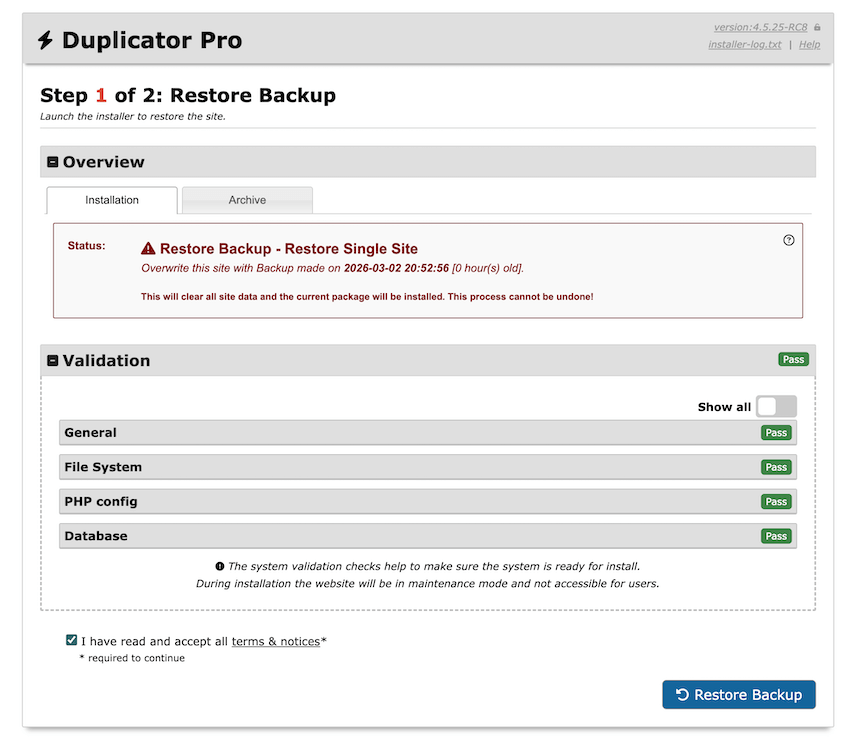
Duplicator is the only WordPress backup plugin with a standalone installer. Every backup comes with one, so you can re-upload these files straight to a server and restore it without a wp-admin dashboard.
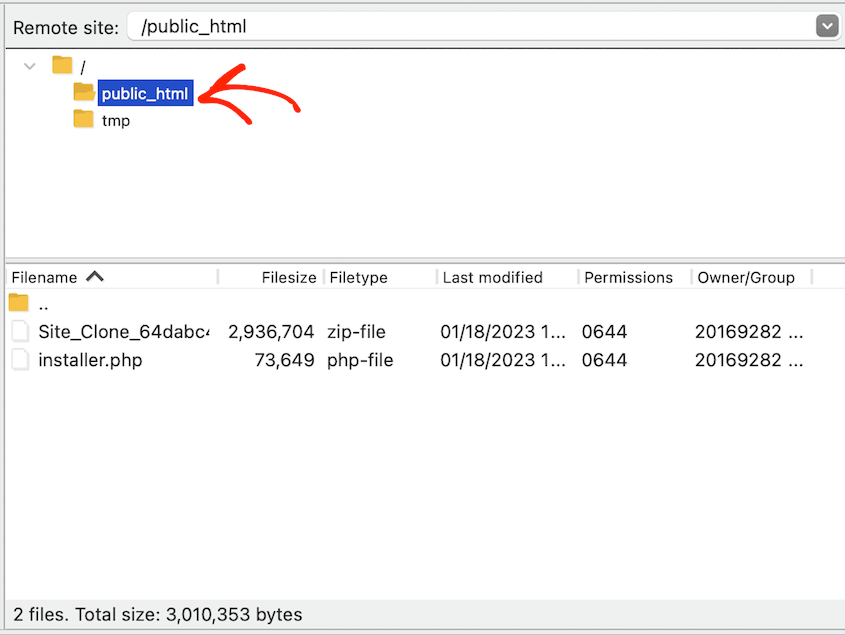
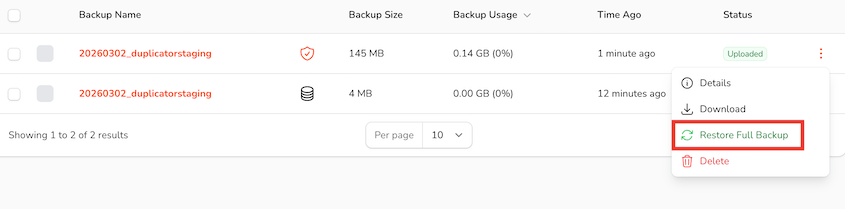
It restores a site even when WordPress itself is completely inaccessible. If you send backups to the native Duplicator Cloud storage, you’ll have a safe place to remotely restore client sites if needed.
The standalone installer works on a blank server without WordPress pre-installed. This saves time for agencies spinning up client sites from templates or migrating between hosts.
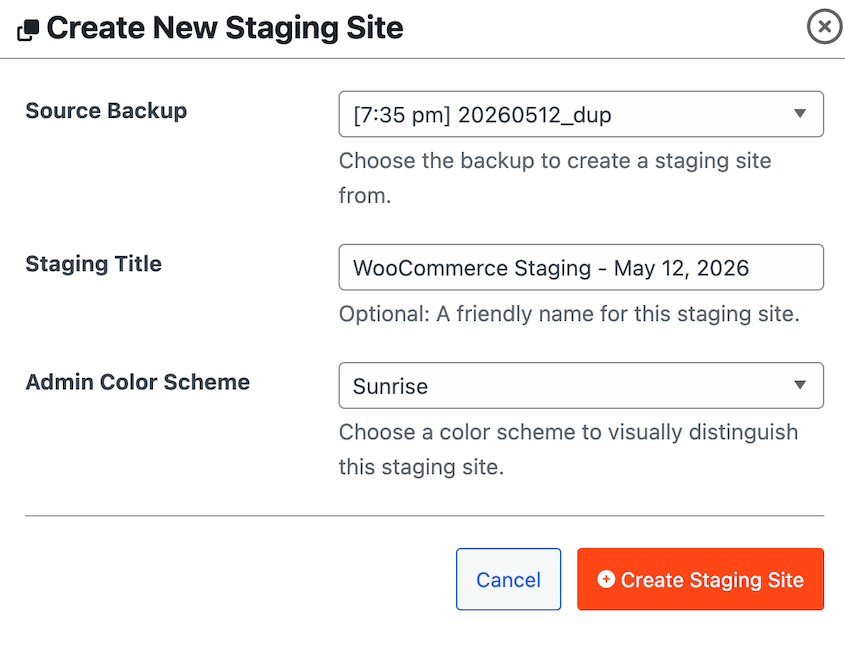
Duplicator also includes one-click staging environments for easy testing on client sites. Simply create a full-site backup and instantly turn it into a staging site. It’ll be separate from the live site, with emails and indexing automatically disabled.
Best for: Agencies that need a single plugin for backups, migrations, cloning client sites from a master template, and staging environments — without a separate tool for each.
Why We Chose Duplicator Pro: No other backup plugin can restore a WordPress site when WordPress itself is broken. That capability has saved agency relationships. For anything involving client site recovery, migration, or spinning up a new build from a template, it’s the right tool.
What We Liked:
- Disaster recovery URL restores a site even when the admin panel is locked out. Nothing else on this list does this.
- Standalone installer migrates to a blank server without WordPress pre-installed — the only plugin with this capability. Matters every time you move a client to a new host.
- DupArchive format has no theoretical file size limit. We’ve confirmed 400GB real-world migrations.
- One-click restore from cloud storage with no re-uploading required, across Amazon S3, Google Drive, Dropbox, and 10+ other providers.
- Remote recovery from Duplicator Cloud
- Full WordPress Multisite support at the Pro tier.
- Elite tier ($299.50/yr for 100 sites) bundles Activity Log and WP Media Cleanup at no additional cost. These help agencies track user activity and clean up a client site’s unused image variations.
- Cloning a site from a template takes minutes, not hours.
What We Didn’t Like:
- No real-time incremental backups at any tier. Backups run on a schedule.
2. UpdraftPlus: Best for Automated Scheduled Backups on Budget Client Accounts
UpdraftPlus is a popular WordPress backup plugin with 3+ million active installs. Its free version includes automated scheduling to remote destinations (Google Drive, Dropbox, Amazon S3, and others), and its incremental backup feature only captures changed files after the initial backup.
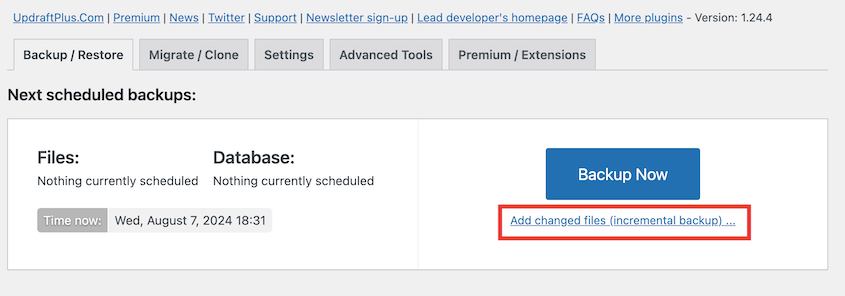
This can reduce storage overhead on large client sites. For agencies running basic backup coverage across a high volume of accounts, it’s a practical option.
Best for: Agencies that need reliable automated backups on budget client accounts or situations where incremental backups are preferable to full-site snapshots.
Why We Chose UpdraftPlus: The incremental backups are genuinely useful. On large client sites where storage costs matter, it’s a good idea to only back up what changed.
What We Liked:
- Incremental backups reduce storage overhead on large client sites. Only changed files are captured after the initial full backup.
- Free version includes automated scheduling to remote cloud destinations.
- Approachable interface that less technical clients can navigate without training.
- 3+ million active installs with a well-documented support track record.
What We Didn’t Like:
- Restoration only works from the WordPress admin dashboard. If a site is locked out or WordPress itself is broken, the backup is inaccessible. This is the single biggest limitation for agencies, and Duplicator’s disaster recovery URL solves this problem.
- Migration and cloning require paid add-ons. The UpdraftMigrator add-on handles server-to-server transfers; UpdraftClone uses a token system that gets expensive for frequent migrations.
- Backups are split into separate archives (database, themes, plugins, uploads) rather than a single package. More files to manage during a restore.
- The destination site must have WordPress pre-installed. Can’t migrate to a blank server.
Site Management & Accountability
Once you’re managing more than a handful of client sites, logistics start to outpace the actual work.
These two plugins handle the infrastructure side of running a client portfolio. One keeps everything updated from a single screen; the other maintains a complete record of every action taken on each site.
3. MainWP: Best for Managing Multiple Client Sites From One Dashboard
MainWP is a multi-site management platform that’s self-hosted. The dashboard runs on your own server, which means client site data never passes through a third-party cloud service.
The core is free and handles unlimited sites. For agencies serving clients in regulated industries (healthcare, legal, finance), that data sovereignty matters.
Best for: Agencies managing 10+ client WordPress sites that need centralized updates, security monitoring, and client reporting without routing data through a SaaS platform.
Why We Chose MainWP: The self-hosted architecture is a genuine differentiator. ManageWP and WP Umbrella are faster to set up, but client data passes through their infrastructure. For compliance-sensitive client portfolios, consider MainWP.
What We Liked:
- Self-hosted dashboard keeps all client site data on your server.
- Free core handles unlimited sites with bulk plugin, theme, and WordPress core updates.
- Generates white-labeled maintenance reports agencies can send directly to clients.
- Extension library adds security scanning, uptime monitoring, and advanced backup management.
- Lifetime license available for a $599 one-time payment
What We Didn’t Like:
- Requires more technical setup than SaaS alternatives. ManageWP or WP Umbrella are faster to get running if you want something live the same afternoon.
4. Activity Log by Duplicator: Best for Client Site Accountability
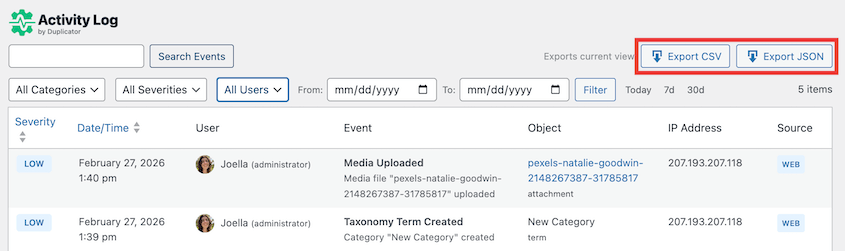
Activity Log tracks 60+ WordPress event types, including failed logins, content edits, plugin and theme changes, and settings updates.
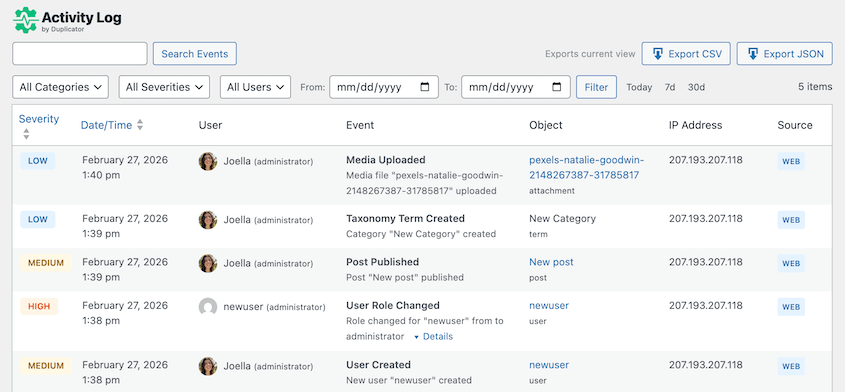
Five severity levels let agencies triage quickly. You can filter your activity log by high or critical severity levels, finding problems immediately.
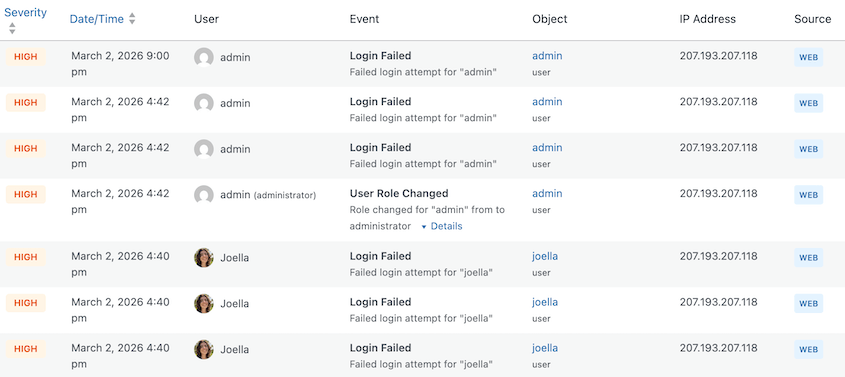
CSV and JSON exports help with client reporting and compliance documentation. For multi-user client sites, it answers the question every agency eventually faces: “Who changed that?”
Best for: Agencies managing client sites with multiple admins, editors, or contributors who need a full, searchable record of every action taken on the site.
Why We Chose Activity Log: Most agencies have lived through this scenario: a client insists nothing changed, but something is clearly broken. Without a log, you’re debugging blind. With Activity Log, you know what was touched, by whom, and when — before you pick up the phone.
What We Liked:
- Tracks 60+ event types across users, content, plugins, themes, and system-level changes.
- Five severity levels (Critical, High, Medium, Low, and Info) for fast triage without reading everything.
- Sensitive data (passwords, API keys) is automatically redacted.
- CSV and JSON export with advanced filters for compliance documentation and client-facing maintenance reports.
- Full WP-CLI support for managing logs across a client portfolio without logging into each site individually.
- Included free with Duplicator Elite ($299.50/yr for 100 sites) for locating issues and immediately rolling them back.
- Available as a standalone plugin for $29/yr, cheaper than other activity log plugins.
What We Didn’t Like:
- Log storage grows on high-traffic, high-activity sites.
Page Builders & Custom Fields
Most agency time on a new client build goes into design and content structure. The right page builder cuts that time significantly once a template system is established.
The right custom fields plugin makes what you build maintainable by the client post-handoff, without them breaking it or calling you every time something needs updating.
6. SeedProd: Best for Full-Site Theme Building, Landing Pages, and AI-Assisted Client Builds

SeedProd is a full theme builder and landing page platform trusted by 1+ million professionals. It builds completely customizable site designs (headers, footers, blog templates, the works).
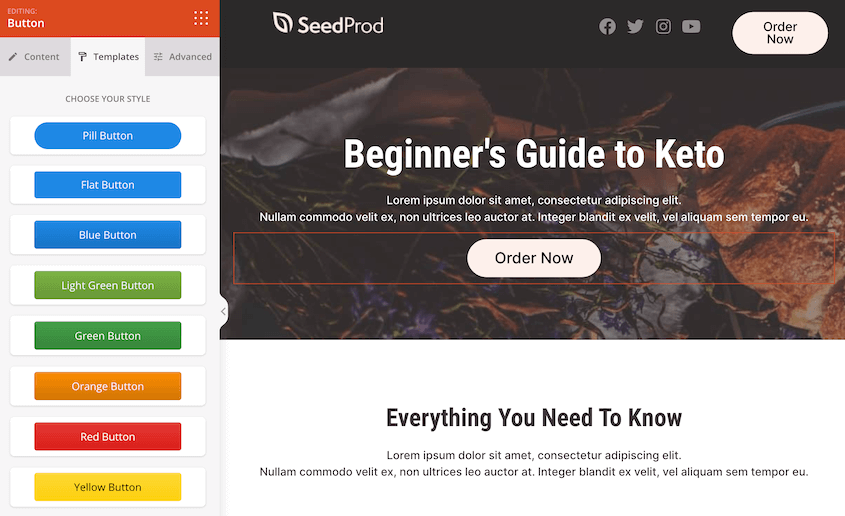
It includes AI-generated copy for headlines and body text. Now, it even has an AI-powered theme builder to launch your client’s dream website in minutes.

Best for: Agencies that want a single plugin for full-site theme building, campaign landing pages, and maintenance mode, with AI copy generation and reusable block templates they can carry across client sites.
Why We Chose SeedProd: The combination of theme builder, landing page builder, and AI copy tools in one plugin at $39.50/yr is valuable for agencies that want to optimize the website creation process.
What We Liked:
- Theme Builder covers full site design: headers, footers, blog templates, and custom page layouts, all without touching code.
- AI content generation writes headlines and body copy with adjustable tone and style, directly inside the editor.
- Domain mapping lets agencies point landing pages to a different client domain without creating a new WordPress installation.
- Reusable blocks and sections can be saved and reused across multiple client sites, not just within a single install.
- Coming soon and maintenance mode are built in.
- WooCommerce builder covers product grids, add-to-cart buttons, and custom checkout pages.
What We Didn’t Like:
- The free version is limited to basic coming soon and maintenance mode. Meaningful landing page features require Pro ($39.50/yr).
6. Elementor: Best for Template-Based Client Site Builds
Elementor is on 10+ million websites. For agencies, the real value isn’t the drag-and-drop editor (which is excellent); it’s the theme builder and template kits. These let you design a master layout once and replicate it across client sites. An agency building its fifth law firm or dental website shouldn’t start from scratch.
Best for: Agencies that build client sites on a repeatable template system and need a visual editor clients can use post-handoff without calling the agency every time something needs updating.
Why We Chose Elementor: Template kits reduce per-site build time once the master is established. The role manager prevents clients from breaking the design after handoff. For agencies building at volume, that combination saves real hours.
What We Liked:
- Theme Builder lets you design headers, footers, and global page templates once, applied across the full site.
- Industry-specific template kits (medical, legal, restaurants, etc.) are ready to import.
- Role Manager controls which parts of the editor clients can access post-handoff.
- Global design system enforces consistent colors, fonts, and spacing across the build.
What We Didn’t Like:
- Elementor-heavy builds add page weight without intentional optimization. Pair with a caching plugin.
7. ACF Pro: Best for Complex Custom Site Builds
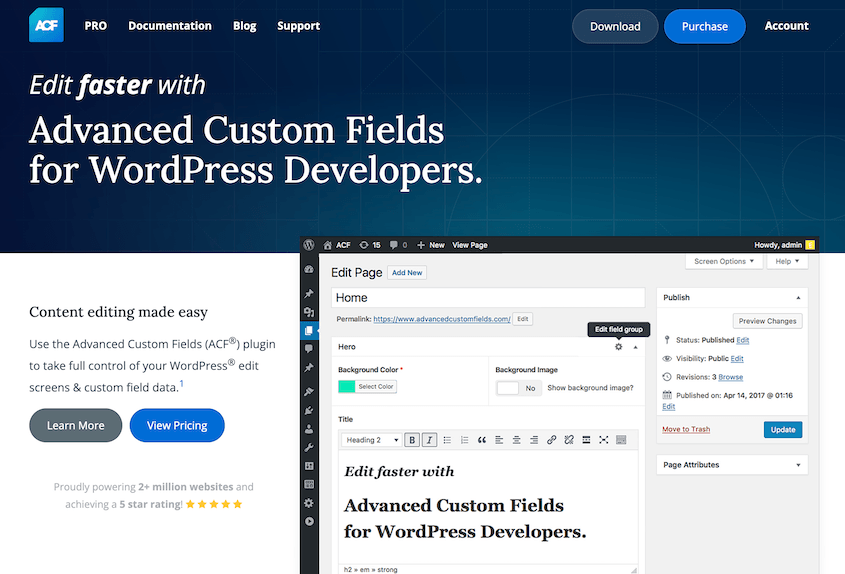
Advanced Custom Fields powers 2+ million websites. It gives agencies the ability to build structured, custom data fields into any WordPress content type without writing custom code for each field.
It’s the plugin most WordPress developers learn first for a reason. It’s the difference between delivering a flexible content system and delivering a rigid theme the client will outgrow in six months.
Best for: Agencies building complex client sites with custom post types, repeating content structures, or content that doesn’t fit standard WordPress fields out of the box.
Why We Chose ACF Pro: When a client needs a staff directory with headshots, bios, social links, and a role filter — or a portfolio with custom metadata — ACF makes it possible without building a custom plugin from scratch.
What We Liked:
- 30+ field types, including Repeater, Flexible Content, Gallery, and Relationship.
- Visual field group builder requires no PHP for most configurations.
- Blocks (Pro) lets agencies build custom Gutenberg blocks backed by ACF fields.
- Agency license ($249/yr for unlimited sites) covers the full client portfolio.
- Free version on WordPress.org handles straightforward use cases without a paid license.
What We Didn’t Like:
- Complex Flexible Content setups can become hard for clients to manage without clear documentation and a handoff walkthrough.
- Blocks feature has a steeper learning curve than standard field groups.
- Performance can degrade on sites with very high field counts and no object caching in place.
Forms & Email
Two of the most common client support tickets come from: “My contact form isn’t working” and “I’m not receiving form submissions.”
These two plugins prevent both, and they take less than 30 minutes combined to set up on a new client site.
8. WPForms: Best for Client Contact Forms and Lead Capture
WPForms has a drag-and-drop form builder that non-developers can use without training.
The free Lite version handles standard contact forms, file uploads, and multi-page forms. Pro adds payments, conditional logic, and 2,000+ templates.
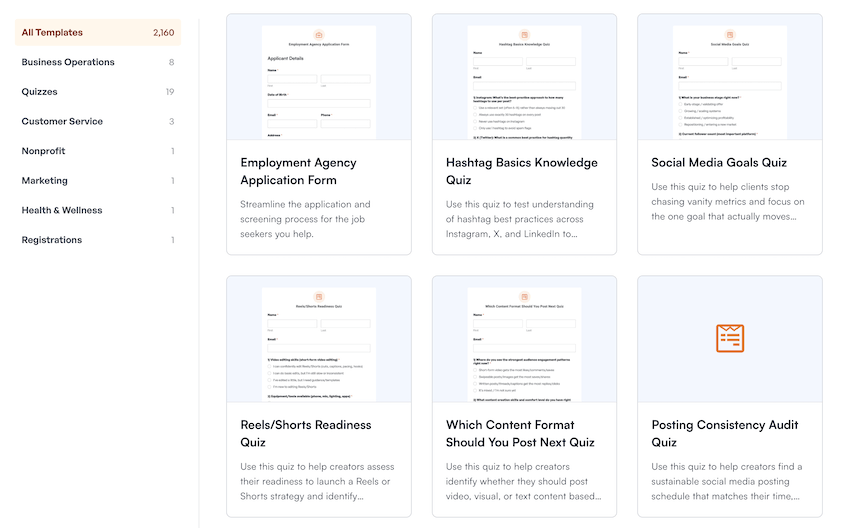
WPForms even has form templates designed for agencies. You can instantly have a beautifully designed form to handle employment, project readiness, product design requests, and much more.
Best for: Agencies that need a reliable, client-manageable form builder for contact, quote request, and lead capture forms across their portfolio.
Why We Chose WPForms: Client manageability is the underrated benefit. WPForms’ interface is simple enough that clients can update their own forms post-handoff without calling the agency. That alone reduces support tickets.
What We Liked:
- Drag-and-drop builder clients can use independently after handoff.
- 2,000+ pre-built templates covering common agency scenarios (contact, quote request, application, booking).
- Anti-spam protection built in (hCaptcha, reCAPTCHA, custom challenge questions).
- Native integrations with major email marketing platforms (Mailchimp, Constant Contact, AWeber, and others).
- Conditional logic for multi-step intake forms.
What We Didn’t Like:
- Conditional logic and payment fields require a Pro upgrade.
- Entry storage in the WordPress database grows large on high-volume sites. Export entries regularly or route them to a CRM.
9. WP Mail SMTP: Best for Email Deliverability on Client Sites
WordPress sends email through PHP’s mail() function by default. Most mail servers treat it as spam. WP Mail SMTP replaces that with a proper SMTP connection to a real mail provider.
A contact form not sending emails is one of the most common client support tickets. The fix takes a few minutes with WP Mail SMTP, which makes it one of the first plugins to install on every new client site.
Best for: Any client site that sends email through contact forms, WooCommerce orders, membership notifications, or user account emails.
Why We Chose WP Mail SMTP: Installing this only takes about five minutes. Debugging a broken email setup after a client notices costs 45 or more. There’s no reason to skip it.
What We Liked:
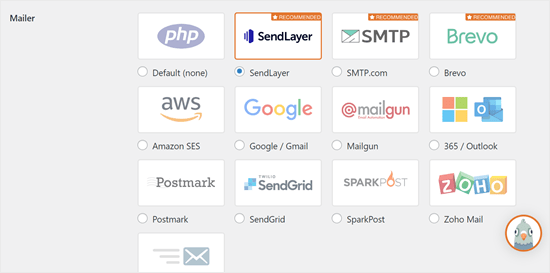
- Connects to every major mail provider: Gmail, SendGrid, Mailgun, Postmark, Brevo, SendLayer, and more.
- Email log records every email sent through WordPress.
- Test tool confirms deliverability on setup before going live.
- Smart routing lets you send different email types through different providers.
- Free version covers the core use case for most client sites.
What We Didn’t Like:
- Email logging and smart email routing are restricted to the pro version.
SEO & Marketing
Agencies are increasingly expected to deliver traffic and leads, not just websites. These three plugins cover on-page SEO, the conversion layer on top of it, and the reporting that shows clients what they’re getting for their investment.
10. All in One SEO (AIOSEO): Best for On-Page SEO Management on Client Sites
AIOSEO is an SEO plugin that handles page titles, meta descriptions, XML sitemaps, schema markup, Open Graph, local SEO, and redirects. For agencies, the TruSEO scoring system gives clients a per-page checklist they can follow without SEO knowledge.
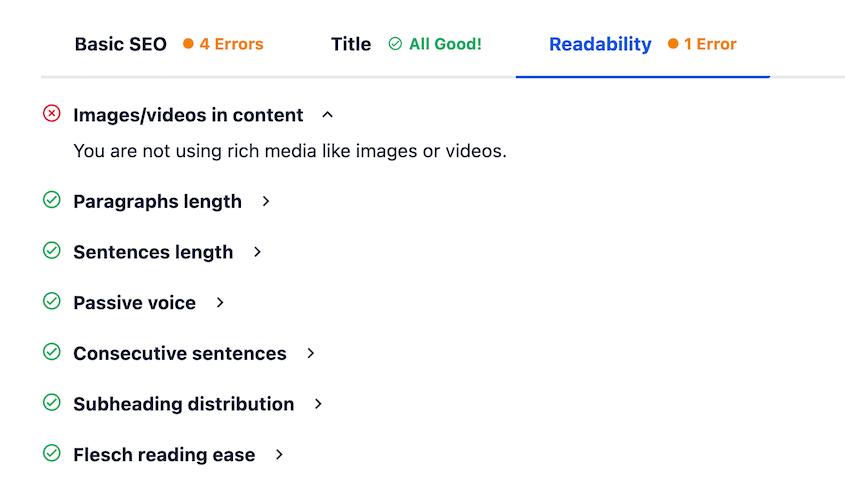
Best for: Agencies that want to hand off on-page SEO to clients through a structured, guided interface that doesn’t require ongoing explanation.
Why We Chose AIOSEO: The TruSEO checklist is what differentiates it for agency workflows. Clients get actionable direction they can follow themselves. They feel in control. Agencies spend less time explaining on-page basics after handoff.
What We Liked:
- TruSEO per-page checklist clients can act on independently.
- Automatic XML sitemap generation and submission to Google Search Console and Bing.
- Schema markup wizard.
- Redirect manager handles 301 redirects without a separate plugin.
- Local SEO module for service-area and brick-and-mortar clients.
What We Didn’t Like:
- Some users find RankMath to be a more lightweight alternative.
11. OptinMonster: Best for Lead Generation and Conversion Campaigns
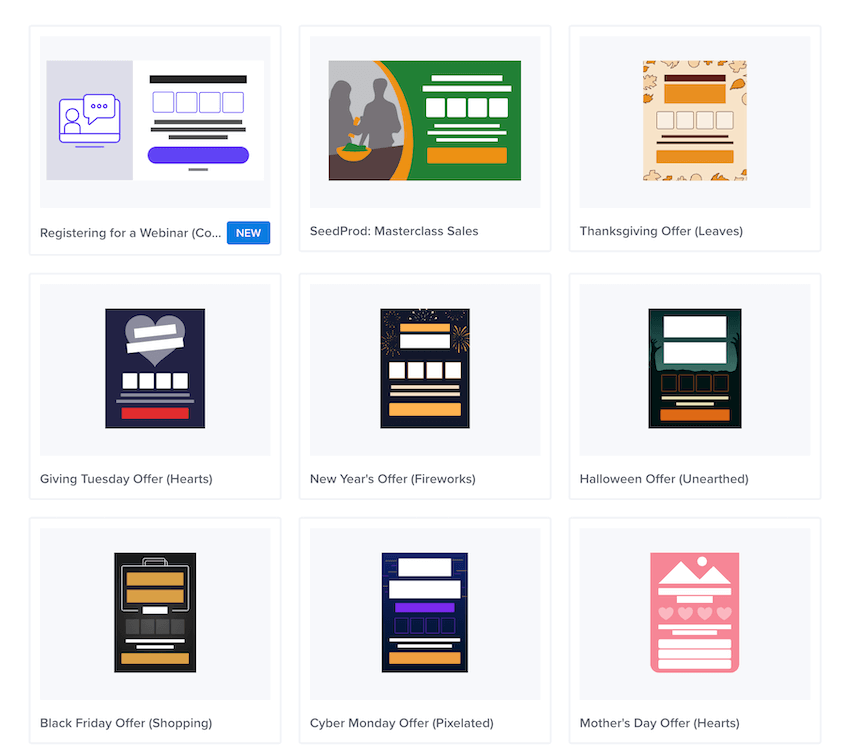
OptinMonster is a plugin designed for generating leads with exit-intent technology, A/B testing, and 700+ pre-built campaign templates. For agencies running lead generation campaigns on client sites, the campaign library speeds up deployment, and the A/B testing dashboard gives you real conversion data to show clients.
Best for: Agencies running conversion-focused campaigns for eCommerce, SaaS, or professional service clients where email subscribers or lead form conversions are a measurable deliverable.
Why We Chose OptinMonster: A/B testing and behavioral targeting are what separate it from basic popup plugins. For clients who care about conversion rate optimization, OptinMonster provides the data to back up the work.
What We Liked:
- Exit-intent technology detects when a visitor is about to leave and triggers a targeted campaign.
- 700+ campaign templates organized by industry and conversion goal.
- A/B testing with statistical significance reporting — you can show clients which variant wins.
- Behavioral targeting by page, device, referral source, time on site, and user behavior.
- Integrates with every major email marketing platform.
What We Didn’t Like:
- No free version. Agency-useful features like A/B testing and behavioral targeting require higher-tier plans.
- Multiple campaigns on a high-traffic site can add JavaScript load. Use conditional loading where possible.
12. MonsterInsights: Best for Presenting GA4 Data to Clients Inside WordPress
MonsterInsights connects WordPress to Google Analytics 4 and surfaces traffic reports, top content, eCommerce data, and user flow directly in the WordPress dashboard.
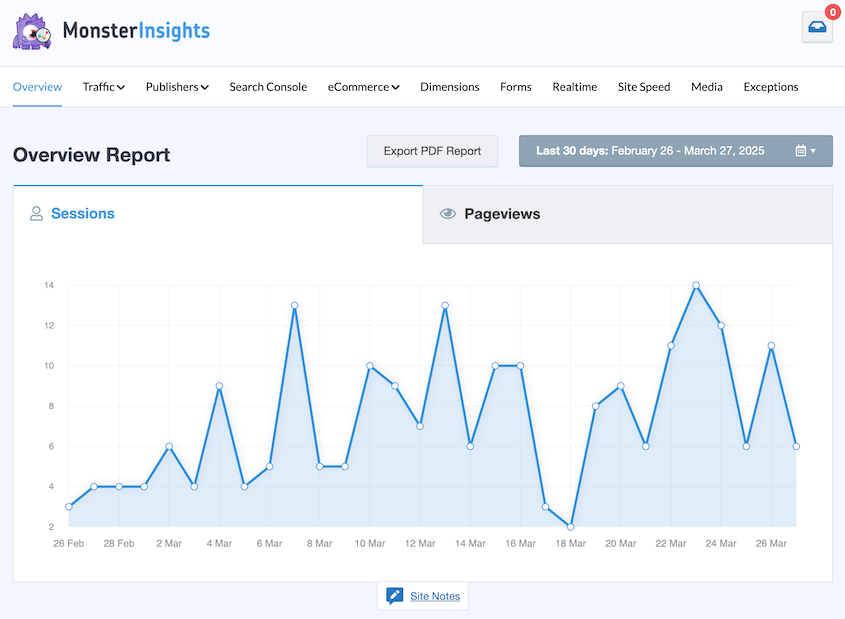
For agencies, the main benefit is a client-facing analytics view that doesn’t require navigating GA4’s complicated native interface. Many clients find GA4 confusing, but you can simplify it for them with MonsterInsights.
Best for: Agencies that want to give clients a clear view of their site performance inside WordPress without sending them into Google Analytics.
Why We Chose MonsterInsights: The reporting lives where clients already are. When an administrator logs into WordPress, the data is right there.
What We Liked:
- GA4 connection with no manual code insertion. MonsterInsights handles the tracking snippet.
- Dashboard reports show sessions, pageviews, top pages, and top referrers directly in WP admin.
- eCommerce tracking for WooCommerce with enhanced measurement.
- Affiliate link and file download tracking for content and media sites.
- Custom dimensions and event tracking without touching code.
What We Didn’t Like:
- Free version is limited to basic metrics. eCommerce tracking and custom events require a paid plan ($99.50/yr and up).
Performance & Security
A slow site hurts rankings. A compromised site ends client relationships.
WP Rocket handles caching and optimization; Wordfence handles firewall protection and malware detection. Both are worth running on every client site you manage.
13. WP Rocket: Best for Site Performance
WP Rocket is the most widely used WordPress performance plugin. It activates page caching, browser caching, GZIP compression, lazy loading, and database optimization, with defaults that work on most sites immediately.
For agencies that need to improve Core Web Vitals scores across a client portfolio without touching server config files, it’s the right tool.
Best for: Improving page speed and Core Web Vitals across a client portfolio without server-level configuration or developer work.
Why We Chose WP Rocket: The defaults move the needle on most client sites straight out of the box. Most caching plugins require significant configuration before producing meaningful results. WP Rocket doesn’t.
What We Liked:
- Page caching activates on install with no configuration needed for baseline performance gains.
- Works with major managed WordPress hosts (WP Engine, Kinsta, Flywheel) without conflicting with host-level caching.
- Cloudflare integration for CDN cache purging directly from WP admin.
- Database cleanup removes post revisions, expired transients, and trash automatically.
- Lazy loading for images and videos built in.
What We Didn’t Like:
- No free version. At ~$59/yr per site, the cost adds up across a large portfolio. Many agencies use free alternatives on budget client accounts.
14. Wordfence: Best for WordPress Firewall and Malware Detection
Wordfence is a security plugin that runs a web application firewall (WAF), malware scanner, and login protection from one plugin. The key feature for agencies is the threat defense feed: it updates firewall rules in real time when new WordPress vulnerabilities are discovered.
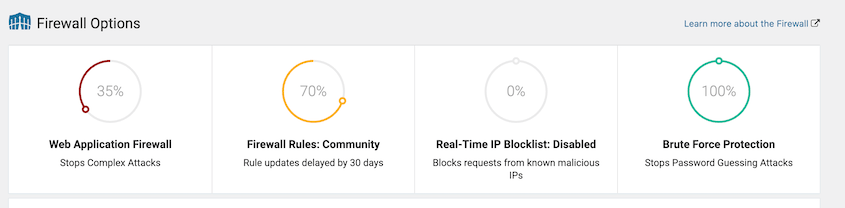
Free users get those rules 30 days delayed. Premium users get them immediately. On client sites handling transactions or user data, that gap matters.
Best for: Agencies that need active firewall protection and malware scanning on client sites, especially eCommerce sites or any site with user registration.
Why We Chose Wordfence: The real-time threat defense feed is what separates it from other security plugins. For any client site that handles sensitive data or transactions, the Premium tier is worth it.
What We Liked:
- Web application firewall blocks malicious traffic before it reaches WordPress.
- Malware scanner checks core files, themes, and plugins against known signatures.
- Two-factor authentication for admin accounts.
- Live traffic view for real-time diagnosis of unusual activity during an incident.
- Wordfence Central provides a centralized dashboard for managing Wordfence across multiple client sites.
What We Didn’t Like:
- The paid plans get expensive at scale. Many agencies use the free version on lower-risk sites and reserve Premium for high-value or eCommerce clients.
Membership & Monetization
More clients are moving toward gated content, subscription models, and online courses. A standard eCommerce plugin won’t handle that on its own.
MemberPress is purpose-built for this use case, and it’s the right recommendation for agencies building subscription-based client projects without wanting to stitch together three separate plugins.
15. MemberPress: Best for Membership Sites, Online Courses, and Gated Content
MemberPress handles membership tiers, content restriction, payment processing, and course delivery. For agencies building subscription-based client projects, it’s the most complete all-in-one option available without combining separate plugins.
Best for: Agencies building membership sites, online course platforms, or any client project that involves gated content and recurring revenue.
Why We Chose MemberPress: The combination of content restriction, payment processing, and course delivery is the right scope for agency builds. Combining WooCommerce Memberships, LearnDash, and a separate paywall plugin for the same outcome adds complexity that clients will eventually call about.
What We Liked:
- Handles membership tiers, content restriction, payment gateways (Stripe, PayPal, Authorize.net), and course delivery from one admin.
- MemberPress Courses (built-in) includes quizzes, progress tracking, and certificates without a separate LMS plugin.
- Integrates with major email marketing platforms for automated onboarding and drip sequences.
- Access rules let agencies build complex content restriction logic (by role, subscription tier, expiry, or purchase).
- Subscription and revenue reporting supports client-facing performance updates.
What We Didn’t Like:
- No free version. Plans start at ~$199.50/yr, which is a real cost for clients still testing a membership model.
Client Collaboration
The revision process is where most agency projects lose time. The longer the email chain, the more room for miscommunication. Atarim replaces that loop with direct, visual feedback on the live page.
16. Atarim: Best for Client Visual Feedback During Builds
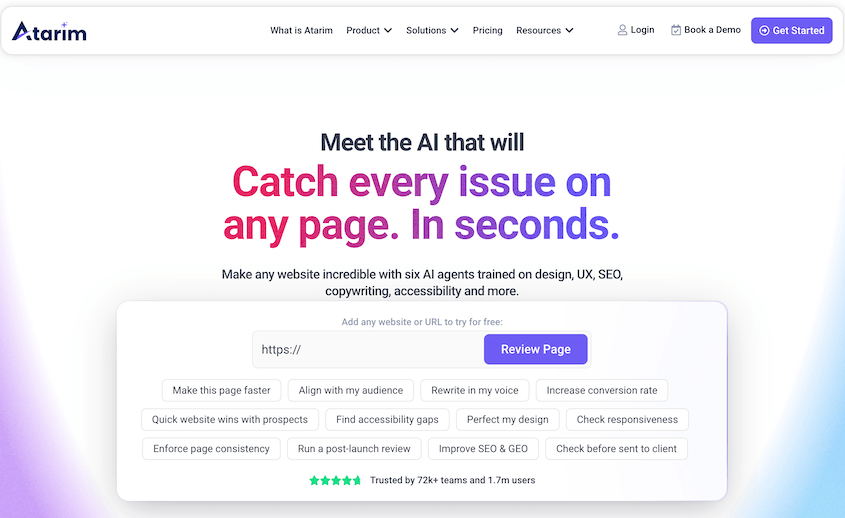
Atarim replaces email threads and annotated screenshots with direct, visual feedback on the live site. Clients click any element on the page, leave a pinned comment, and Atarim creates a task in the agency’s project management workflow.
For agencies stuck in endless revision email chains, it cuts the back-and-forth significantly.
Atarim also includes AI agents that instantly become team members. They review designs, catch problems, personalize feedback, and speed up approvals.
Best for: Agencies in active build or redesign phases that need a faster, less chaotic way to collect and act on client feedback on live pages.
Why We Chose Atarim: Collaborating directly on a website is genuinely faster than describing locations in email. Clients can show you what they mean instead of trying to write it.
What We Liked:
- Clients click any element on the live site and leave a pinned comment. No training required.
- Comments convert into tasks and sync with Asana, Trello, ClickUp, and Slack.
- Built-in screen recording for client walkthroughs without switching apps.
- Guest access lets clients leave feedback without creating an account.
- Role-based permissions for team members and client collaborators.
- AI inner circle for reviewing and clarifying work.
What We Didn’t Like:
- Primarily useful during active build phases. Value drops once a site is stable and in maintenance mode.
Frequently Asked Questions
What’s the best WordPress backup plugin for agencies?
Duplicator Pro is the strongest option for agency use because it handles more than backups. You can clone client sites from a master template, migrate between hosts without WordPress pre-installed on the destination, build staging environments, and restore a site even when WordPress itself is inaccessible. No competing plugin does all of that. For agencies responsible for client uptime, the disaster recovery capability alone sets it apart.
Can I manage all my client WordPress sites from one dashboard?
Yes. MainWP (self-hosted, free core) manages unlimited WordPress sites from a single dashboard, covering bulk plugin updates, security scans, and client reports. ManageWP is the SaaS alternative if you’d rather not host the dashboard yourself. It’s faster to set up, but client data passes through their servers. WP Umbrella is worth considering for agencies that want per-site pricing with uptime monitoring and reporting built in.
Do I need a membership plugin if my client already uses WooCommerce?
WooCommerce handles product sales but not content restriction or course delivery. If a client wants to sell access to gated content, run an online course, or build a subscription community, WooCommerce alone isn’t enough. MemberPress integrates with WooCommerce and adds membership tiers, content restriction, and course functionality without replacing the eCommerce setup already in place.
Do agencies need different plugin licenses than regular site owners?
Most plugins are priced per site, which gets expensive fast across a large portfolio. Look for developer or agency licenses. Check licensing terms carefully — some “unlimited” plans restrict commercial use on client-owned sites.
Is a separate activity log plugin necessary if I’m already running a security plugin?
Security plugins and activity log plugins solve different problems. Wordfence and similar tools block threats and scan for malware. Activity Log tracks what authorized users do inside WordPress: who published a post, deactivated a plugin, or changed a setting. On multi-user client sites, both matter. The security plugin watches outside. The activity log watches inside.
What’s the first plugin to install on a client site I’ve inherited?
A backup plugin, specifically one that works when WordPress itself is broken. Before touching a theme, updating a plugin, or making any structural changes on a site you didn’t build, run a full backup first. Duplicator Pro’s disaster recovery URL means you can restore even if the admin panel is locked. It takes ten minutes to set up. Not having it costs hours and potentially a client relationship.
Start With the Plugin That Covers Your Biggest Gap
Don’t try to implement all 16 at once.
Start with what removes the most risk. I recommend setting up automated backups with cloud storage on every client site before anything else. Then, an activity log on any site with multiple admins. Add any extra tools that improve your workflow or your client’s results.
If you’re managing more than a handful of client sites and don’t have disaster recovery in place, that’s the gap to close today. Duplicator’s Elite tier covers backups, migrations, cloning, staging, activity logs, and media cleanup from a single license.
Thinking about optimizing your agency’s day-to-day tasks? These other posts can help:
- How a Web Design Agency Completes 50 Migrations a Month
- How a WordPress Agency Achieved a 95% Site Restoration Success Rate
- How a Web Design Agency Avoided Migration Failures Across 50+ Projects
- How a One-Man Web Agency Saves 10% of Revenue with Duplicator
- Is Duplicator Pro Worth It for Agencies?
- Finding the Perfect Backup Plugin for WordPress Agencies