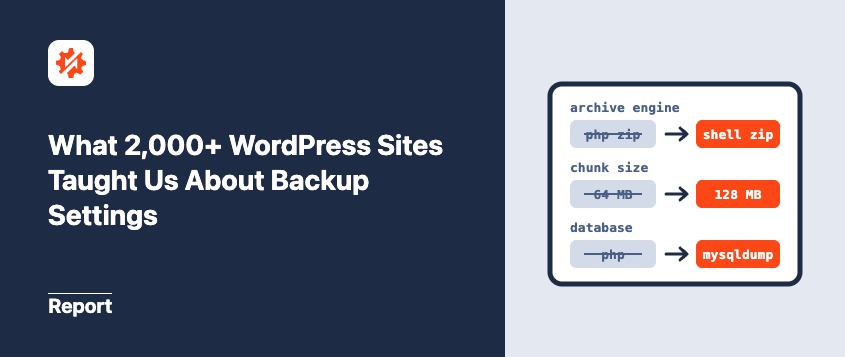
What 2,000+ WordPress Sites Taught Us About Backup Settings
 Joella Dunn
Joella Dunn
Joella Dunn
 John Turner
John Turner
John Turner
Your backup stalls at the same spot every time.
So, you go looking for help. One forum thread says to lower the chunk size. Another says to turn off compression. You try both.
The backup still stalls. Or it finishes now, but it takes much longer than it used to.
That advice did fix somebody’s backup. It just fixed it on their server, and yours may not allow the same things.
So instead of trading anecdotes, we looked at data. AutoTune, the settings tester built into Duplicator, runs real test backups on a site’s server until one finishes. We looked at where 2,000+ sites ended up.
In this post, I’ll walk through those results and explain what they mean for your backup settings.
Table of Contents
- Key Findings
- How Does AutoTune Test Your Server?
- How Many Sites Ended Up With Different Settings?
- Is There One Best Backup Configuration for WordPress?
- Which Common Fixes Were Usually Unnecessary?
- How Often Did AutoTune Need More Than One Try?
- What Happens When No Backup Setting Works?
- What Should You Do With Your Own Backup Settings?
- Frequently Asked Questions (FAQs)
Key Findings
For anyone who wants the numbers first, here’s what the data shows. Every figure comes from Duplicator’s own AutoTune usage data.
- AutoTune changed at least one backup setting in about 9 in 10 tuning sessions. That doesn’t necessarily mean the previous settings were broken.
- Shell ZIP with mysqldump accounted for about half of successful configurations.
- PHP ZIP accounted for just under 4 in 10 successful configurations, while DupArchive accounted for fewer than 1 in 10.
- Mysqldump appeared in about 2 in 3 successful configurations. PHP-based database export handled the rest.
- Nearly all successful configurations used compression and the 128 MB chunk size.
- About 9 in 10 successful tuning sessions completed on the first test attempt.
- More than 8 in 10 tuning sessions found a successful configuration.
How Does AutoTune Test Your Server?
Duplicator’s AutoTune runs real test backups on your site. It starts with the fastest configuration. If a test fails, it adjusts settings and tries another configuration.
Once a test succeeds, it saves those settings automatically. If the problem is a server limit that no setting can change, it tells you that instead.
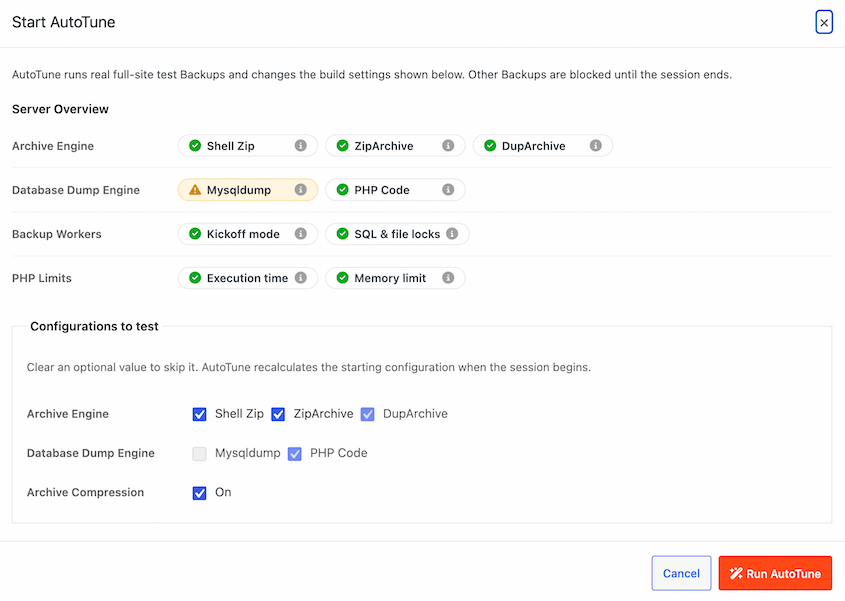
AutoTune adjusts four groups of backup settings. Here’s what each one controls:
- Archive engine and compression: How files are packaged into the backup.
- ZIP mode and chunk size: How archive processing is divided into steps.
- Database engine and dump mode: How the database is exported.
- Server-load reduction: Whether processing slows down to reduce pressure on the server.
Its Server Overview also reports information about your environment, including PHP limits, engine availability, and background-processing checks.
If you want to run it on your own site, I walk through it step by step in How to Fix a Failed WordPress Backup.
How Many Sites Ended Up With Different Settings?
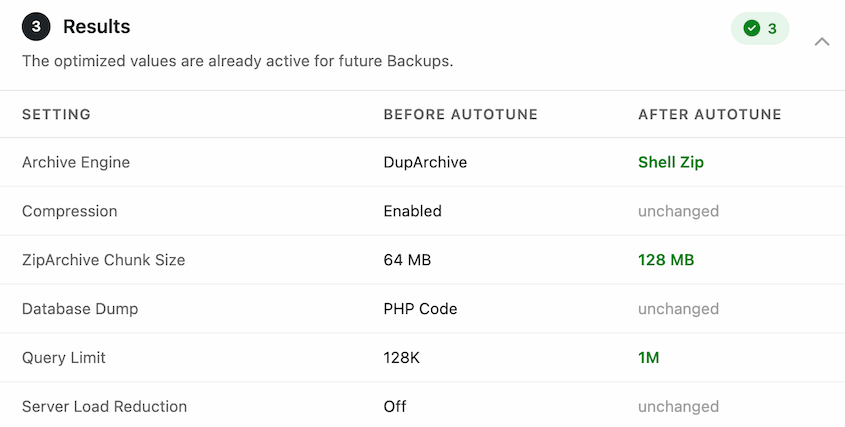
AutoTune changed at least one backup setting in about 9 in 10 tuning sessions.
That’s a substantial share, but “changed” doesn’t mean “fixed a broken configuration.”
A site might have been using settings that completed backups reliably, while AutoTune found a faster supported option. Another site might have needed a fallback because its existing configuration couldn’t finish.
There are several reasons to revisit your backup settings:
- The site has moved to a different server.
- Your host has changed its PHP configuration or resource limits.
- Your files or database have grown.
- You copied settings from another site.
- You’ve never tested alternatives to the defaults.
The data doesn’t tell us how common these situations are across all WordPress sites. It does show that running AutoTune often resulted in a configuration change among the sites that used it.
If your hosting environment has changed, retesting is more useful than assuming your old settings still fit.
Is There One Best Backup Configuration for WordPress?
There isn’t one combination that every server can use.
Some hosts provide command-line archive and database tools. Others restrict those tools but support PHP-based alternatives. Resource limits also affect which configurations can complete.
Here’s where successful AutoTune configurations landed:
| Setup | Share of successful configurations | What your server needs | Where it fits |
|---|---|---|---|
| Shell ZIP with mysqldump | About half | Accessible ZIP tools, enabled PHP command functions, and access to mysqldump | Servers that allow their own tools. It’s typically the fastest combination when the server supports it. |
| PHP ZIP (with mysqldump or PHP export) | Just under 4 in 10 | The PHP ZipArchive extension | Hosts that restrict command-line tools but have ZipArchive enabled |
| Shell ZIP with the PHP database export | About 1 in 20 | Shell ZIP support, without relying on mysqldump | Servers that allow ZIP tools but where mysqldump isn’t available |
| DupArchive with either database export method | Fewer than 1 in 10 | Duplicator’s normal server requirements; no external ZIP executable or ZipArchive extension needed | Servers where the other engines couldn’t finish. It builds the backup in small pieces across many requests. |
Each of these is the right answer somewhere. The question is which one fits your server.
The Fastest Setup Accounted for About Half of Successful Configurations
Shell ZIP with mysqldump accounted for about half of successful configurations. Including its PHP database-export pairing, Shell ZIP represented a little over half.
Shell ZIP uses the server’s own ZIP tools rather than building the archive entirely through PHP. It’s often faster than PHP ZIP when the server supports it.
Duplicator’s Shell ZIP option requires the zip and unzip tools and enabled PHP popen() and pclose() functions.
Mysqldump is a separate command-line tool for exporting the database. Duplicator must be able to access and run it.
When those tools are available, they can be an efficient combination. When they’re unavailable or restricted, a PHP-based alternative may be the better fit.
PHP ZIP Covers Most of the Rest
Just under 4 in 10 successful configurations used PHP ZIP in multi-threaded mode.
PHP ZIP doesn’t depend on external ZIP executables, but it does require PHP’s ZipArchive extension to be installed and enabled.
That makes it a useful alternative when a host restricts command-line tools.
It can pair with either mysqldump or PHP database export. Archive creation and database export are separate tasks, so your server may support a command-line tool for one but not the other.
DupArchive Is the Safety Net for the Hardest Servers
DupArchive accounted for fewer than 1 in 10 successful configurations.
That small number matters, because it shows who needs it. Smaller chunk sizes and server-load reduction turned up in only a handful of successful configurations, and most of those used DupArchive. These look like the most constrained servers in the data.
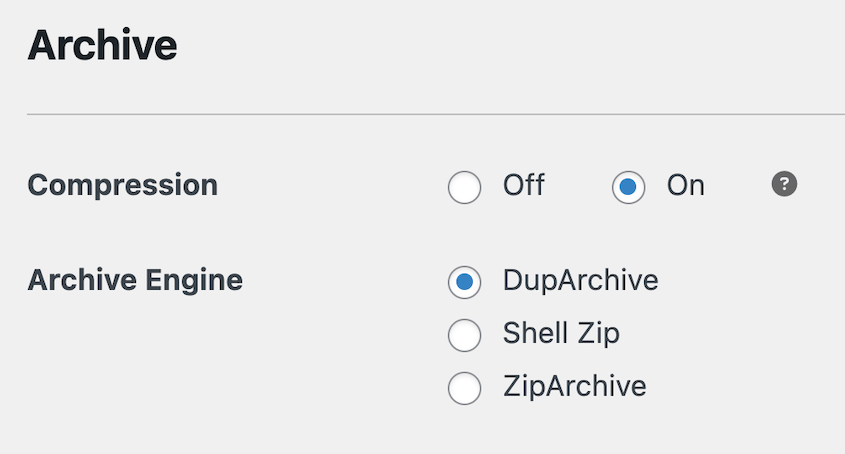
DupArchive is Duplicator’s own archive format. It builds the backup in small pieces across many requests, which is how it gets past strict time limits that stop other engines partway.
On servers like these, it’s what lets a backup finish.
But it isn’t the default fix for every slow backup. Most servers never needed it.
Mysqldump or PHP: Which Database Backup Method Works More Often?
Mysqldump appeared in about 2 in 3 successful configurations. PHP-based export accounted for about 1 in 3.
If mysqldump is unavailable, PHP export gives Duplicator another way to export the database. It still depends on adequate server resources, database access, and permissions.
Which Common Fixes Were Usually Unnecessary?
Three pieces of advice show up in forum threads about slow or failing backups. Here’s how each one compares with the successful configurations in our data.
One thing to keep in mind as you read these. AutoTune stops as soon as a test backup finishes, so the final configuration shows what a backup needed to finish on that server, not every setting that might have worked.
- “Turn off compression.” Nearly every successful configuration used compression. Turning it off is rarely the change that turns a failing backup into a working one. If your backup is stalling, the archive engine and your host’s limits are better places to look.
- “Always use DupArchive on shared hosting.” Fewer than 1 in 10 successful configurations used DupArchive, and most servers in our data finished on Shell ZIP or PHP ZIP. (We don’t have a breakdown by host type, so this covers every server, not only shared ones.) DupArchive is the right call on the most constrained hosts.
- “Lower your chunk size.” Nearly every successful configuration used the 128 MB chunk size. Smaller chunks only appeared on a small group of servers, and almost always alongside DupArchive.
Each fix worked for someone. On your server, it’s a guess. Use AutoTune to find the best configuration for your site.
How Often Did AutoTune Need More Than One Try?
About 9 in 10 successful sessions found a working configuration on the first try.
The other 1 in 10 needed at least one fallback before a backup finished. Fewer than 1 in 100 needed four or five attempts.
What Happens When No Backup Setting Works?
In fewer than 1 in 20 tuning sessions, AutoTune tested and couldn’t find a configuration that completed on that server.
Here’s what stopped the most sessions, and what fixes each one.
The Server’s Time Limit Ran Out
This was one of the most common reasons no setting could finish.
Hosts cap how long a single PHP process can run. If the backup can’t break its work into small enough steps to fit under that cap, the host stops it partway, whatever the settings say.
The fix lives with your host. Ask them to raise the PHP execution time limit (max_execution_time), or move to a plan that doesn’t cap it so tightly.
AutoTune’s Server Overview shows your server’s PHP time limit, so you can quote it in your support ticket.
The Disk Filled Up
A full disk stopped some sessions before they could finish. We count these separately, because no backup setting fixes a server that’s out of space.
The fix is housekeeping. Delete old backups you no longer need, set a retention limit so they don’t pile up again, and keep copies off-site instead of on the same server.
Old backups quietly filling a server is one of the patterns we found in Duplicator’s support tickets too, which I cover in What Breaks WordPress Backups.
The Build Stalled in the Browser
About 1 in 5 of the sessions that found no working configuration were running through the browser rather than in the background.
That happens when a host blocks a site from calling itself (a “loopback request”). Duplicator falls back to driving the backup from your browser, which means it only moves while a page is open. Close the tab, or let the session time out, and the build stalls.
The fix is a quick question for your host: ask whether loopback requests are blocked, and whether they can allow them for your site.
What Should You Do With Your Own Backup Settings?
You don’t need to memorize this data. Use it as a reason to test your own environment.
Here’s what I’d do next:
- Update Duplicator. AutoTune is available in version 5.0 and newer, in Lite and Pro.
- Run AutoTune. Let it test the configurations your server supports.
- Create a normal backup afterward. The tuning tests aren’t restorable backups.
- Verify recovery. Confirm that the normal backup completes, then test a restore in a staging or test environment (not on your live site).
- Review storage and retention. Keep enough local working space and a recovery copy off-site.
- Configure automation. In Duplicator Pro, set up a backup schedule and your chosen storage destination.
Take the AutoTune report to your host if nothing works. The Server Overview lists your server’s PHP limits, which turns a vague complaint into a specific request.
Frequently Asked Questions (FAQs)
Is Shell Zip faster than ZipArchive?
Usually, when your server allows it. Shell Zip uses the server’s own zip tools, which tends to be quicker than zipping from inside PHP. The catch is availability. It needs the server’s zip and unzip packages plus PHP’s popen and pclose functions, and many shared hosts don’t provide them. That’s likely why it accounted for only a little over half of the successful configurations in our data.
Should I use mysqldump or PHP to back up my WordPress database?
Use mysqldump if your server supports it. It’s the server’s own database export tool, and it appeared in about 2 in 3 successful configurations in our data. If your host doesn’t allow it, the PHP-based export is the fallback. It runs from inside PHP, so it works on many servers where mysqldump doesn’t, as long as the server has enough resources and database access.
Does turning off compression fix a failed backup?
Rarely. Nearly every successful configuration in our data used compression. It’s one of the most repeated forum tips, but it’s seldom what separates a failing backup from a working one. Check the archive engine and your host’s time and disk limits first.
Why can’t my server use Shell Zip?
Most likely, your host hasn’t installed the zip and unzip packages, or it has disabled PHP’s popen and pclose functions. You can ask your host to enable them. If they won’t, PHP ZIP is the alternative, as long as your server has PHP’s ZipArchive extension enabled.
Before Your Next Backup, Let Your Server Pick the Settings
A backup that stalls halfway leaves you with nothing to restore, and you may not find out until you need it.
AutoTune helps you find a configuration that completes on your server without working through every setting manually. But tuning is only one part of recovery planning.
Afterward, create a backup, verify a restore, and configure a schedule, retention policy, and off-site destination.
AutoTune is in Duplicator 5.0, in both the free and premium versions. Update your plugin today.
Duplicator Pro keeps that working setup running on a schedule and sends copies off-site automatically. More than 1.5 million WordPress professionals use Duplicator to keep their sites recoverable.
If this post got you thinking about your backup settings, these guides are worth reading next:
- What Breaks WordPress Backups: Lessons From 1,400+ Support Tickets
- What 8,000+ WordPress Support Tickets Reveal About Why Migrations Break
- How to Fix a Failed WordPress Backup: Settings vs. Server Limits
- How WordPress Backups Affect Site Performance (and How to Fix It)
- How to Back Up a Large WordPress Site