

Tips for migrating a large website on a limited hosting plan
Introducing the Easy Guide to Migrating Large Sites on Limited Hosting! Whether you’re facing upload size constraints or build interruptions, this step-by-step manual offers simple solutions. Learn how to navigate hosting limitations with Duplicator Lite and Pro, ensuring a smooth transition for your website. Say goodbye to migration headaches and hello to seamless site transfers!
Issues While Building a Backup
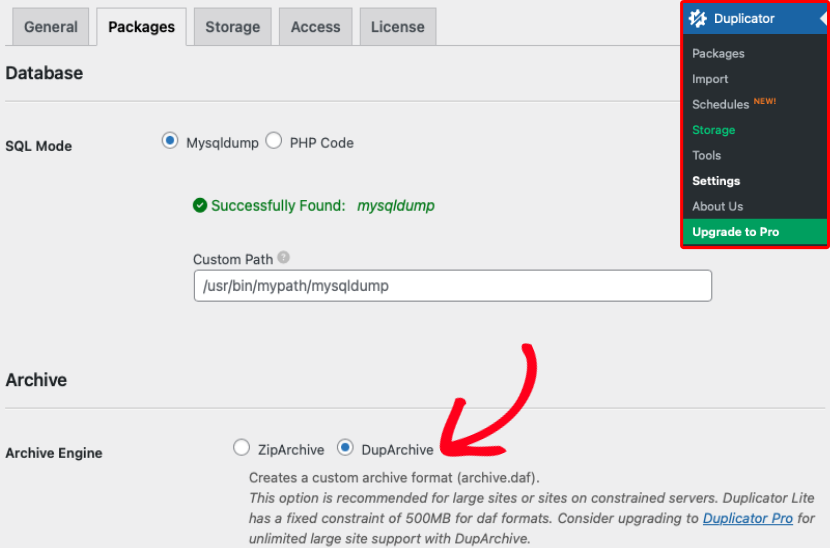
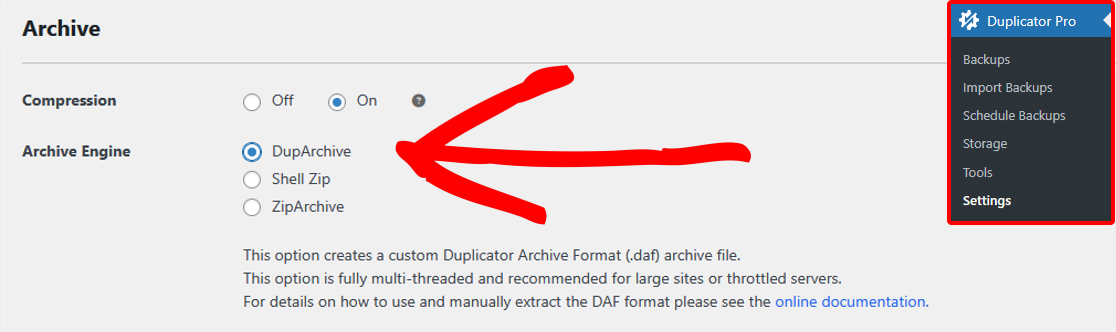
Some hosting providers might restrict you from creating a backup using Zip. Duplicator has a special format called DupArchive (daf) made for such hosts. To use it, follow these steps:
For Duplicator Lite: Go to Settings » Backups » Archive Engine and enable DupArchive:
For Duplicator Pro: Head to Settings » Backups » Archive and enable DupArchive under Archive Engine.
Two-Part Installation: If you’re using Duplicator Lite and face a “Build Interrupt” issue, try the Two-Part Installation method. Depending on your host’s performance and limitations, if your site is over 2GB on a budget host with Duplicator Pro, you might also need this method.
Upload Limitations
If your budget host has an upload size limit, you can work around it in a few ways:
- File Filters: Add large files to the file filter when creating a backup to fit within your host’s limit. Then, manually move these filtered files over via FTP. Usually, it’s easiest to filter your wp-content/uploads/ folder (usually containing images) and then move these files manually.
- Two-Part Installation: If you’re using Duplicator Lite and face a “Build Interrupt” issue, try the Two-Part Installation method. Duplicator Pro users generally shouldn’t need this, its built-in DupArchive format uses chunked processing that handles large sites without hitting the same build interruptions Lite can run into.


