

Handling Build Failures Due to 32-Bit PHP Limits
If the build fails with file/folder count mismatch or the result size is a negative size value (i.e. SIZE: -1724710633B) then it’s possible you are running a PHP 32 version. These types of errors indicate that the server is running 32-bit PHP and the site is over 2.1 GB. Unfortunately, 32-bit PHP can only process/create archive files less than 2.1 GB.
Common Error Messages
- Hash mismatch on DupArchive file entry
- Number of files expected (xxxxx) doesn’t equal number written
- Number of directories expected (xxxxx) doesn’t equal number written
Validation
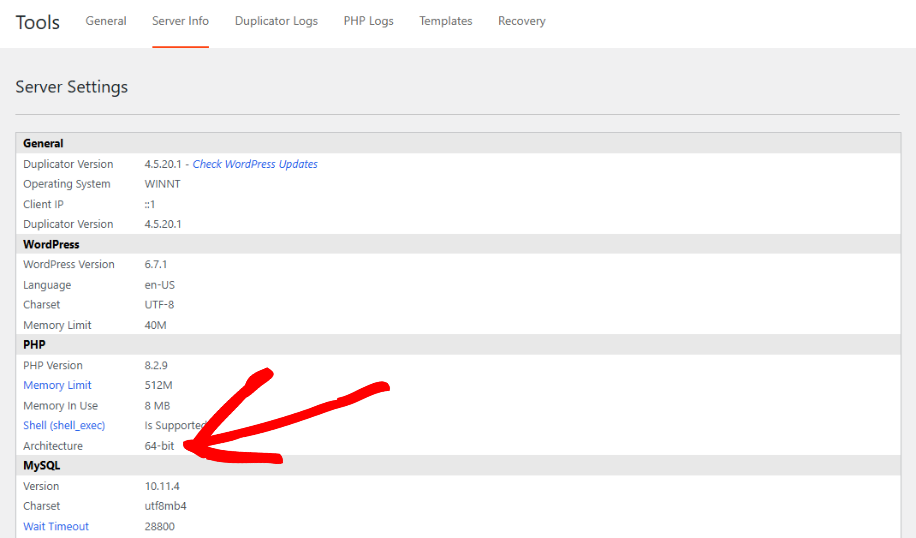
To validate if your system is running 32-bit PHP, go to Duplicator Pro » Tools » Server Info » PHP and see what value is in the “Architecture” setting.
If you can’t access the Tools page, you can also check via a phpinfo file: create a file containing <?php phpinfo(); ?>, upload it to your site, and open it in a browser. Look for the “Architecture” or “PHP Extension Build” value, an entry containing “x86” typically indicates 32-bit, while “x64” indicates 64-bit. Remove the file after checking, since phpinfo output shouldn’t be left publicly accessible. Check this article for more.
Solutions
If you are running 32-bit PHP and the site is large greater than 2.1 GB then you have three options:
Option 1
Ask your host to upgrade PHP to a 64 bit PHP version. Almost all hosts support 64 bit PHP these days.
Option 2
Filter out unnecessary files/folders using the filters on Backups » Step 1 (Setup) to get the size below 2.1 GB.
If your build is also running slowly in addition to hitting this size limit, see How to accelerate slow backup build process.
Option 3
Perform a 2-step migration which minimizes the backup size using the Two-Part Installation technique.


