The Best WordPress Database Optimization Plugin for 2026 (Plus 4 Alternatives)
 Joella Dunn
Joella Dunn
Joella Dunn
 John Turner
John Turner
John Turner
Your WordPress site looks fast to visitors, but when you log into your admin dashboard, everything feels sluggish.
Pages take forever to load. Even simple tasks like searching for an old post feel incredibly slow.
The problem is probably your database.
Think of your WordPress database as a filing cabinet. Over time, that cabinet fills up with duplicate files, outdated documents, and stuff you forgot to throw away. Finding anything becomes a nightmare.
That’s database bloat. And it’s slowing down every database query your site makes, especially in the admin area, where those queries happen constantly.
The easiest way to get rid of bloat is to use a WordPress database optimization plugin. In this post, I’ll test and review plugins that make your database light and efficient. Let’s find the best one for you!
Here are the key takeaways:
- Database bloat slows your WordPress admin area: Post revisions, spam comments, trashed items, and orphaned plugin data accumulate over time, making every database query slower.
- Most sites need regular database optimization: If your site has been running for a year or more, you likely have unnecessary data weighing down your database.
- Symptoms include slow admin loads and massive backups: If your dashboard takes several seconds to respond or your backup files are 500MB+ when content is only 100MB, database bloat is the culprit.
- Best database optimization plugin: DB Optimizer scores your database health from 0-100, cleans up data in bulk, and can even repair database tables.
- Best safety net: Duplicator creates a restore point before you touch your database, so a bad cleanup is a one-click rollback instead of a support ticket.
Table of Contents
Do You Need a Database Optimization Plugin?
Yes. If your site has been running for a year or more, you need to optimize your database. You could do this manually, but there are plugins available to help you easily remove unnecessary data from your website’s database.
Here’s how you know your database needs attention:
- Your WordPress admin dashboard loads slowly.
This is the most common symptom I see. It might take several seconds for you to click between pages in wp-admin.
- Your on-site search is painfully slow.
When visitors use your search function, it times out or takes 10+ seconds to return results. That’s your database struggling to query through all the clutter.
- Your backups are massive and take forever.
Your backup files might be 500MB+ when the actual site content is maybe 100MB. The rest? Database bloat.
Because the database is so large, the backup process itself crawls along.
What Causes Database Bloat?
Every time you publish a post, approve a comment, or install a plugin, WordPress writes data to your database. Most of that data stays there forever, even when you don’t need it anymore.
Here are the main culprits for database bloat.
Post Revisions
WordPress automatically saves a copy of your post every time you make a change.
Write a 2,000-word blog post with 50 edits? You now have 50 copies of that post sitting in your database.
Trashed Items
When you delete a post, page, or comment, it goes to the trash. But “trash” doesn’t mean permanently deleted.
If you’re not regularly emptying the WordPress trash, this content is still in your database, taking up space and slowing down queries.
Spam Comments
Every spam comment that hits your site gets stored in the database. Even if a plugin like Akismet catches it, it’s still there unless you manually empty the spam folder.
Orphaned Data
When you uninstall a plugin or switch themes, they often leave their settings behind in the wp_options table. I’ve seen sites with data from 20+ old plugins they deleted years ago.
Transients
Transients are temporary data snippets that plugins use for caching. They’re supposed to expire and delete themselves, but they don’t always. Old transients can pile up quickly.
Database Overhead
Think of this like empty shelves in a warehouse that are marked “reserved” but never actually used.
Your database allocates space for data that used to exist but doesn’t anymore. That space sits there, unusable, making your database larger than it needs to be.
Our Favorite WordPress Database Optimization Plugins
The best WordPress database optimization plugin depends on what you need to accomplish.
Some are built for routine maintenance. Others are specialized tools for specific problems.
Here’s what I actually use and recommend:
- DB Optimizer: Gives you a beginner-friendly database health score, guided cleanup and repair options, and a Duplicator integration for easy restore points.
- Duplicator: Creates restore points before optimization and offers migration tools to move content to a fresh database when routine cleaning isn’t enough.
- WP-Optimize: The best all-in-one plugin for scheduled maintenance. Automatically removes revisions, spam, trash, and transients on a weekly or monthly schedule.
- WP-Sweep: Uses WordPress’s native delete functions instead of SQL queries to thoroughly clean up orphaned metadata and relationships that other plugins miss.
- Database Reset Pro: A tool for completely wiping staging or development databases without reinstalling WordPress. Not for live production sites.
DB Optimizer for Database Optimization and Repair
DB Optimizer scores your WordPress database from 0-100 across overhead, transients, revisions, autoloaded data, and trash. It shows you the space you can reclaim before you delete anything.
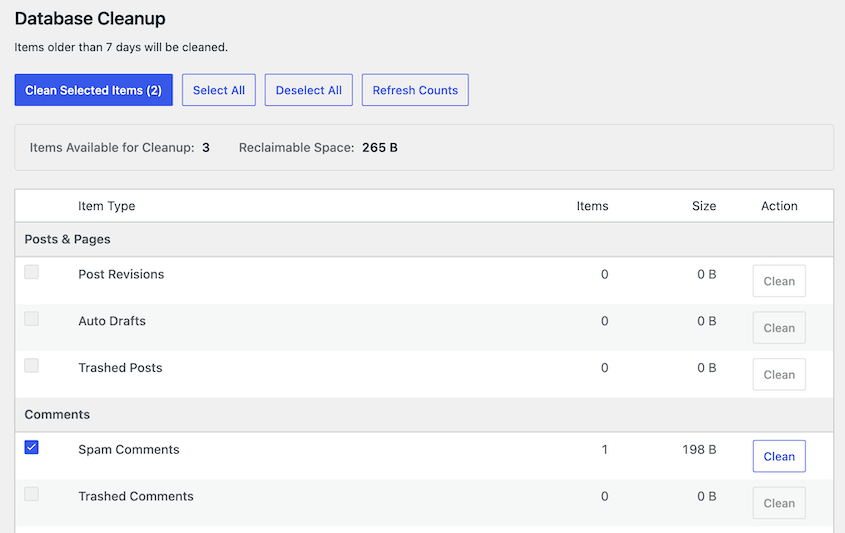
Most database plugins either throw raw numbers at you (which mean nothing if you don’t know MySQL) or just delete things and hope for the best. DB Optimizer gives you a baseline you can check again after cleanup, so you can see the impact instead of just hoping the site feels faster.
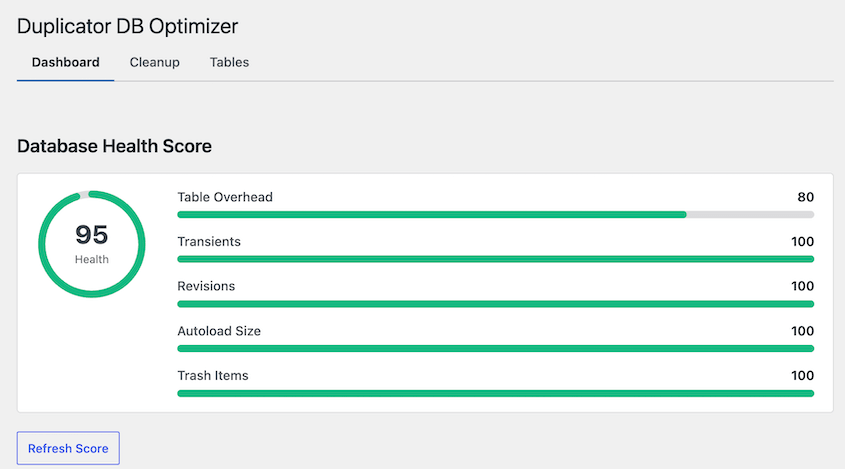
Write down the score, run a cleanup, check it again. It’s the kind of before-and-after comparison that’s been missing from other plugins.
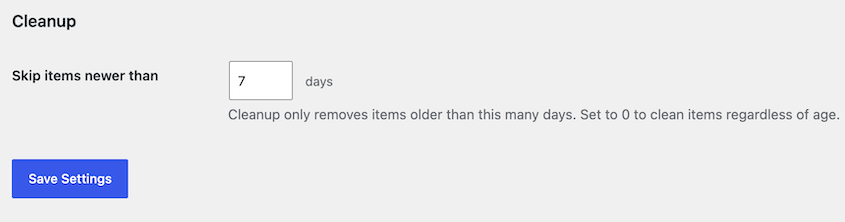
A 7-day retention default protects anything created in the last week, which catches the “I just published that” mistake before it happens. New posts, fresh comments, and recent transients all get a grace period instead of getting swept up in the first cleanup.
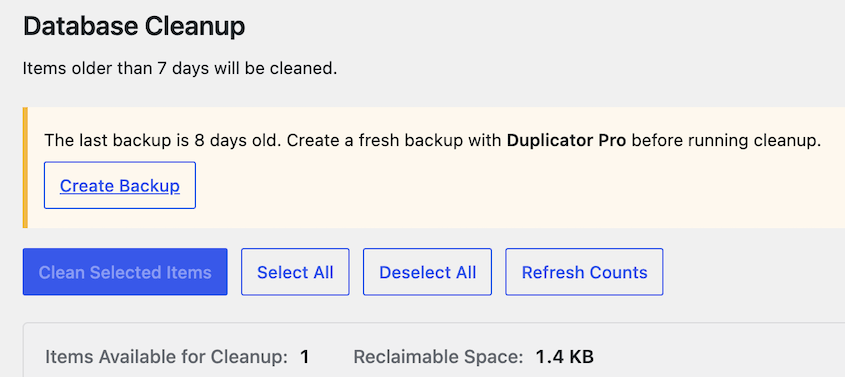
DB Optimizer prompts you to run a Duplicator backup before cleanup starts. You’ll get an important security reminder at the exact moment it matters.
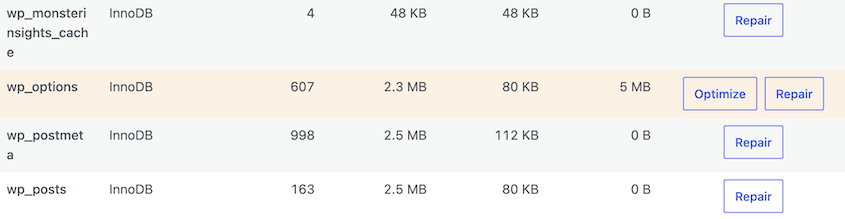
Beyond the cleanup itself, you get real-time database snapshots. Total size, table count, overhead, and wasted space are all visible without digging through phpMyAdmin.
Pair that with per-table optimize and repair, and you’ve got an easy way to maintain individual tables that are misbehaving.
It’s a standalone plugin for $29/year. DB Optimizer is also included free in Duplicator Pro or Elite plans, since the two are designed to work together.
Duplicator for Backup Cleanups and Optimized Backup Files
Duplicator isn’t a database cleaner in the traditional sense. It won’t remove spam comments or post revisions, but it can be used for database optimization in a more advanced way than you might expect.
First, it’s your safety net. Before you touch your database with any optimization plugin, you need a restore point.
Duplicator Pro’s scheduled backups give you that peace of mind automatically. If something goes wrong during optimization, you can roll back in minutes.
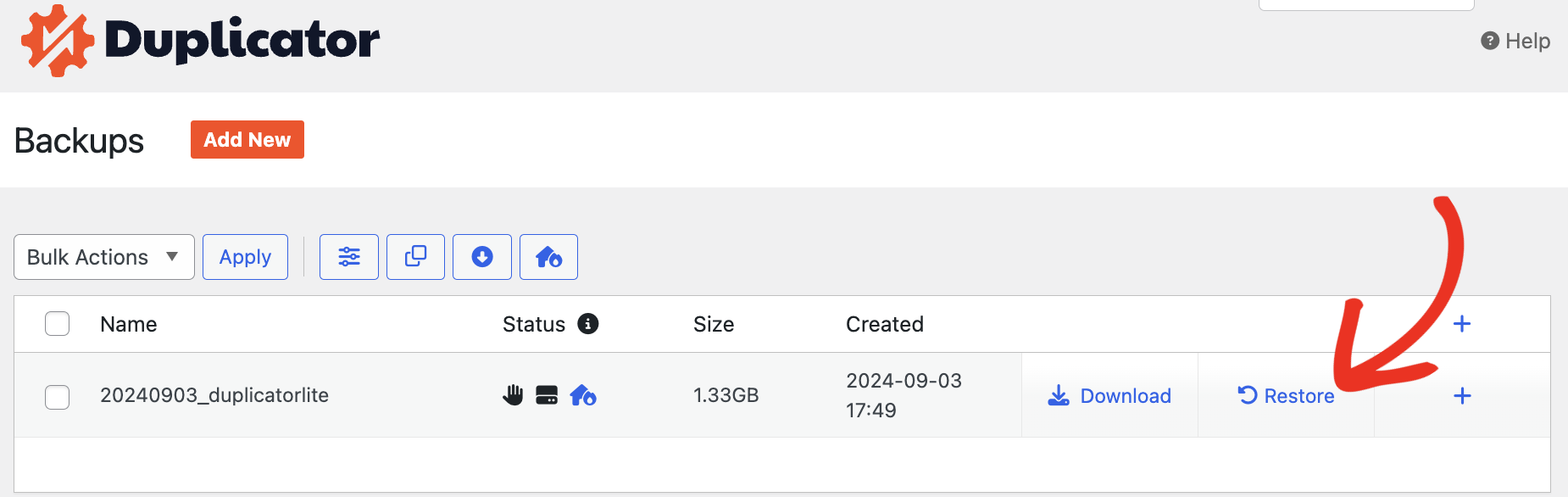
Second, it keeps your server clean. Those large backup files we talked about earlier? Duplicator can automatically delete old backups so they don’t pile up and eat your hosting space.
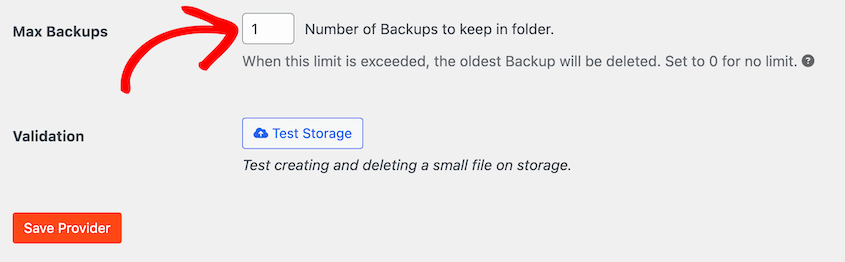
Sometimes the most efficient optimization isn’t cleaning your database. It’s starting with a fresh one.
Duplicator Pro’s migration features let you do exactly that. It helps you easily move your essential content to a brand-new, clean WordPress installation.
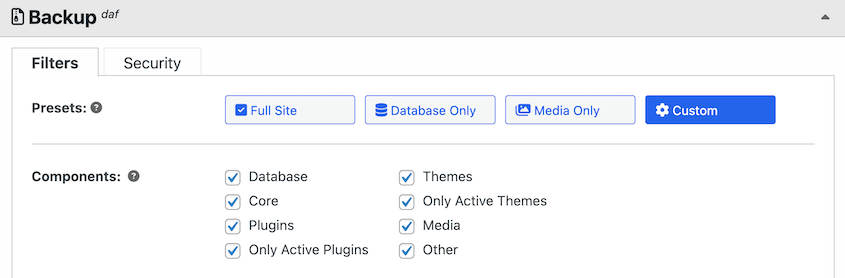
With Duplicator, create a custom backup of your site. Include only the necessary data using the file and database filters.
Set up a fresh WordPress installation on a staging URL or local development environment. The database will be tiny and optimized because it’s brand new.
Import your content using Duplicator Pro » Import. Your posts, pages, and users move to the clean database. Everything else gets left behind.
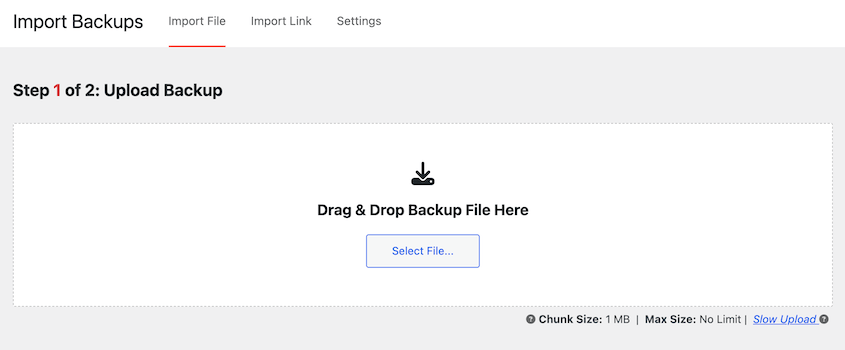
I’ve used this method on sites that were five or more years old, and I’ve seen it cut database sizes significantly. If routine optimization plugins aren’t making a dent, this approach gives you a genuinely fresh start.
WP-Optimize for Database Table Optimization
WP-Optimize is a good all-in-one solution for scheduled, routine database maintenance. It removes post revisions, clears out spam comments and trashed items, deletes expired transients, and cleans up database overhead.
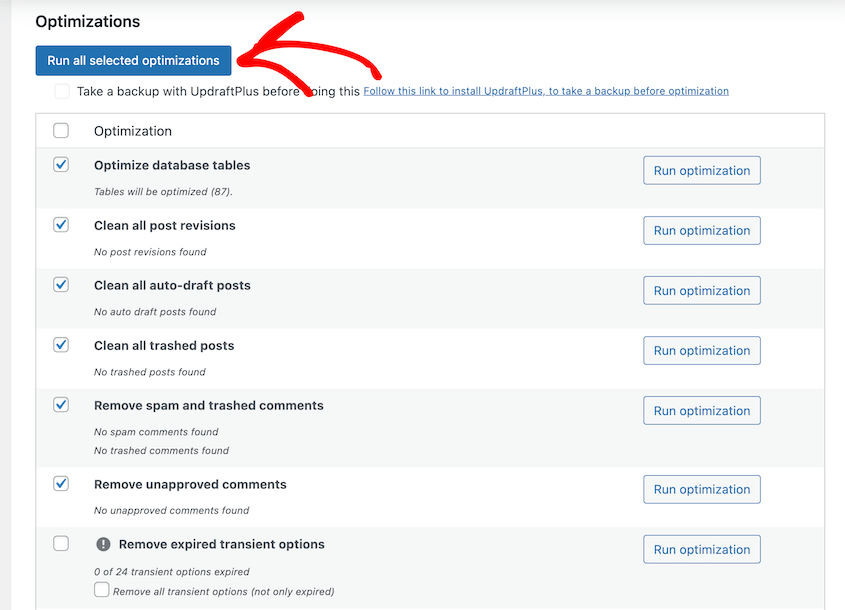
The real value is the scheduling feature.
You can set WP-Optimize to run automatically every week or every month. Configure it once, and it maintains your database in the background.
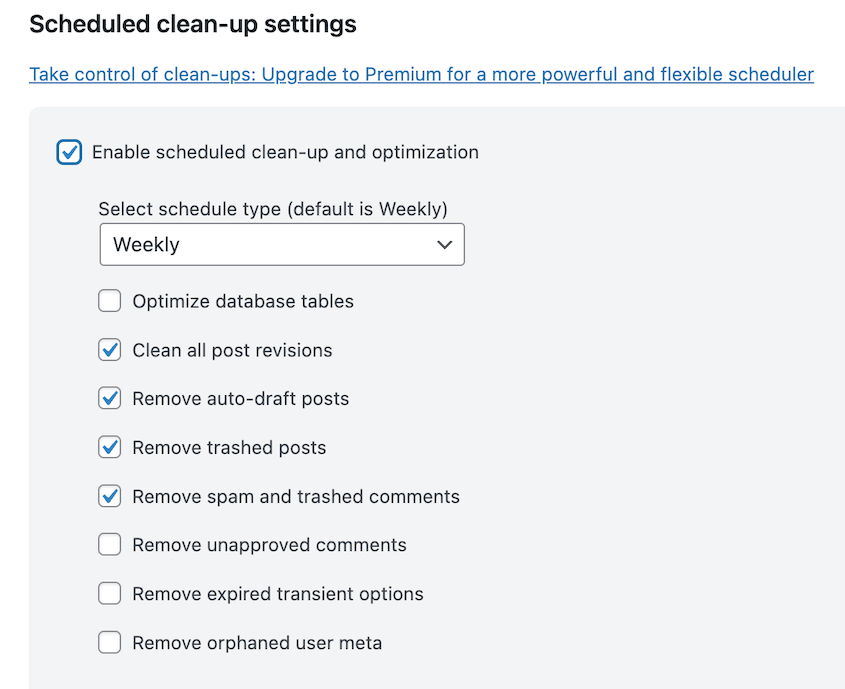
That’s the kind of set-and-forget maintenance that prevents problems instead of just fixing them.
WP-Optimize also offers page caching, image compression, GZIP compression, and code minification. It’ll keep your database light and fast.
WP-Sweep for Proper Delete Functions

Most database optimization plugins clean your database using direct SQL DELETE queries. They tell the database: “Delete this row.” Done.
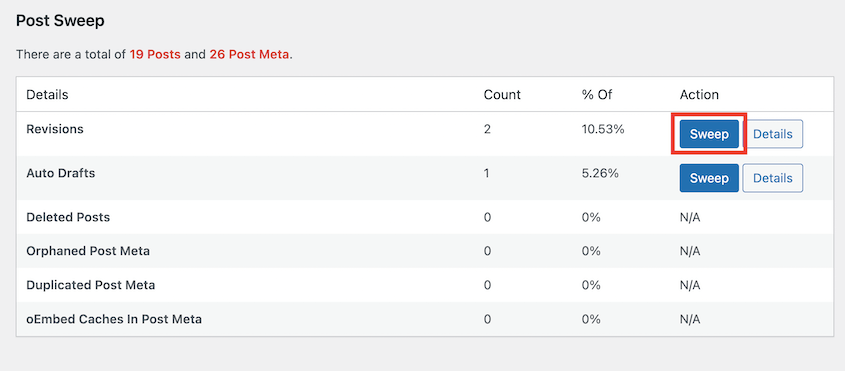
WP-Sweep uses WordPress’s built-in delete functions instead—functions like wp_delete_post_revision() and wp_delete_comment().
Why does this matter? Because those WordPress functions don’t just delete the main record. They also clean up all the associated metadata, relationships, and references that connect to that record.
Direct SQL queries don’t do that. They leave fragments behind, which become more orphaned data down the road.
It’s a more thorough cleaning method. If you’ve already optimized your database with other plugins and still feel like something’s off, WP-Sweep often catches what they missed.
WP-Sweep can remove all of this data:
- Post revisions and auto drafts
- Orphaned post meta
- Unapproved or spam comments
- Orphaned or duplicated user meta
- Orphaned or duplicated term meta
- Transient options
There are easy-to-use Sweep buttons to optimize specific data, or you can sweep your entire database.
Database Reset Pro for Complete Rollbacks
This is not a routine database optimization tool. This is the scorched earth option.
Database Reset Pro is built for developers who need to completely reset a development or staging site without reinstalling WordPress from scratch. It wipes your database clean and starts fresh.
I don’t recommend this for live production sites. But if you’re testing themes, building a site for a client, or need to reset a staging environment quickly, it’s incredibly useful.
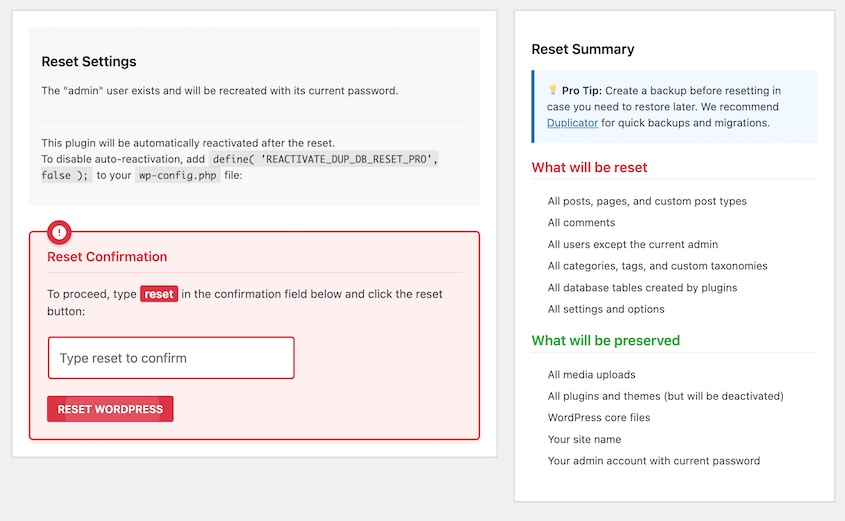
With a single click, you’ll remove all custom data including:
- Posts, pages, and custom post types
- Comments and comment meta
- Users except the preserved admin account
- Categories, tags, and custom taxonomies
- Plugin and theme settings
- Widgets and widget settings
- Customizer settings
- Database tables with your WordPress prefix
- Options and transients
It’ll keep your plugins and themes installed but deactivated. After a reset, you’ll still have your media files, WordPress core files, and admin user.
This can be useful if you’re a WordPress developer who needs to quickly reset a staging site. It can help you quickly clean your database after a troubleshooting session.
Frequently Asked Questions (FAQs)
What’s the best free WordPress database optimization plugin?
DB Optimizer is the best option for most sites. It scores your database health from 0-100, shows exactly what it’ll remove with reclaimable space estimates, and prompts a Duplicator backup before cleanup runs. It’s bundled free with Duplicator Pro and Elite, or $29/year standalone.
Can I optimize the database myself using phpMyAdmin?
You can, but I don’t recommend it unless you’re an experienced database administrator. One typo in a SQL query can permanently destroy your site with no undo button. Database optimization plugins provide a safe interface that protects you from catastrophic mistakes.
How often should I optimize my database?
High-traffic sites should optimize weekly. Low-traffic sites can get away with monthly or quarterly cleanups. The key is consistency.
Is it safe to use a WordPress database optimization plugin?
Yes, if you use a reputable, well-maintained plugin and back up your site first. Check reviews and last updated dates, and always have a recent backup before making any database changes.
Will database optimization make my site faster for visitors?
Mostly it speeds up wp-admin and your backups, not your front-end load time for visitors. Visitors rarely hit the bloated tables directly. If you’re chasing front-end speed, pair this with caching and image optimization.
What’s the difference between DB Optimizer and WP-Optimize?
DB Optimizer leads with a health score and a guided, preview-first cleanup with Duplicator backup integration. WP-Optimize has free scheduled automation.
Put Your Database on a Healthy Diet
Database optimization is an ongoing process, just like keeping your plugins updated or monitoring your site’s security.
Most WordPress users never think about their database until something breaks. By then, you’re dealing with a crisis instead of preventing one.
Regular database optimization keeps your admin dashboard responsive. It makes your on-site search actually usable, and it lets visitors browse your content without frustratingly slow pages.
But none of this matters if you don’t protect yourself first. You need a safety net before you touch anything.
Duplicator Pro gives you automated, scheduled backups that run in the background. You set it once, and you always have a restore point ready, which is handy before optimizations or other major changes.
Install Duplicator Pro to back up your database before any cleanup, and check whether DB Optimizer is already included in your plan!
While you’re here, I think you’ll like these other hand-picked WordPress guides:
- Here Are the WordPress Database Repair Steps I Took Myself (No Developer Needed)
- How to Update Your WordPress Database (+ Fix the Update Required Loop)
- How to Back Up a WordPress Database (Complete Guide)
- How to Restore a Website With Only a Database Backup
- 13 Best WordPress Database Plugins for Easy Data Management
- How Black Bike Media Rescued a 2.4GB Corrupted Database