

Duplicator Cloud vs OneDrive: Where Should Your WordPress Backups Go? (2026)
 Joella Dunn
 John Turner
OneDrive is built into Windows. It’s attached to your Outlook address. And if you pay for Microsoft 365, you already have a terabyte of it.
So when Duplicator asks where your backups should go, you may already have the space.
That’s a strong argument, and I’m not going to wave it away. OneDrive is cheap storage you probably own already.
The bigger questions come after the backup lands:
- Who else is using that storage?
- What can break the connection?
- Who owns the files when someone leaves the company?
- Can you get the site back if WordPress won’t load?
In this post, I’ll compare Duplicator Cloud and Microsoft OneDrive on cost, storage, reliability, backup frequency, and recovery.
Here are the key takeaways:
- OneDrive is cheaper per gigabyte. Microsoft 365 Basic gives you 100GB for $19.99 a year. The same amount on Duplicator Cloud costs $149.
- OneDrive needs Duplicator Pro. The free plugin can’t connect to it. It can connect to Duplicator Cloud.
- OneDrive storage is shared. Your Outlook.com attachments and photos use the same quota. Going over it stops your email too. Duplicator Cloud only stores your backups.
- The OneDrive connection could break without warning. A password change or a revoked permission can cut it off.
- Only Duplicator Cloud stores incremental backups. These hourly snapshots save only what changed (on Pro and Elite plans).
- A dead dashboard is the real test. Duplicator Cloud can restore your site from cloud.duplicator.com. With OneDrive, you move the files by hand.
Table of Contents
- Duplicator Cloud vs OneDrive: What's the Quick Verdict?
- What Is Duplicator Cloud?
- What Is Microsoft OneDrive?
- How Do You Connect Each One to WordPress?
- Why Can a Full OneDrive Stop Your Email?
- What Can Break the OneDrive Connection?
- Who Owns the Backups When Someone Leaves?
- Which One Can Back Up Your Site Every Hour?
- Which One Handles Large WordPress Sites Better?
- What Does Recovery Look Like?
- How Do They Compare on Security?
- What Does Each One Cost?
- Which One Is Better for Managing Multiple Sites?
- Should You Use Duplicator Cloud or OneDrive?
- Frequently Asked Questions (FAQs)
Duplicator Cloud vs OneDrive: What’s the Quick Verdict?
Here’s how the two compare on the details that matter most:
| Duplicator Cloud | Microsoft OneDrive | |
|---|---|---|
| Requirements | Duplicator (free or paid) and a Duplicator Cloud plan | A Microsoft account and a Duplicator Pro license (or other compatible backup plugin) |
| Free tier | None, plans start at $29/year | 5GB |
| Entry paid plan | 2GB for $29/year | 100GB for $19.99/year (Microsoft 365 Basic) |
| Storage range | 2GB to 150GB | 5GB free up to 2TB on home plans, 1TB per user on business plans |
| Shares the quota with | Nothing, it only holds backups | OneDrive files, photos, and Outlook.com attachments |
| Where backups go | Grouped by site in your Duplicator Cloud dashboard | A folder per site inside /Apps/Duplicator Pro/ |
| Incremental backups | Yes, on Duplicator Pro and Elite plans | No |
| Restore while WordPress works | From wp-admin | From wp-admin (with Duplicator Pro) |
| Restore while WordPress is down | Recovery connector restores over saved FTP or SFTP details | Manual: download the archive and installer, upload both, run the installer |
| Partial restore without WordPress | Database only, media only, or specific files | Not available |
| Encryption | AES-256 at rest, 99.9% uptime SLA | Encrypted at rest and in transit |
| Best for | The backup copy you plan to restore from | Documents, photos, and a secondary backup copy |
OneDrive is excellent at what Microsoft built it for. It syncs documents, backs up your PC, and stores your photos.
None of that involves a web server.
To OneDrive, your WordPress backup is just a zip file. It can’t tell you which site it came from or how to turn it back into a website. You’ll need a backup plugin like Duplicator to handle all of that.
Duplicator Cloud was built around WordPress backups from the start. That’s why it can offer a dashboard for each site, a restore that works when WordPress doesn’t, and smaller backups that only store changes.
What Is Duplicator Cloud?
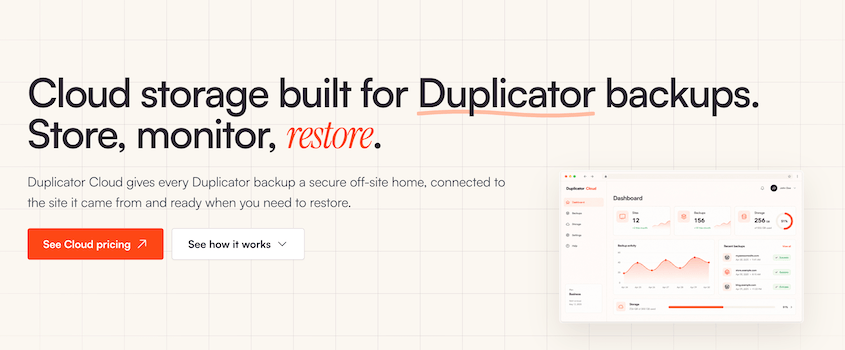
Duplicator Cloud is a custom storage service Duplicator created for its own backups. The Duplicator plugin has more than 1.5 million active users, so it’s one of the most popular tools for backing up your site.
Other destinations in Duplicator’s storage list need an outside account. OneDrive, for example, needs a Microsoft sign-in and a permission token.
Duplicator Cloud doesn’t. It connects with your Duplicator license or a token from duplicator.com.
Your backups then show up at cloud.duplicator.com. You sign in there with your duplicator.com account.
The dashboard lists every connected site, with its own storage use and backup history. From there, you can:
- Download any backup without logging into WordPress.
- Start a full or partial restore.
- Cut off one site’s access without touching the others.
You don’t need a paid license to use it. Since Duplicator 5.0, the free plugin can connect to Duplicator Cloud. The storage plan itself costs $29 to $199 a year.
What Is Microsoft OneDrive?
OneDrive is Microsoft’s cloud storage service. It’s built into Windows and bundled with every Microsoft 365 subscription.
There are two versions, and the difference matters for backups:
- OneDrive for home comes with a personal Microsoft account or a Microsoft 365 Basic, Personal, or Family plan.
- OneDrive for work or school comes with a Microsoft 365 business plan. Your company’s administrator controls it.
Duplicator Pro connects to both. On a business account, your administrator may need to approve the connection.
What Is OneDrive Good At?
OneDrive earns its place on a lot of computers. It’s worth being fair about why.
Here’s where it shines:
- The price is hard to beat. 100GB costs $19.99 a year.
- You may already pay for it. Microsoft 365 Personal includes 1TB. The family plan includes 2TB shared across up to six people.
- Paid plans include ransomware detection. OneDrive alerts you to an attack and helps you roll your files back.
If your backups only live on your web server right now, a copy in OneDrive is a real improvement. I just wouldn’t make it your only off-site copy.
Can OneDrive’s Windows Backup Protect a WordPress Site?
No, even though the name makes it sound like it should.
OneDrive’s backup feature syncs folders on your computer, like Desktop and Documents.
Your WordPress site isn’t on your computer. Its files are on your hosting server, and its content is in a database on that server. OneDrive’s backup can’t reach either one.
Without a backup plugin, you’d have to copy your files and database by hand and upload them yourself. That manual backup process works, but it’s easy to let slide.
How Do You Connect Each One to WordPress?
Both take a few minutes from inside WordPress. OneDrive has a few more steps.
How Do You Connect OneDrive to Duplicator?
You’ll need a Duplicator Pro license. The free plugin doesn’t include third-party cloud storage.
Here’s how to connect OneDrive to WordPress:
- Open Duplicator Pro » Storage and click Add New.
- Name the storage and pick OneDrive from the Type list.
- For a work or school account, switch on Are you using a business account?
- Click Connect to OneDrive, then Authorize OneDrive. Microsoft opens in a new tab.
- Sign in to Microsoft, click Accept, and copy the code it shows you.
- Back in WordPress, paste the code and click Finalize Setup.
- Set Max Backups to fit your OneDrive space, then click Test Storage.
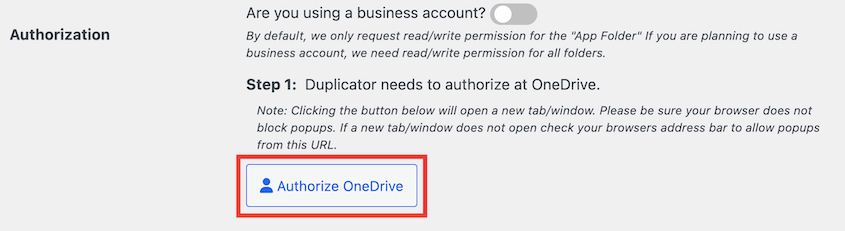
Duplicator saves everything to /Apps/Duplicator Pro/ in OneDrive. Each site gets its own folder.
How Do You Connect Duplicator Cloud?
Because Duplicator Cloud is a Duplicator product, it’s much easier to connect.
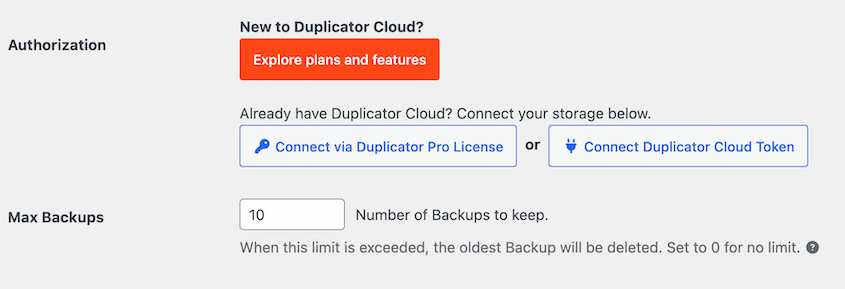
Add a new storage location and choose Duplicator Cloud. Hit Connect via Duplicator Pro License or Connect Duplicator Cloud token.
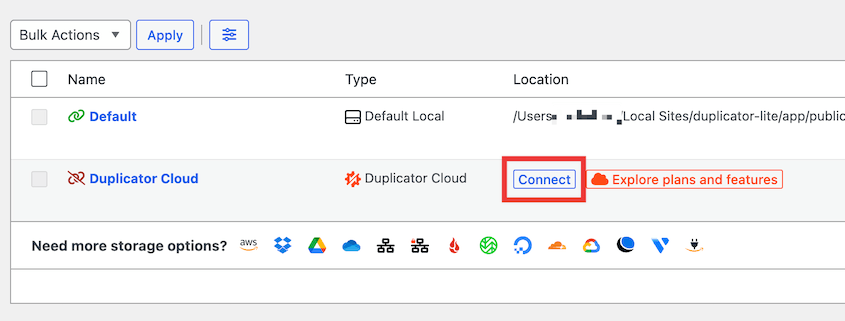
The connection also works on the free plugin. Go to the Storage page and click Connect beside Duplicator Cloud. Then paste in a connection token from your duplicator.com account.
Either way, click Test Storage before your first cloud backup.
Why Can a Full OneDrive Stop Your Email?
Your Microsoft storage quota covers more than OneDrive files. It also counts your photos and every Outlook.com email attachment.
On the free 5GB plan, that space goes quickly. Business sites commonly produce backups between 1GB and 5GB. One or two copies can fill whatever your email left over.
Here’s what Microsoft says happens when you go over your limit:
- Right away, new files stop uploading, so your backups stop too.
- Also right away, Outlook.com stops sending and receiving email.
- After three months, your OneDrive is frozen.
- After six months, Microsoft may delete your OneDrive and everything in it.
Plan around that last one. An account you only use for backups is easy to forget about.
What Can Break the OneDrive Connection?
A storage connection only matters if it still works when something goes wrong.
When you connect OneDrive, Microsoft gives Duplicator a token. That token can stop working for reasons that have nothing to do with your site.
Duplicator’s documentation lists these:
- A Microsoft password change can revoke the connection.
- Removing Duplicator’s access in your Microsoft account disconnects it.
- Revoking access at Microsoft disconnects every site using that OneDrive account, not just one.
- Security plugins that rotate the secret keys in wp-config.php can break the connection.
- On business accounts, an administrator’s policy change can block it.
Each of these is normal security behavior. The side effect is that your backups can stop reaching OneDrive without you changing anything.
You’ll find out, because Duplicator emails you when a backup fails. Then you’ll need to authorize OneDrive again.
Duplicator Cloud connects through your Duplicator license, so a password change doesn’t affect it. Revoking one site’s access leaves the others connected.
Who Owns the Backups When Someone Leaves?
This section is for businesses and agencies on Microsoft 365. If you use a personal Microsoft account, skip ahead.
On Microsoft 365, each employee has their own OneDrive. If a staff member connected Duplicator to theirs, your site’s backups live in that person’s storage.
Here’s what Microsoft’s default settings do when that person leaves:
- When their account is deleted, their OneDrive is kept for 30 days (your admin can change this).
- If their license is removed, the OneDrive is archived after 93 days.
Your admin can recover the files. But someone has to remember the backups were there before time runs out.
Duplicator Cloud belongs to the Duplicator license. The connection stays with the business when people come and go.
Which One Can Back Up Your Site Every Hour?
This is the biggest difference between the two right now.
Duplicator Pro can send automatic backups to OneDrive every hour. But each one is a full copy of your site.
Take a 1GB site. Hourly full backups add up to 24GB a day.
Incremental backups with Duplicator Cloud avoid that. Duplicator makes one full copy first, called the baseline. Every backup after that saves only the files and database tables that changed.
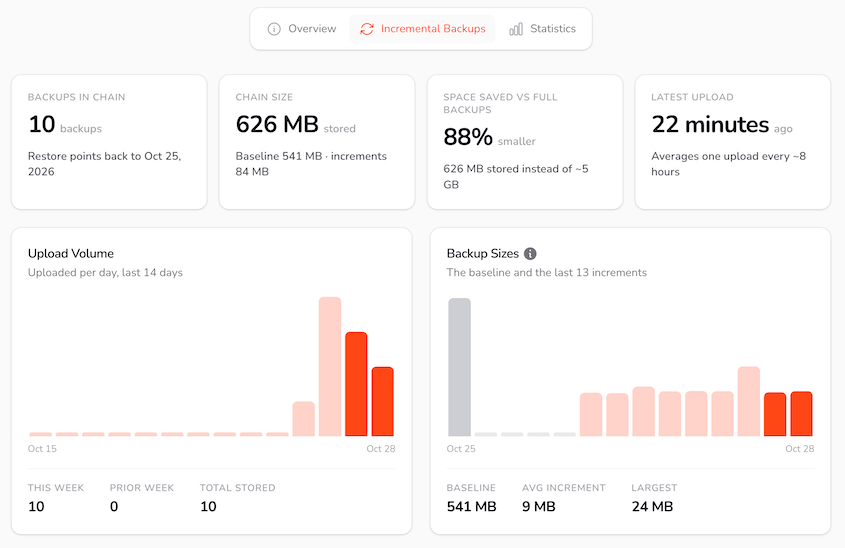
If nothing changed, Duplicator skips the backup.
Which One Handles Large WordPress Sites Better?
For a single large backup, both are fine. Very few WordPress backups come close to either one’s limits.
Total storage is where OneDrive pulls ahead. Duplicator Cloud’s largest plan is 150GB. Microsoft 365 Personal gives you 1TB for $99.99 a year.
Here’s how that works out for a site with a 5GB backup:
- Duplicator Cloud’s 150GB plan holds about 30 full backups.
- A 1TB OneDrive plan holds about 200, if nothing else is using the space.
If you want months of full backups for a big site, OneDrive gives you more room for less money. That’s a fair reason to pick it.
Incremental backups narrow that gap. Each backup after the first only stores what changed, so the same Duplicator Cloud plan holds a much longer history.
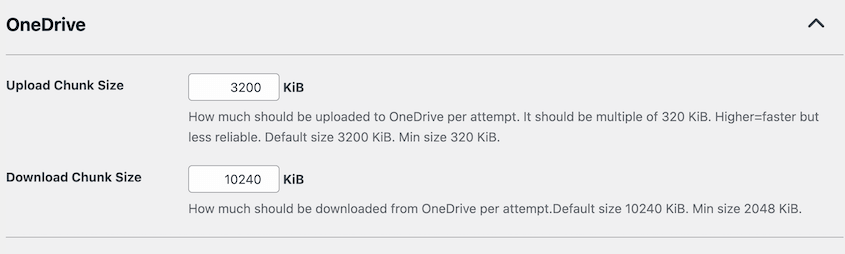
If large uploads to OneDrive keep failing, Duplicator’s documentation suggests lowering the OneDrive Upload Chunk Size under Duplicator Pro » Settings » Storage.
What Does Recovery Look Like?
You only find out what your storage is worth when you need to restore a backup.
There are two situations to plan for. Either WordPress is still running, or it isn’t.
What If WordPress Is Still Running?
If your wp-admin dashboard is still functional, there’s not much difference between them.
From Duplicator Pro » Backups, you can restore a OneDrive backup without leaving wp-admin.
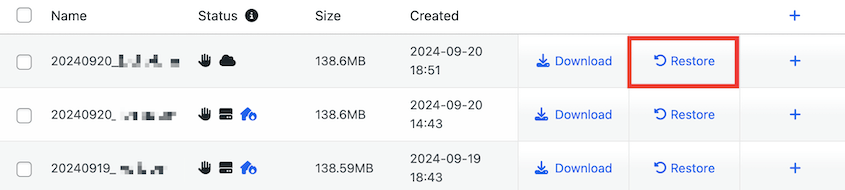
However, this is only applicable if you’re using Duplicator Pro. If you’re creating manual backups, you’ll have to manually restore files from OneDrive.
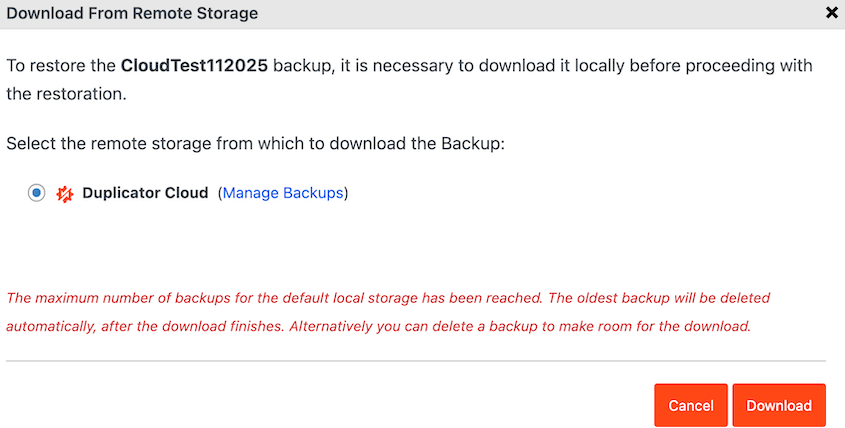
You can also restore any Duplicator Cloud backup from wp-admin. Choose the right backup, hit Restore, and your backup will download from the cloud.
What If WordPress Won’t Load?
This is what backups are for. A fatal error, a bad update, or a hack can lock you out of wp-admin.
And wp-admin is where the restore button was.
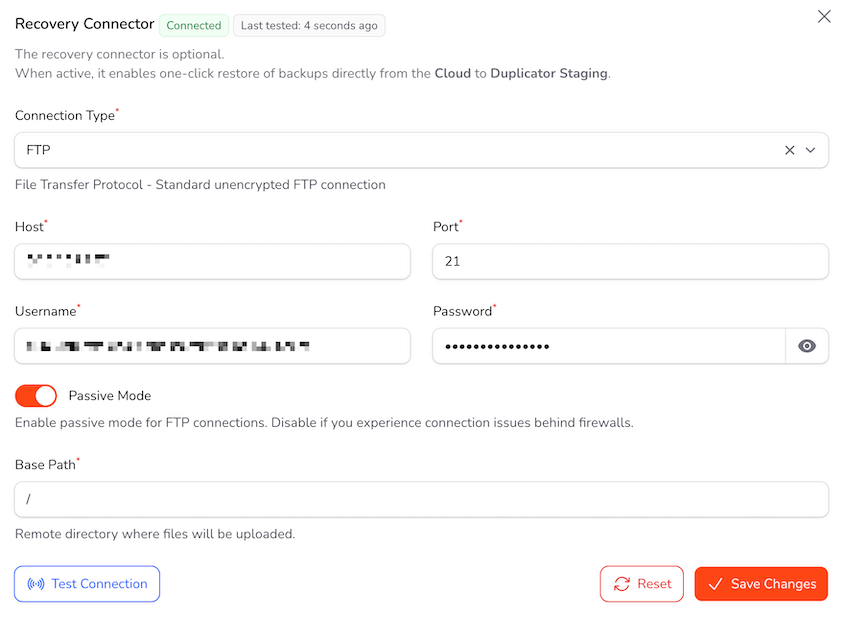
Duplicator Cloud gets around that with the recovery connector. You set it up ahead of time by saving your site’s FTP or SFTP login in the Duplicator Cloud dashboard.
When something breaks, you log in to cloud.duplicator.com from any browser. Pick a backup and click Restore Full Backup. Duplicator Cloud writes the site back onto your server.
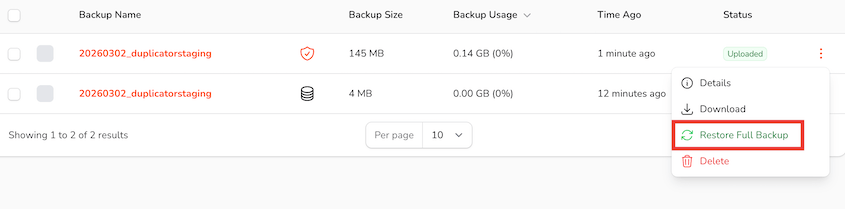
WordPress doesn’t need to be working for that to happen.
Here’s the OneDrive route for the same situation:
- Sign in to OneDrive and open /Apps/Duplicator Pro/.
- Find the right site folder and date.
- Download the archive and the installer.
- Upload both to your site’s root directory over FTP or SFTP.
- Open the installer in your browser and follow the steps.
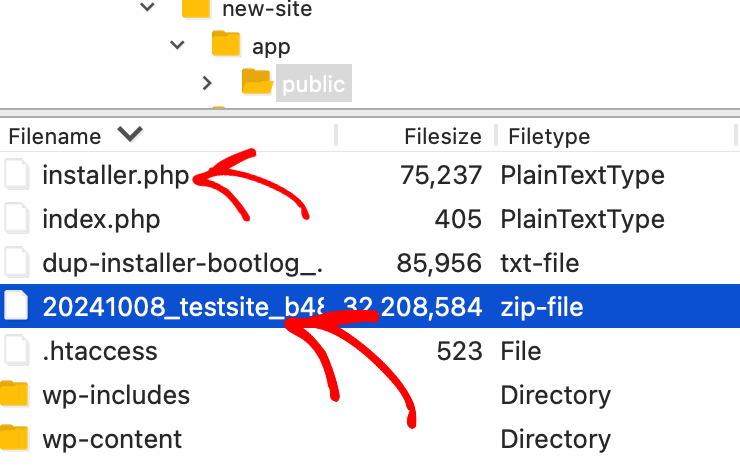
It works, and Duplicator’s installer was built for this. It’s just slower than Duplicator Cloud remote restores. Every gigabyte travels twice, down to your computer and back up to the server.
Plus, if you’re not using Duplicator, you’ll have to re-upload your entire site’s files over FTP and database files in phpMyAdmin. OneDrive just stores your files; it doesn’t restore them.
How Do They Compare on Security?
Both encrypt your backups at rest and in transit.
OneDrive adds two-step verification and, on paid plans, ransomware detection.
Duplicator Cloud uses AES-256 encryption and a 99.9% uptime SLA. Download links expire automatically, and you can revoke access one site at a time.
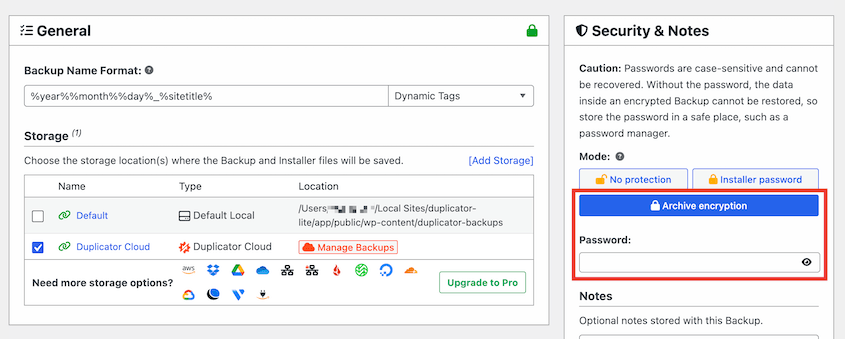
You can add another layer to either one. Duplicator can encrypt the backup archive with a password before it leaves your server.
What Does Each One Cost?
Duplicator Cloud is priced by storage size, billed once a year:
| Plan | Storage | Per year |
|---|---|---|
| Starter | 2GB | $29 |
| Basic | 10GB | $49 |
| Plus | 25GB | $69 |
| Business | 50GB | $99 |
| Pro | 100GB | $149 |
| Scale | 150GB | $199 |
Downloading or restoring a backup doesn’t add anything to the bill.
OneDrive’s storage comes bundled with Microsoft 365:
| Plan | Storage | Price |
|---|---|---|
| Free | 5GB | $0 |
| Microsoft 365 Basic | 100GB | $19.99/year |
| Microsoft 365 Personal | 1TB | $99.99/year |
| Microsoft 365 Family | 2TB shared, up to 6 people | $129.99/year |
| Microsoft 365 Business Basic | 1TB per user | $7/user/month, paid yearly |
Here’s how they line up at the sizes WordPress sites need:
| Backups you’re storing | Duplicator Cloud | OneDrive |
|---|---|---|
| Up to 5GB | $29 to $49/year | Free (shared with email and photos) |
| 10GB | $49/year | $19.99/year |
| 50GB | $99/year | $19.99/year |
| 100GB | $149/year | $19.99/year |
| 150GB | $199/year | $99.99/year |
On storage alone, OneDrive is cheaper. However, don’t overlook the costs of having to manually upload and restore backups yourself. Ultimately, I recommend a storage location that understands WordPress.
Which One Is Better for Managing Multiple Sites?
Duplicator Cloud is better for multi-site management.
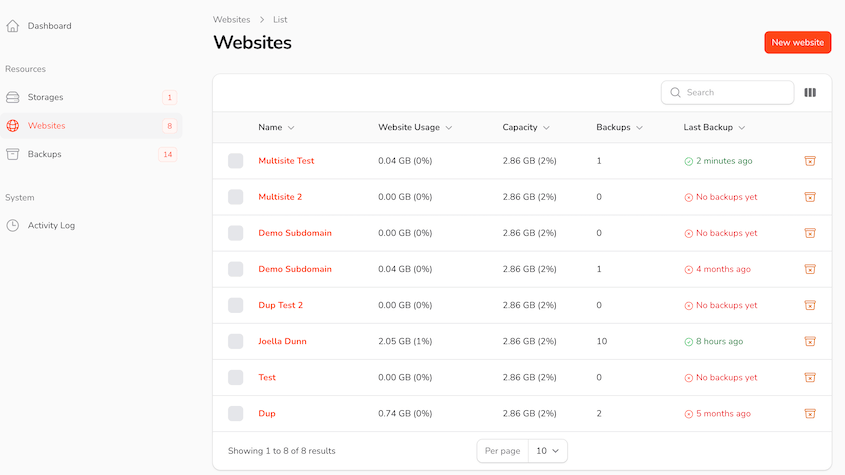
Its cloud storage is organized by website. Every site’s backups, storage use, and last backup date are on one screen.
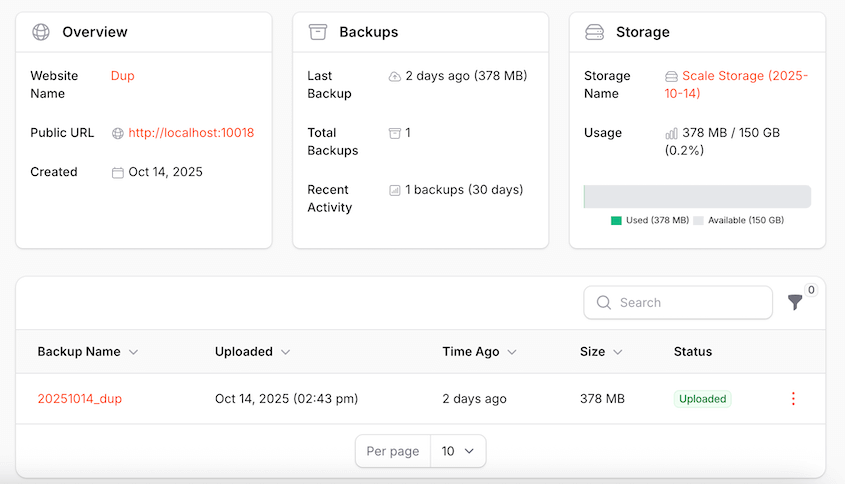
OneDrive gives you a folder per site inside /Apps/Duplicator Pro/.
With three or four sites, that’s manageable. At fifteen, you’re opening folders and comparing dates to find the site that missed a backup.
Remember the shared connection, too. Revoke Duplicator’s access in one Microsoft account, and every site linked to it disconnects.
For agencies, Duplicator Cloud also keeps client backups out of your team’s OneDrive. That makes handing a site over a lot cleaner.
Should You Use Duplicator Cloud or OneDrive?
My pick is Duplicator Cloud. Whether OneDrive also belongs in your setup depends on your situation.
You run a small site, and you’re already paying for Microsoft 365.
- OneDrive is a reasonable choice if you have Duplicator Pro. Set Max Backups low and watch for failure emails.
You run a business site that brings in revenue.
- Duplicator Cloud. The recovery connector gets your site back when WordPress won’t load. Add incremental backups on Duplicator Pro or Elite if your content changes during the day.
You’re on the free version of Duplicator.
- Duplicator Cloud. The free plugin connects to it directly. OneDrive would need a Duplicator Pro license first.
You manage sites for clients.
- Duplicator Cloud. Each client site gets its own view and access, and the connection stays with your license.
Your company runs on Microsoft 365.
- Use both. Duplicator Pro can send one backup to several places. Keep a short history in OneDrive and restore from Duplicator Cloud. That covers the 3-2-1 backup rule.
Frequently Asked Questions (FAQs)
Is OneDrive good for WordPress backups?
Yes, when a backup plugin does the work. Duplicator Pro builds the backup, uploads it to OneDrive on a schedule, and restores it from wp-admin. On its own, OneDrive can’t reach your web server or database.
Can I back up WordPress to OneDrive for free?
You can store backups on OneDrive’s free 5GB plan. But you’ll need a plugin like Duplicator Pro to send them there automatically. That 5GB is also shared with your email attachments and photos.
Does Duplicator work with OneDrive for Business?
Yes. Turn on Are you using a business account? when you add OneDrive as storage. Your Microsoft 365 administrator may need to approve the connection.
Why did my WordPress backups stop uploading to OneDrive?
The usual causes are a full quota, a Microsoft password change, or a revoked permission. Duplicator emails you when a backup fails. To fix it, edit the OneDrive storage in Duplicator and authorize it again.
Do WordPress backups count against my Outlook.com storage?
Yes. Your Microsoft storage quota covers OneDrive files, photos, and Outlook.com attachments. If you go over it, Outlook.com stops sending and receiving email.
What happens to my backups if I cancel Microsoft 365?
Your storage drops to the free 5GB. If you’re over that, uploads stop, and your OneDrive can be deleted after six months. Download your backups before you cancel.
Can I restore just my WordPress database from the cloud?
Yes, with Duplicator Cloud. The recovery connector can restore only the database, only the media library, or specific files. It works even when WordPress won’t load.
Is Duplicator Cloud included with Duplicator Pro?
No. Duplicator Cloud is a separate storage plan, starting at $29 a year for 2GB. It works with both the free plugin and Duplicator Pro.
Can I use OneDrive and Duplicator Cloud together?
Yes, if you have Duplicator Pro. Choose both storage locations when you create a backup or schedule. You can set a different Max Backups value for each.
OneDrive Stores Your Files: Duplicator Cloud Gets Your Site Back
OneDrive is good, cheap storage. If it came with your Microsoft 365 plan, there’s no harm in sending a copy of your backups there.
It just wasn’t built for WordPress.
It shares space with your email. Its connection can expire. And when WordPress is down, the restore is up to you.
Duplicator Cloud holds backups and nothing else. It stores hourly incremental backups on Duplicator Pro and Elite plans. And it can restore your site even when WordPress won’t load.
Storage plans start at $29 a year with a 14-day, no-questions-asked refund.
Still deciding where your backups should live? These guides go deeper:
- How to Back Up WordPress to Microsoft OneDrive in 2026
- 12 Best Cloud Storage Services for WordPress Backups (Expert Pick)
- Duplicator Cloud vs Google Drive: Which Should Store Your WordPress Backups?
- Duplicator Cloud vs Dropbox: Which Is Better for WordPress Backups?
- What Is an Incremental Backup in WordPress? (And How to Run Them)
- Cloud Backup vs. Local Backup: Which One Protects Your WordPress Site?