![[NEW] Duplicator DB Optimizer: Clean Your WordPress Database Before It Becomes a Problem](https://duplicator.com/wp-content/uploads/2026/06/Announcement-DB-Optimizer.jpg)
The 3-2-1 Backup Rule: What It Is, Why It Works, and What’s Changed in 2026
 Joella Dunn
Joella Dunn
Joella Dunn
 John Turner
John Turner
John Turner
What’s the one thing you don’t want to see when you type in your website address? A blank screen? An error message?
If you just felt a jolt of panic reading that, you’re not alone. Building a website is a lot of hard work, and it could vanish in a blink if disaster strikes.
That’s where the 3-2-1 backup rule comes in. It’s a smart, simple safety net for your website – a way to make sure that even if the unthinkable happens, your data stays standing strong.
The 3-2-1 rule is a widely respected and proven strategy for protecting any kind of data. People use it to secure their computers, websites, hard drives, and much more.
In this post, I’ll explain what the 3-2-1 backup rule is and how you can easily put it to work for your website. Let’s get you a rock-solid backup plan!
Here are the key takeaways:
- The 3-2-1 rule means: 3 copies of your data, on 2 different types of storage, with 1 stored offsite
- The original rule protects against hardware failure, accidental deletion, and most disasters. It doesn’t protect against an attacker who specifically targets your backups.
- The updated 3-2-1-1-0 rule adds: 1 immutable backup (can’t be deleted or overwritten) and 0 errors on a verified restore test
- A backup you’ve never tested is not a backup you can rely on. The “0” is not optional.
- Duplicator Pro implements the 3-2-1 strategy natively, with cloud storage to 10+ destinations and scheduled daily backups
Table of Contents
What Is the 3-2-1 Backup Rule?
The 3-2-1 backup rule ensures you have three copies of your data, on two different types of storage media, with one copy stored offsite. It’s a widely recommended strategy for data protection.
Let’s break it down piece by piece. The “3-2-1” refers to the number of backups and where they should live.
It means you should have:
- 3 copies of your data. Your original plus two backups. One backup fails more often than you’d expect. Two backups give you a real fallback.
- 2 different storage types. Store your copies on at least two physically different kinds of media, like a local hard drive and a cloud service or an on-site server and an external drive. The point is that the same failure that takes out one storage type shouldn’t take out both.
- 1 copy stored offsite. At minimum, one backup needs to live somewhere that a fire, flood, theft, or server failure at your primary location can’t touch. For most WordPress site owners, this means cloud storage: Google Drive, Amazon S3, Dropbox, or a dedicated backup service.
Those three requirements protect against the most common data loss scenarios: hardware failure, accidental deletion, and physical disasters.
If your server crashes and takes your local backups with it, you have the cloud copy. If you accidentally delete a post and overwrite the local backup, you have the second copy on a separate drive. If one copy fails to restore, you have another.
The framework was originally coined by photographer Peter Krogh in his 2005 book “The DAM Book: Digital Asset Management for Photographers.” It became the standard across IT and data protection because it’s simple, memorable, and it works.
Let’s look at each part in more detail.
3 Copies of Your Data
This is all about redundancy. Redundancy just means having multiple backups in case something goes wrong.
If you only have one copy of your website data, and your server crashes, you lose everything. But with three copies, you have options. If one copy fails, you have others ready to go. It’s like having spares.
2 Different Types of Storage Media
Why two different types of media? Because relying on just one type is risky.
Imagine you back up everything to external hard drives. What if there’s a problem with that type of hard drive? Or what if they all get damaged in the same event? Using different media protects you from these kinds of failures.
“Media” just means where you store your backups. Examples include:
- External Hard Drives
- SSDs (Solid State Drives)
- NAS (Network Attached Storage) devices
- Cloud storage (like Dropbox, Google Drive, AWS S3)
- Tape drives (less common for websites, but still used)
Mixing it up is key. For example, you could have one backup on an external hard drive and another in cloud storage.
1 Off-Site Location
This is the final piece of the puzzle, and it’s super important. “Off-site” means storing one backup in a completely different location.
Off-site backups give you continuous data protection from site-specific disasters. “Off-site” could be:
- A cloud storage service (data centers are usually in different locations)
- A different office location
- A secure data center
- Even a safety deposit box in a bank (for physical media).
The key is physical separation. If your main website and your local backups are hit by a problem, your off-site backup is safe and sound, ready to restore.
So, that’s the 3-2-1 rule in a nutshell. Three copies, two media types, one off-site. Simple, right? But incredibly powerful for protecting your valuable website data.
Why the 3-2-1 Rule Still Works
The 3-2-1 backup rule has survived decades of changing technology because the threats it protects against are still real.
Hard drives still fail. Cloud services still have outages. People still accidentally delete things. Physical disasters still happen.
A study by Barracuda Networks found that for organizations with a tested backup strategy, 97% recovered from ransomware attacks without paying the ransom. Having a backup is still the most reliable single factor in recovery.
The rule also survives because it is storage-agnostic. It doesn’t rely on one tool or service. You can implement it with free cloud storage and a plugin, or with enterprise-grade infrastructure — the numbers stay the same. That flexibility has made it a durable standard across every kind of organization, from solo bloggers to large agencies.
For a WordPress site specifically, the 3-2-1 rule translates naturally:
- Copy 1: Your live site (files + database on your web host)
- Copy 2: A local backup on your computer or a NAS drive
- Copy 3: An offsite cloud backup to Duplicator Cloud, Google Drive, Amazon S3, Dropbox, or similar
That structure, maintained consistently, protects against the vast majority of data loss events WordPress site owners actually face.
Increased Data Security and Redundancy
The 3-2-1 rule is all about redundancy. It means you have multiple copies of your data. If one copy fails, you have others. This dramatically reduces the risk of permanent data loss.
Prevent Data Loss
Data loss can happen in many ways. Hard drive crashes are common. So are accidental deletions. Cyberattacks like ransomware can encrypt your files. Natural disasters like floods or fires can destroy your equipment.
The 3-2-1 rule protects you against a wider range of threats like:
- Hardware Failure: If a hard drive dies, you have backups on different media.
- Software Issues/Corruption: If your website files get corrupted, you have clean backups.
- Human Error: Accidentally delete important files? Restore a backup.
- Cyberattacks: Ransomware got you? Wipe your system and restore from a pre-attack backup.
- Disasters: Fire or flood at your location? Your offsite backup is safe.
Data breaches and other disasters can compromise your valuable information, making a multi-layered backup strategy essential for business continuity.
Peace of Mind
Knowing you have a solid backup strategy in place gives you peace of mind. You can focus on your work, your website, and your business, without constantly worrying about data loss. You’ll always have a disaster recovery plan available if you need one.
Industry Best Practice
The 3-2-1 rule isn’t some niche idea. It’s a widely recognized and recommended best practice in the IT industry. Experts and organizations around the world advocate for it. Following the 3-2-1 rule means you’re using a proven, reliable strategy for data protection.
Where the 3-2-1 Rule Falls Short in 2026
Modern ransomware attacks work differently than they did ten years ago. Early ransomware found your files and encrypted them. You restored from backup and moved on.
Current attacks don’t work that way. Attackers now spend time inside compromised systems before activating any encryption.
During that time, they locate and delete or corrupt all accessible backups. Then they encrypt. When the site owner goes to restore, there’s nothing to restore from.
If your backups are stored somewhere the attacker can reach (like a cloud storage account connected to the same compromised admin credentials or a backup folder on the same server), they’re vulnerable. The physical separation the 3-2-1 rule provides doesn’t help if the attacker has your login credentials.
There’s a second gap: a backup that has never been tested is a backup that might not work.
I’ve seen site owners discover this at the worst possible moment. They open a backup file after a crash and find it corrupted, incomplete, or created by a plugin that no longer runs on the new environment.
The backup existed. It just didn’t restore.
Neither of these gaps makes the 3-2-1 rule wrong. It just means the rule needed an update.
The 3-2-1-1-0 Rule: The 2026 Standard
The 3-2-1-1-0 rule builds on the original 3-2-1 rule by adding two extra requirements.
+1 immutable backup. At least one of your backup copies must be immutable.
An immutable backup cannot be modified, overwritten, or deleted (even by an administrator with full credentials) for a defined retention period. If an attacker gains full access to your systems, an immutable backup is the one copy they cannot touch.
Cloud storage providers like Amazon S3 offer object lock settings that make buckets immutable. Some backup services store backups on infrastructure you don’t control directly.
+0 errors on restore testing. The “0” means your backup strategy includes verified restore tests, and those tests complete with zero errors.
A backup that has never been tested carries unknown risk. A backup that restored successfully last quarter is one you can actually rely on.
The “1” and “0” don’t replace the original rule; they extend it. You still need three copies, two media types, and one offsite. Now you also need one of those copies to be genuinely untouchable, and you need proof that the restore process works.
For most WordPress site owners, implementing the full 3-2-1-1-0 standard looks like this:
- Copy 1: Live site on your web host
- Copy 2: Automated scheduled backup to a cloud storage account with object lock enabled (immutable)
- Copy 3: A second cloud destination or local drive
- Restore test: Quarterly, restore a backup to a staging environment and verify it works completely
The immutable copy is the one most site owners skip because it sounds complicated. It’s not. Amazon S3’s Object Lock, for example, can be configured in minutes.
How to Implement a 3-2-1 Backup Plan
Okay, you understand why you need 3-2-1 backups. Now, let’s get into how to actually implement this strategy for your WordPress site.
It might sound complicated, but it doesn’t have to be, especially with the right tools!
Step 1: Install Duplicator Pro
Duplicator Pro is a powerful WordPress plugin that makes backups simple. It lets you easily start following the 3-2-1 rule, even if you’re not a tech expert.
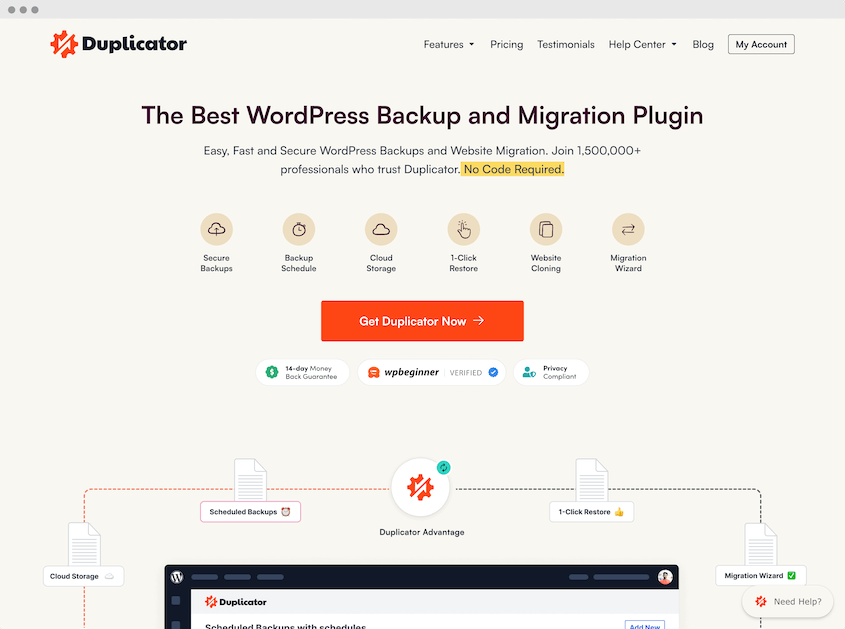
Think of Duplicator as your backup command center. It’s where you’ll control and manage your entire 3-2-1 backup strategy.
Here are some Duplicator features that perfectly align with the 3-2-1 backup rule:
- Unlimited backup creation
- Select multiple storage locations
- On-site local backups and third-party cloud backups
- Integrates with cloud services like Duplicator Cloud, Amazon S3, Google Cloud, Cloudflare R2, and more
- Schedule automatic backups
- Restore backups from the cloud in one click
First things first, you need to get Duplicator Pro installed on your WordPress website.
Activate the plugin. Then, go to Duplicator Pro » Settings. Paste your license key and hit Activate.
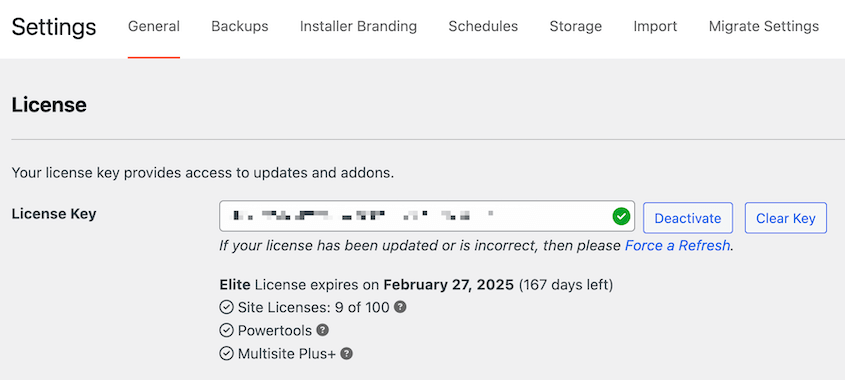
That’s it! Duplicator is now installed and ready to go. You’re ready to start backing up your website.
Step 2: Set Up At Least 2 Storage Locations
Now that Duplicator is installed, it’s time to tell it where to store your backups.
Remember the “2 different storage media” part of the 3-2-1 rule? This is where that comes in.
You need to set up at least two different storage locations within Duplicator. Ideally, you’ll set up even more for a secure 3-2-1 plan.
Off-site backups are the crucial part of true disaster recovery. They’re stored in a completely separate physical location, protecting you from location-specific disasters.
Services like Dropbox, Google Drive, Amazon S3, Google Cloud Storage, OneDrive, and Backblaze B2 are excellent off-site options that are convenient and reliable. Plus, they’re easy to set up within Duplicator.
If you have access to a separate server, you can use FTP or SFTP to send backups there. This offers more control but can be slightly more technical to set up.
Don’t underestimate the simplicity of a physical location. You could copy backups to a hard drive and store it at a friend’s house, a safe deposit box, or a different office location. It’s more manual, but still a valid off-site strategy.
For this tutorial, I’ll set up cloud backups. In my opinion, this is the easiest option.
Go to Duplicator Pro » Storage in your WordPress dashboard. Click the Add New button.
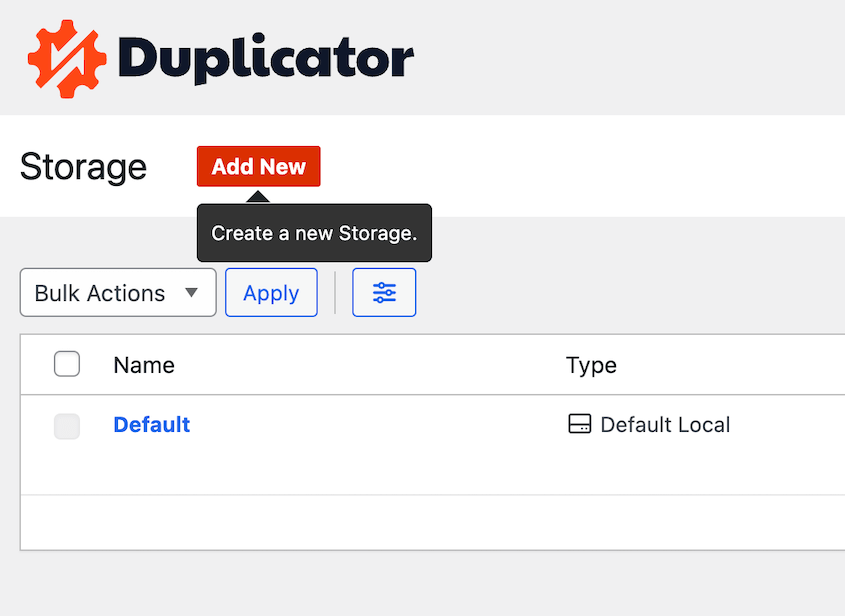
Give your storage location a descriptive name. Choose your storage type from the dropdown list.

Follow the prompts to authorize and connect Duplicator Pro to your chosen storage location. This usually involves logging into your cloud storage account or entering FTP/SFTP credentials.

Click Save Storage.
Step 3: Create Backups
Now for the exciting part: creating your first backup!
With Duplicator, creating a backup is a breeze. It makes a copy of your entire WordPress website (files, database, plugins, themes, everything). This backup is what you’ll use to restore your site if needed.
Go to Duplicator Pro » Backups in your WordPress dashboard. Click the Add New button.
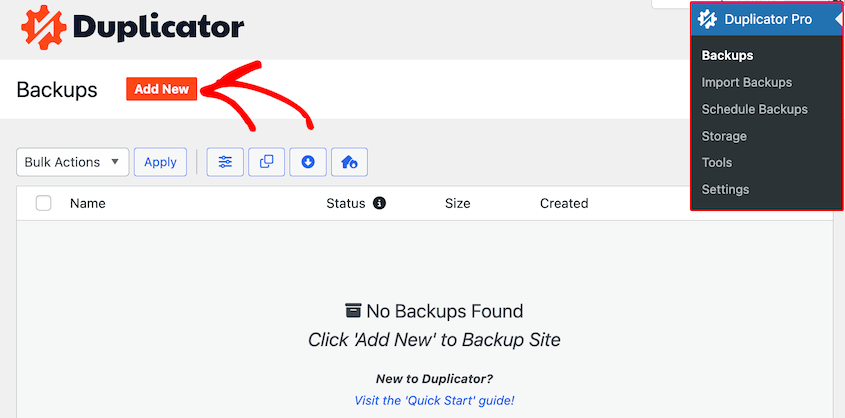
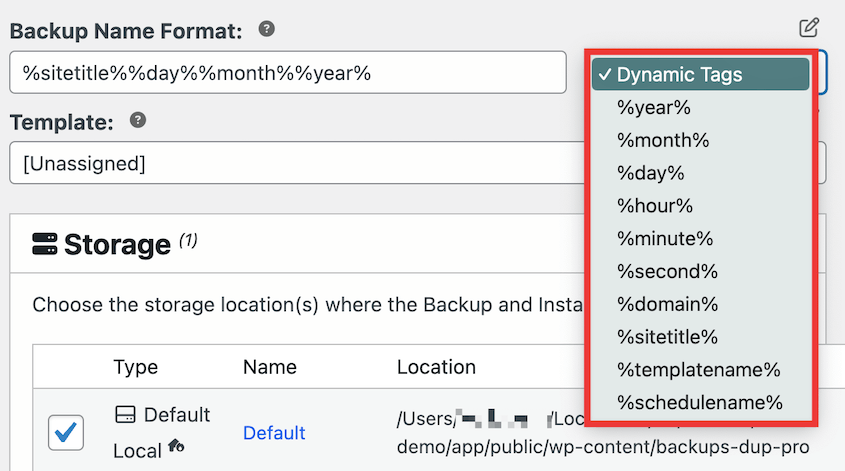
Name the backup. To easily find it later, use the dynamic tags to include the current time, backup template, day, or month.
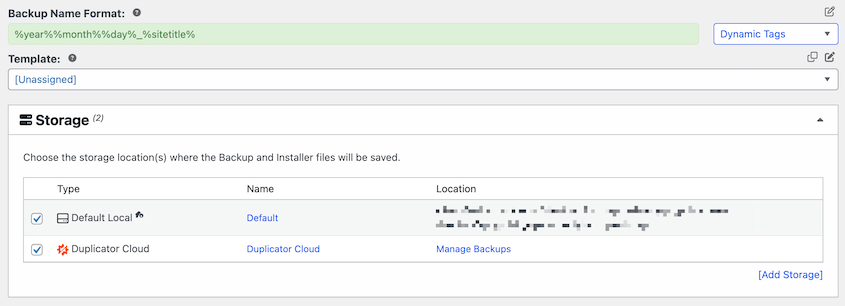
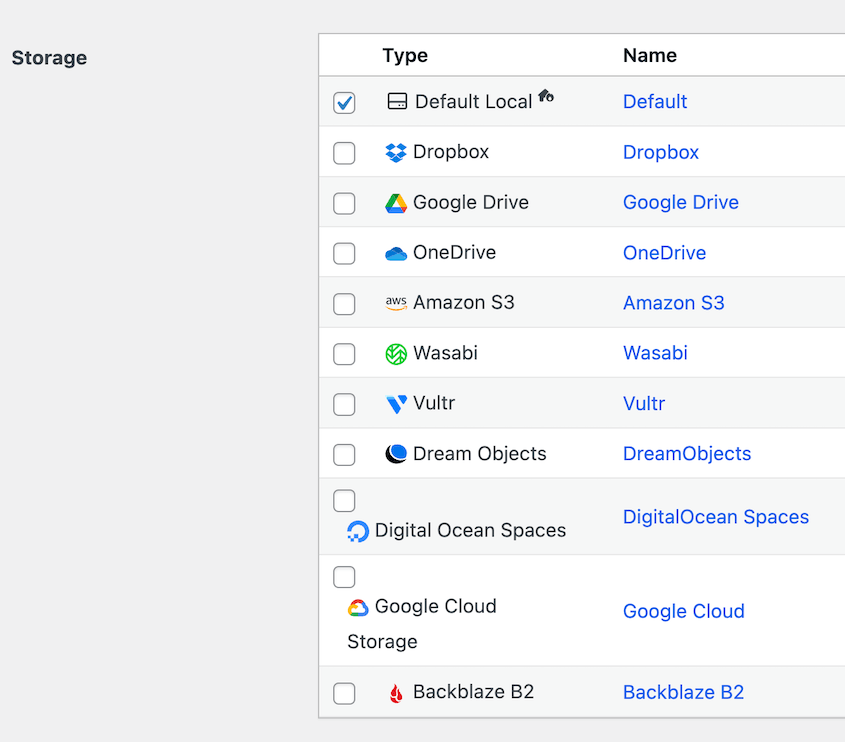
Under Storage, you’ll see a local option, as well as the cloud storage you set up in the last step. Select as many locations as you want, but make sure there are at least two.
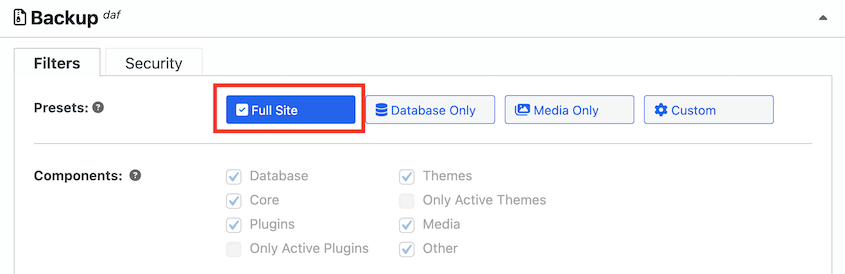
You can then decide what data to save in the backup. I’d recommend using the Full Site backup preset, but feel free to customize the backup if you want to.
Hit Next. Duplicator will scan your site and show you details about the backup it’s about to create. You can review these settings, but for a standard full-site backup, the defaults are usually fine.
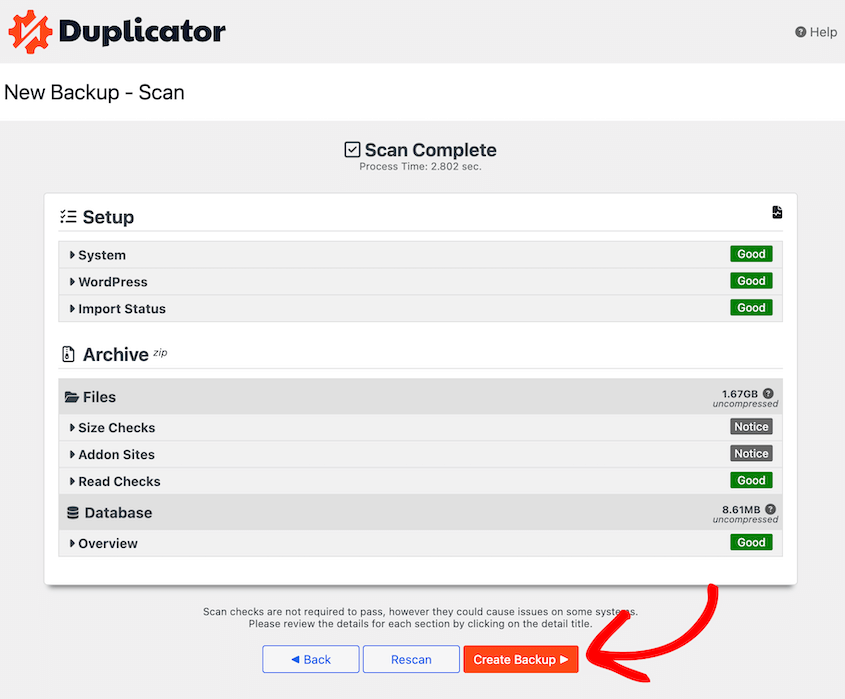
Once you’re ready, click the Create Backup button at the bottom of the page. Duplicator will start building your backup and sending it to multiple storage locations.
Once the backup is complete, you’ll see two files:
- Archive: This is the main backup file that contains all your website’s files and database tables. It will usually be a ZIP file.
- Installer: This is a small PHP file that’s used to restore your backup. You’ll need this file along with the archive file to restore your website.
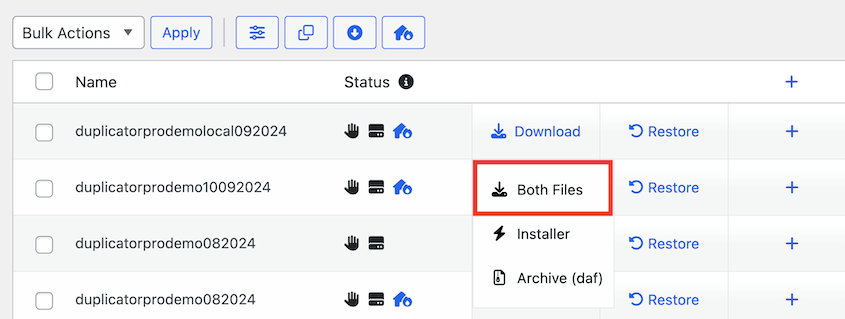
Download both the installer and archive files to your computer. Remember that you also have a copy stored in the cloud.
Step 4: Schedule Automatic Backups
Manual backups are a good start, but let’s be honest, remembering to manually back up your website regularly is tough. Life gets busy.
I always use automatic backups to make sure my site is protected.
Automation is key to a reliable 3-2-1 backup strategy. You want your backups to happen consistently, without you having to lift a finger.
Luckily, Duplicator supports backup scheduling. Go to Duplicator Pro » Schedule Backups » Add New.
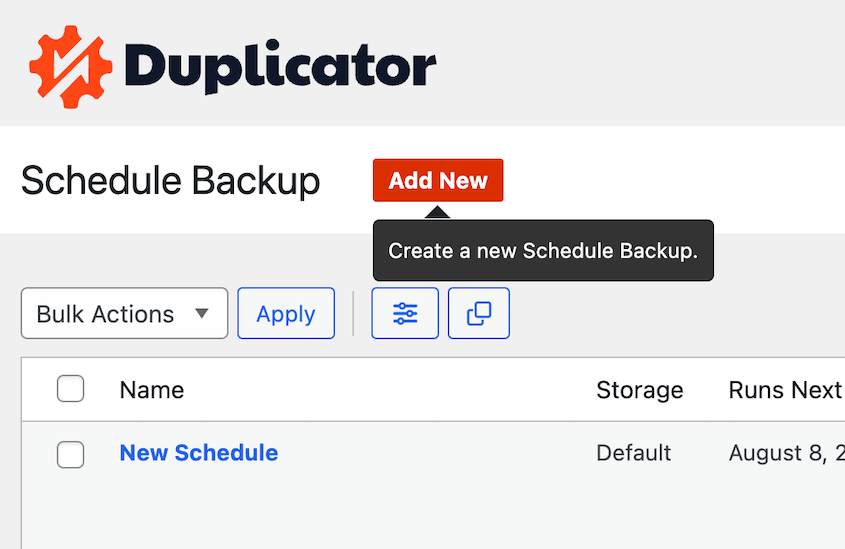
Enter a descriptive name for your schedule like Weekly Offsite Backup or Monthly Google Cloud Backup.
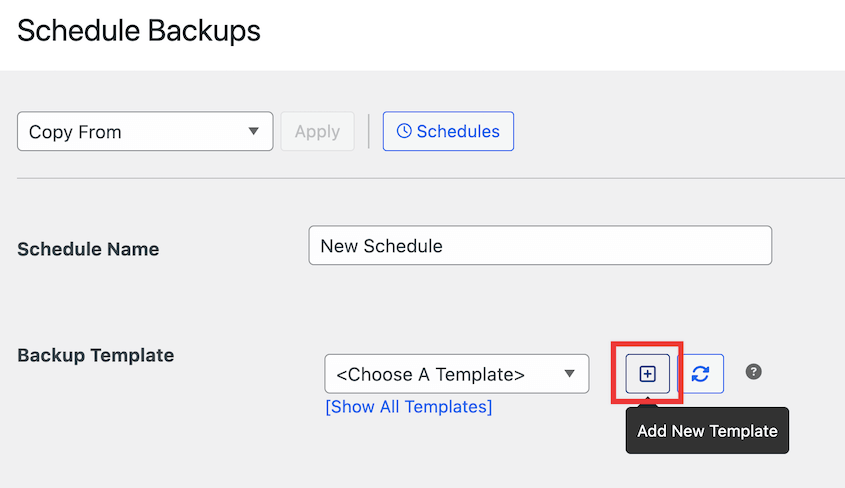
The backup template determines what data is backed up when the schedule runs. Keep the default if you want full-site backups. Create a new template for custom backups.
For an automatic backup, you can select multiple locations! This is how you automatically send backups to your different storage media and off-site locations. You could also create two different schedules for different storage locations.
Use the Repeats dropdown to choose how often you want backups to run. You have options like:
- Hourly: For very frequently updated sites.
- Daily: A good balance for most websites. Recommended for many WordPress sites.
- Weekly: Suitable for sites that don’t change content very often.
- Monthly: Less frequent, but still better than no automation.
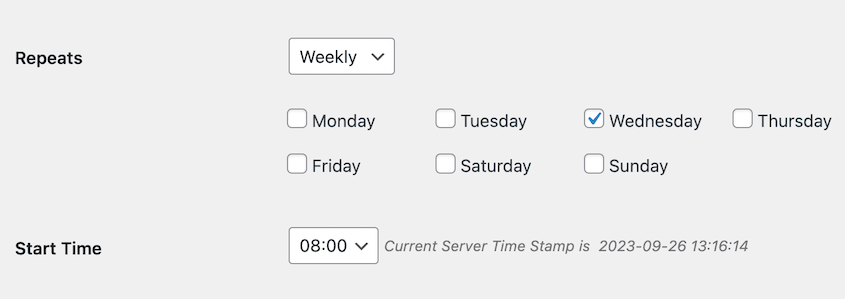
Choose a frequency that matches how often your website content changes. If you publish new blog posts daily, daily backups are a good idea. If your site is more static, weekly might be a good start.
After this, save your schedule and enable it.
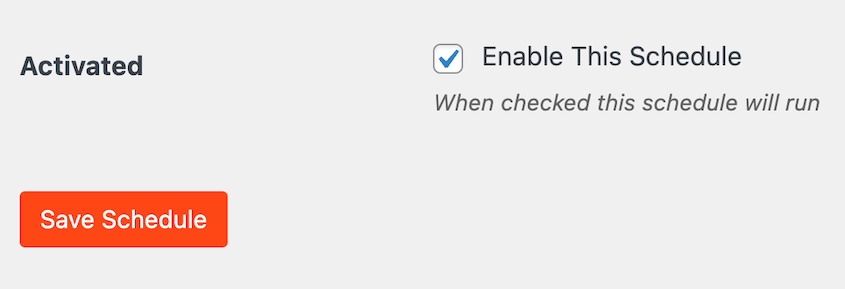
That’s it! Duplicator will now automatically create backups of your WordPress site according to the schedule you’ve set. You can relax knowing your backups are running in the background, keeping your website data safe.
Remember, consistency is crucial with backups. By automating your backups with Duplicator, you’re taking a huge step towards a reliable 3-2-1 backup plan.
Step 5: Add an Immutable Backup Destination (The 3-2-1-1-0 Upgrade)
This step takes the strategy from 3-2-1 to 3-2-1-1-0. You need one backup stored somewhere an attacker cannot delete it, even with your full admin credentials.
Amazon S3 with Object Lock is the most practical way to do this for WordPress site owners. Object Lock prevents any object (file) in an S3 bucket from being deleted or overwritten for a configured retention period, even by the bucket owner.
Follow this guide on setting up Amazon S3 as a WordPress storage location. However, as you create a new bucket, enable Object Lock in the advanced settings.
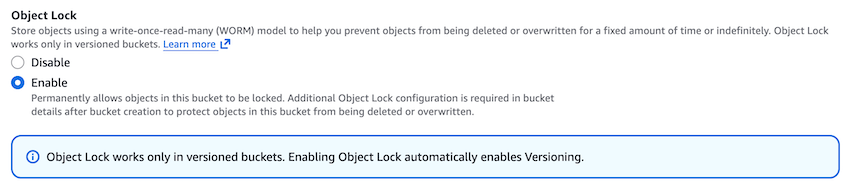
Update your backup schedule to include this S3 destination as a third storage location. Now your 3-2-1 structure is:
- Local server copy (Copy 1 via Default Storage)
- Duplicator Cloud (Copy 2, offsite)
- Amazon S3 with Object Lock (Copy 3, immutable offsite)
Step 6: Configure Backup Notifications
Imagine your automated backups are running, but you have no idea if they are succeeding or failing. That’s not ideal, right?
Backup notifications are like having a check engine light for your backup system. They alert you of any issues so you can fix them.
Duplicator will automatically notify you if a backup fails. Maybe there was an issue connecting to your storage location, or perhaps there was an error during the backup process. Notifications help you catch these problems quickly.
Plus, you can get routine updates on your backups. Duplicator sends an email summary with all of your new backups, storage locations, and running schedules.
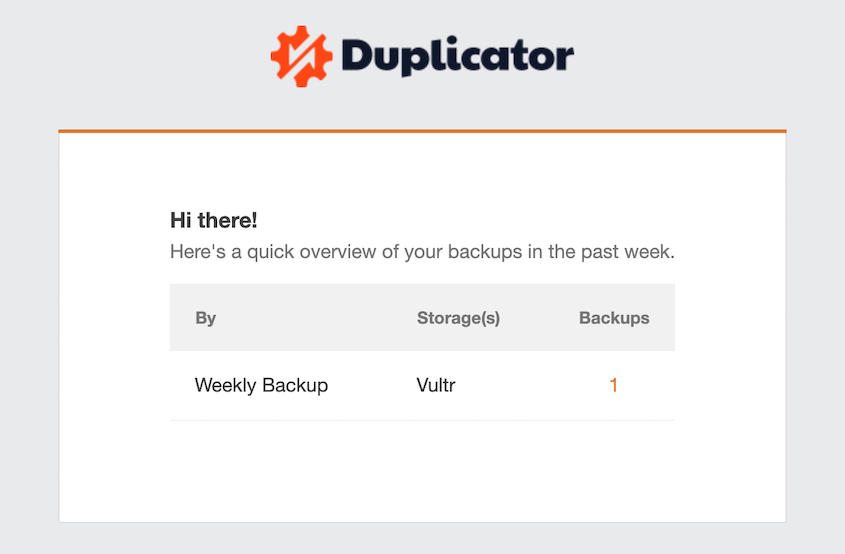
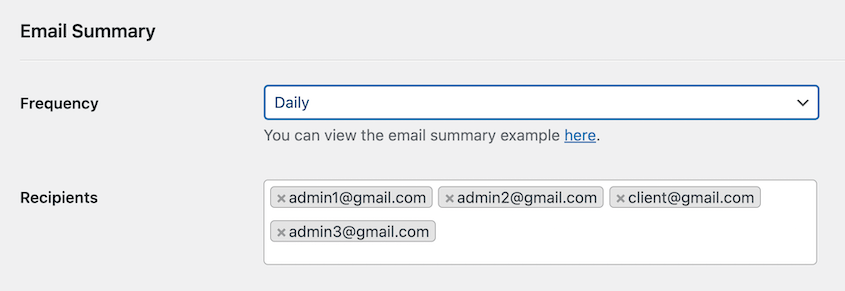
To customize these email summaries, find the Email Summary section in Duplicator’s General settings. Set the frequency to daily, weekly, or monthly. Enter your email address in the Recipients field.
Keep an eye on these notifications. If you receive failure notifications, check your Duplicator logs and settings to troubleshoot the issue. Addressing backup failures promptly is essential for maintaining a reliable 3-2-1 backup plan.
Step 7: Set Up Disaster Recovery
Backups are great, but they’re only useful if you know how to restore them. This is where disaster recovery comes in.
Disaster recovery is the process of restoring your website from a backup in case of data loss or website failure. With Duplicator, the restore process is designed to be straightforward.
If an error happens, find a clean backup and hit the Restore button. Even if it’s stored in the cloud, Duplicator will download and restore it.
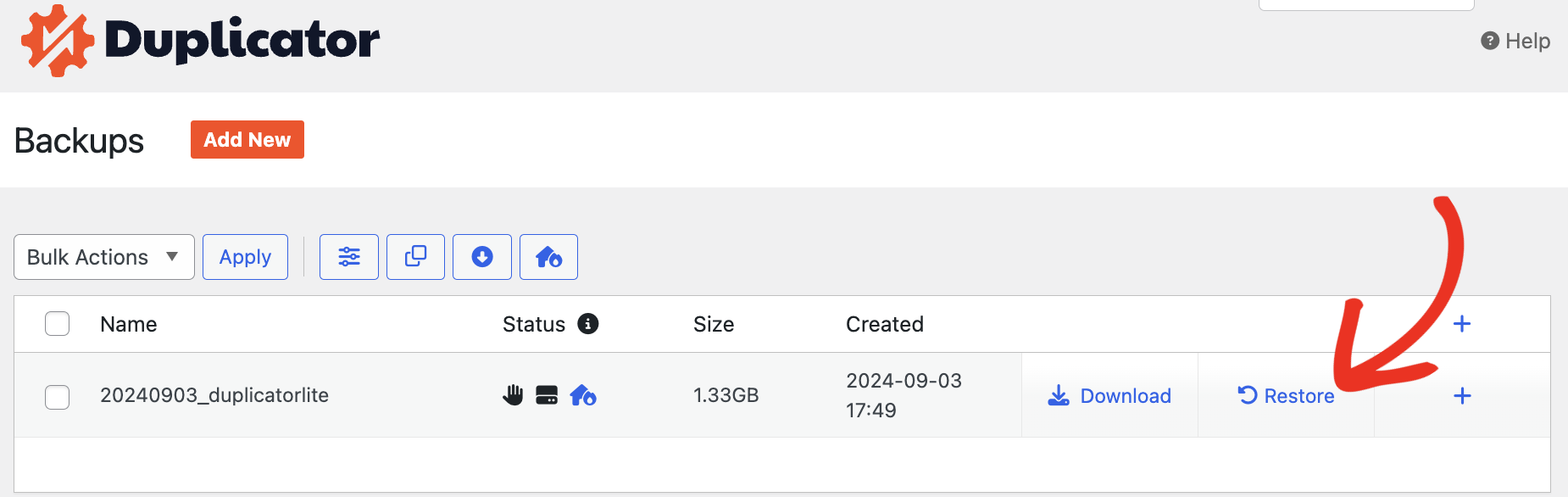
Remember those two files Duplicator creates for each backup: the archive and the installer? These are what you can use to restore your website.
If your backups are in a third-party location, download these two files. Then, using FTP or your hosting control panel’s file manager, upload both the installer.php file and the archive file to the root directory of your server.
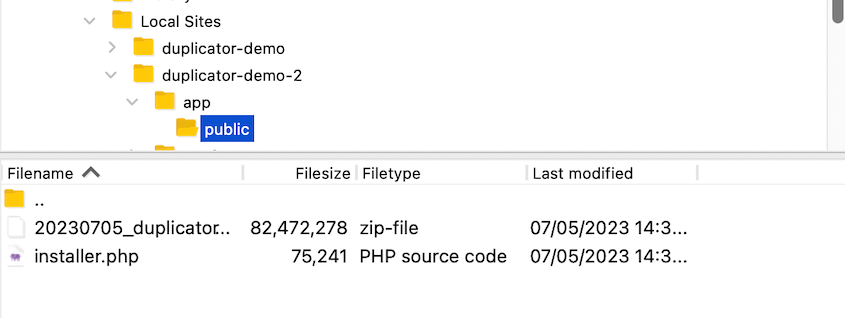
Open a web browser and search http://yourdomain.com/installer.php (replace yourdomain.com with your actual domain name or server IP address). The installer will guide you through the restoration process step-by-step.
You can also prepare for the worst-case scenario by setting up Duplicator’s disaster recovery feature. Locate a backup you’d want to restore in an emergency. Click on the blue house icon.
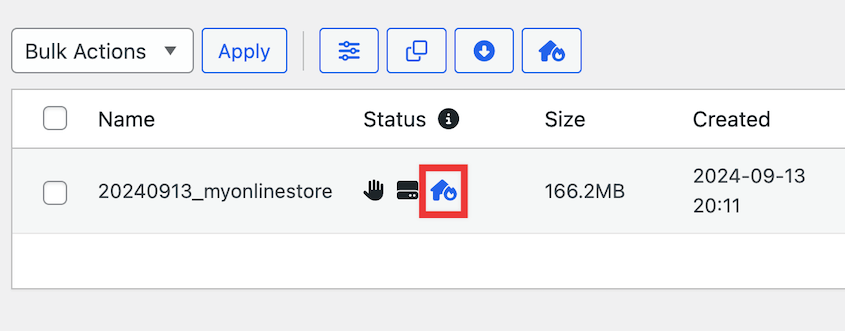
Continue setting disaster recovery.
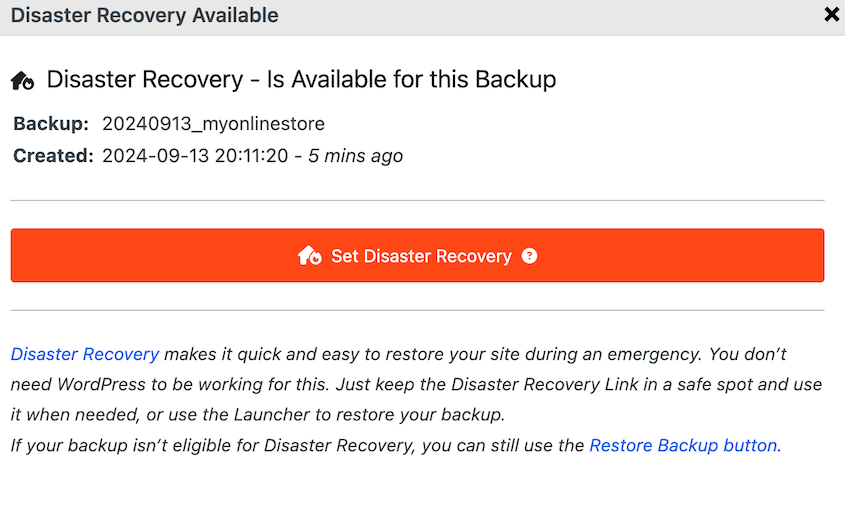
Then, you’ll get a disaster recovery link and a launcher file. Save both of these in a safe location (away from your WordPress site).
If anything bad happens, paste the link in a browser window. On the other hand, you could open the recovery launcher file.
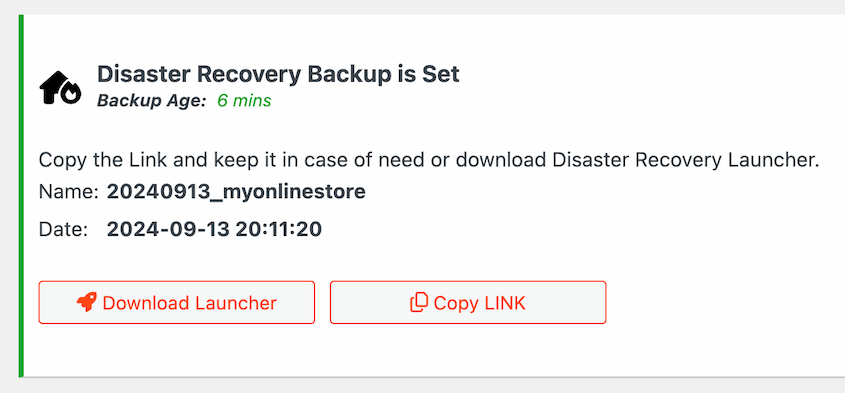
Duplicator will automatically restore your site, even if it’s completely down!
Step 8: Test Backup Restores
A backup that has never successfully restored is not a backup you can rely on. This step verifies that your backup actually works, which is what the “0” in 3-2-1-1-0 requires.
Think of it as a fire drill for your website. You want to make sure your backups actually work, and that you know how to restore your site when you need to.
The best way to test restores is in a staging environment. A staging environment is a copy of your website in a separate location where you can safely test changes without affecting your live website.
Many web hosting providers offer free staging sites. Alternatively, create a staging site with Duplicator in one click.
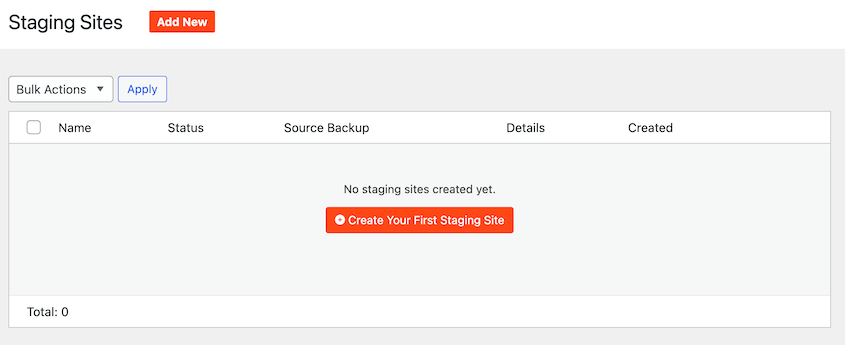
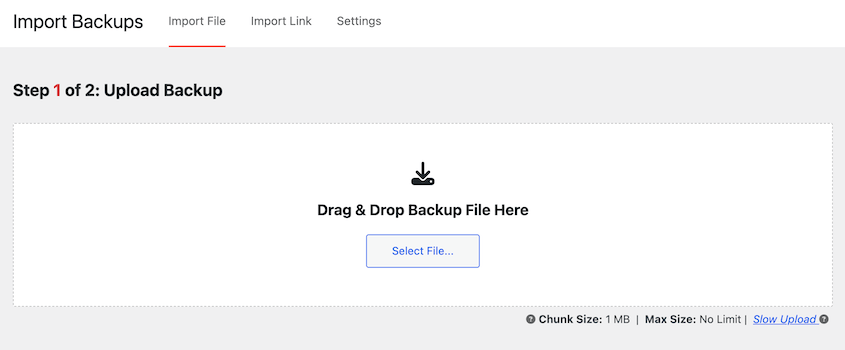
Then, restore a backup on your staging site. One way to do this is by uploading the backup to the Import Backups page.
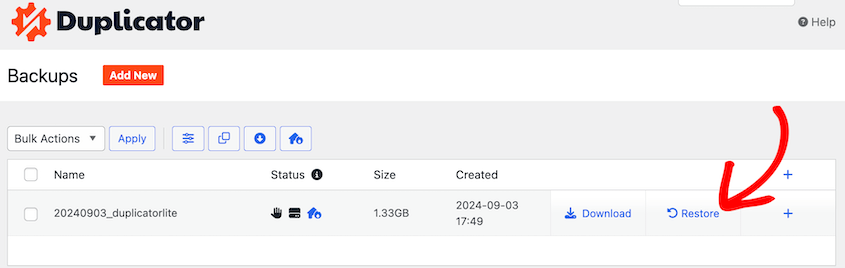
Backups can also be recovered with the one-click Restore buttons.
Once the restore is complete, thoroughly check your staging website. Browse through different pages, test forms, check plugin functionality, and make sure everything is working correctly.
Verify that your content, posts, pages, images, and database data are all present and accurate in the restored staging site.
If you encounter any problems during the restore process or find issues with the restored website, document them. Troubleshoot the issues and adjust your backup or restore process as needed.
3-2-1 Backup Rule Examples
The numbers are easy to remember. What they look like in practice varies based on your setup.
Small blog or personal site
Daily automated backup to Google Drive or Amazon S3. Weekly backup to a local external hard drive.
Duplicator handles the basics, and the immutable requirement (only if you’re following the 3-2-1-1-0 rule) can be met by enabling Amazon S3 Object Lock.
Active business site or WooCommerce store
Daily automated backup to Amazon S3 with Object Lock enabled (immutable, offsite). Second copy to a local drive or a different cloud service.
Quarterly restore test on a staging site to confirm recovery works end-to-end. Duplicator Pro handles the scheduling, S3 integration, and staging site creation from a single dashboard.
Agency managing multiple client sites
Each client gets at least two cloud destinations and a verified restore test included in the monthly maintenance report. Duplicator Pro’s multi-site management supports different backup schedules and storage destinations per site.
The specific tools matter less than the structure. Three copies. Two types. One offsite. One immutable. Zero failed restore tests.
Frequently Asked Questions (FAQs)
What is the 4-3-2 backup rule?
The 4-3-2 backup rule requires four copies of data, stored on three different types of storage media, with two copies stored offsite. For most individuals and smaller websites, the 3-2-1 rule provides a very strong level of protection. But it’s good to know the 4-3-2 rule exists if you need even more backup security.
What is the 3-2-1-1-0 rule?
The 3-2-1-1-0 backup rule enhances data protection by requiring three copies of data on two different media types, with one copy offsite and one copy offline or immutable. The zero ensures no backup errors.
It stands for:
- 3 copies of your data
- 2 different types of storage media
- 1 offsite location
- 1 offline or air-gapped copy
- 0 errors in backups
Let’s break down the new parts:
- 1 Offline or Air-Gapped Copy: This emphasizes having a backup copy that is physically disconnected from your network. It’ll protect against ransomware and other cyber threats that could potentially compromise online backups. Think of an external hard drive you disconnect after backup, or immutable storage.
- 0 Errors in Backups: This is about backup verification. It’s not enough to just make backups. You need to make sure they are actually restorable and error-free. Regularly testing your backups is key to achieving zero errors.
The 3-2-1-1-0 rule is a more comprehensive and modern approach to data protection. It adds important elements of offline protection and backup verification to the already solid foundation of the 3-2-1 rule.
Is the 3-2-1 backup rule too expensive?
You don’t need to break the bank to implement 3-2-1 backups. External hard drives are quite cheap these days. Cloud storage can be very budget-friendly, especially for smaller websites. Free tiers of cloud storage might even be enough to get started.
Duplicator offers local and cloud backups at an affordable rate. Many web hosting control panels include free backup tools. Duplicator, your web host, and a free cloud storage tier will round out an inexpensive 3-2-1 backup strategy.
You don’t have to implement the most elaborate 3-2-1 setup right away. Start with a basic setup and expand as needed. Even a simple 3-2-1 approach is far better than no backups at all.
Is the 3-2-1 backup rule too complex for small businesses/individuals?
While large organizations might have complex backup systems, individuals and small businesses can implement 3-2-1 very simply. Tools like Duplicator are designed to be user-friendly, even for non-technical users. They guide you through the backup process.
Once set up, backups can be largely automated. You don’t need to manually do backups every day.
Begin with a simple 3-2-1 setup. For example, use Duplicator to back up your WordPress site to your computer and Google Drive. That’s a great start and not complex at all.
Can I do 3-2-1 backups for a large website?
Yes, you can do 3-2-1 backups for a large website. Duplicator has a custom file format called DupArchive that makes it easy to back up large files and databases. You’ll just need to make sure your local server and cloud storage are scalable.
To avoid unnecessary storage costs, limit how many backups are saved. In Duplicator’s storage settings, reduce the maximum number of backups. Once you create a new backup, older ones will be deleted.

What are some 3-2-1 backup best practices?
The 3-2-1 backup rule ensures data protection by keeping three copies of data: two on different storage devices and one offsite. Best practices include using a mix of SSDs and HDDs for local copies, cloud storage for offsite backups, and automated backups to prevent data loss.
What is the fastest backup strategy?
The fastest backup strategy uses incremental or differential backups with SSD storage and cloud synchronization. Incremental backups save only changed data, reducing time and storage needs. Real-time replication and automation further speed up the process, ensuring minimal downtime and quick recovery.
Who invented the 3-2-1 backup rule?
The 3-2-1 backup rule was popularized by Peter Krogh, a photographer and data management expert. He introduced the concept to ensure data redundancy by keeping three copies of data, stored on two different media types, with one copy offsite for protection against data loss.
What are some other backup strategies?
While 3-2-1 is a highly recommended backup strategy, you might run across some different options. These are usually an extension of 3-2-1, like 3-2-1-1-0 and 4-3-2-1.
Here’s a closer look at other backup options:
Cloud-Only Backup: Relying solely on cloud backups. Convenient and often automated, but can be risky if you encounter issues with your cloud provider’s service, pricing, or internet connectivity. Also, restores might be slower than local backups.
3-2-1-1-0 Backup Strategy: This is an extension of the 3-2-1 rule for even greater resilience. It adds:
- 1 Immutable Backup: One of the offsite backups should be immutable. Immutable backups are stored in a way that prevents them from being changed, deleted, or encrypted after creation. This protects against ransomware and accidental deletion.
- 0 Errors After Verification: After each backup process, aim for zero errors during verification. This emphasizes the importance of regularly checking backup integrity.
- Pros: More data protection, especially against ransomware and data corruption.
- Cons: More complex to implement and may require specialized storage solutions that support immutability. Could increase storage costs. Might be overkill for smaller websites, but ideal for highly sensitive data.
4-3-2-1 Backup Strategy: Another variation, focusing on location diversity:
- 4 Copies of Data: Increased redundancy.
- 3 Different Storage Media: Maintaining media diversity.
- 2 Offsite Locations: Backups are stored in two geographically separate offsite locations. This protects against regional disasters that could affect a single offsite location.
- 1 Offline Copy: One backup is kept offline, physically disconnected from networks (like tape or removable hard drive stored securely). This provides air-gap protection against cyberattacks that could compromise online backups.
- Pros: Maximum protection against a wide range of disasters, including location-specific and cyber threats.
- Cons: Most complex and expensive to implement. Requires significant infrastructure and management. Typically for large enterprises with higher data protection needs.
What’s the optimal recommended backup storage strategy?
“Optimal” depends on your specific needs, budget, and technical comfort level. However, a very solid and commonly recommended strategy is a combination of:
- Local Storage (External Hard Drive or NAS): For fast restores and fulfilling the “different media” requirement.
- Cloud Storage (Amazon S3, Google Cloud Storage, Backblaze B2, etc.): For reliable, offsite, automated backups and disaster recovery.
This provides a good balance of speed, cost, convenience, security, and redundancy, aligning perfectly with the principles of the 3-2-1 rule.
The Rule Is Simple. The Gap Is Whether You’ve Actually Tested It.
The 3-2-1 backup rule is easy to understand and, for most WordPress site owners, straightforward to use. The part that gets skipped is the restore test.
Most people set up a backup, see the confirmation email, and assume they’re covered. They’re not, until they’ve verified that the restore process actually completes.
That’s the real lesson of the 3-2-1-1-0 update. Schedule a restore test once a quarter. Spin up a staging site, restore your backup there, and confirm the site looks and functions exactly as expected.
It takes 20 minutes. It’s the only way to know your backup strategy works before you need it.
Over 1.5 million WordPress professionals use Duplicator Pro to manage backups, migrations, and site recovery. Duplicator Pro supports the full 3-2-1-1-0 strategy with scheduled automated backups, 10+ cloud storage integrations (including Amazon S3 with Object Lock for immutability), and one-click restore directly from cloud storage.
Ready to set it up? Upgrade today! Then, configure two cloud destinations, enable scheduled backups, and set up a quarterly restore test.
While you’re here, I think you’ll like these related WordPress guides:
- STOP Making These Website Backup Mistakes
- How to Back Up WordPress with SSH
- How to Create a Cloud WordPress Backup
- How to Restore WordPress From a Backup (In Less Than 5 Minutes)
- Set It and Forget It: WordPress Automatic Backup Plugins That Do the Work For You
- 5 Best WordPress Cloud Storage Plugins